

PDM Installer Freezes at 66%

Andrew-ANS

New Member
May 29, 2026
3
0
1
I am new to setting up Proxmox VE and PDM. I have Proxmox VE 9.2.2 installed. I setup a new VM to install PDM 1.1. I downloaded the PDM ISO and attach it to the VM. I start the installer and it always gets stuck at 66%, extracting proxmox-kernel-7.0.2-6-pve-signed_7.0.2-6_amd64.deb. The hardware that Proxmox is running on is a Dell PowerEdge R630. The drives are in a RAID10 config.

Since I am new to setting all this up any and all help to get PDM installed would be greatly appreciated.
 

Attachments
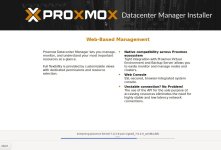
  • PDM Stuck.jpg
    PDM Stuck.jpg
    95.4 KB · Views: 10
Last edited:
Hi,

did you verify the checksum of the downloaded ISO?
Also, how are you booting the ISO? Via iDRAC? Or a physical medium like a USB flash drive?

The kernel extraction step can take some time, at least on HDDs and with a slow source medium.
How long did you let it run?

You can press Ctrl+Alt+F2 to get some debug logs and/or Ctrl+Alt+F3 for a console.
 
I ran Get-FileHash "C:\Path\To\Your\file.iso" -Algorithm SHA256 in Powershell on my PC and the checksum matched. I downloaded the PDM ISO from the Proxmox website.

It has been sitting since Thursday and it is still stuck at 66%.

I am installing PDM through Proxmox VE 9.2.2. I am creating a new VM and attaching the PDM ISO, which I uploaded to the ISO Images folder in Proxmox. I then power on the VM and boot to the ISO.

I also created a bootable USB. Attached it to the server then added the USB in passthrough to the new VM. I get the same results. Stuck at 66%

I have tried pressing Ctrl+Alt+F2 and Ctrl+Alt+F3, but nothing happens (I did this while it was stuck.) I restarted the install and right after it started I pressed Ctrl+Alt+F2. It gets stuck at the same spot with no additional info.
 
Last edited: