

[SOLVED] [PDM 1.1.x] New to PDM: How to Add Remote (Set Up User/Permissions)?

Sep 1, 2022
566
215
68
42
I apologize. I just read through the entire documentation for PDM and feel like I must have missed something. Is there a guide to adding a Remote (cluster) to PDM using the web GUI?

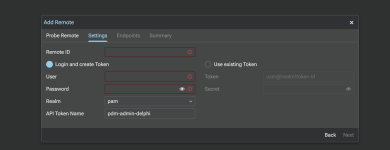
The web GUI's interface for adding a Remote is pretty straightforward.
1787528190315.png
Right now, I only have a root user with PAM authentication on my test PVE single node cluster. The root user is protected via OTP 2FA, but even still, giving PBS direct access to the Remote via a root user does not feel like the most secure possible way to do this.
  • If I give it my root username and password, will it just log in and create a new user with the necessary token? (from the way window looks, I suspect it'll just give the root user a token, which isn't what I want).
  • So, I think I need to create a user to act as the PDM user (using the PVE realm), but I have no idea what Role to give it to set the correct permissions. I want to grant the minimum necessary permissions, and I'm completely lost on how to do that.
Just to keep things simple and avoid creating a user that doesn't have enough permissions to create a token for itself, I'll manually create the token after I've made the user.

Any suggestions would be appreciated. Thanks!
 
  • Like
Reactions: Johannes S
Hi,

If I give it my root username and password, will it just log in and create a new user with the necessary token? (from the way window looks, I suspect it'll just give the root user a token, which isn't what I want).
It will create a token on the user you've specified; so when using the root user, the token is created on that. If you don't want this, you can create a separate user.

So, I think I need to create a user to act as the PDM user (using the PVE realm), but I have no idea what Role to give it to set the correct permissions. I want to grant the minimum necessary permissions, and I'm completely lost on how to do that.
That fully depends on what you want PDM to do (both the user and token permissions, that is). If you want to use PDM solely as a dashboard, you'll need to give the user/token audit permissions. If you want it to start/stop VMs, you'll need it to give it those permissions, etc.
 
Hi,


It will create a token on the user you've specified; so when using the root user, the token is created on that. If you don't want this, you can create a separate user.


That fully depends on what you want PDM to do (both the user and token permissions, that is). If you want to use PDM solely as a dashboard, you'll need to give the user/token audit permissions. If you want it to start/stop VMs, you'll need it to give it those permissions, etc.
Thanks!

What's the recommended Role if I want PDM to use all of PDM's management features, without giving it too many permissions? I have some vision issues, so eyeballing the listed permissions under PVEAdmin and Administrator and trying to compare them, but i suspect PVEAdmin is the "full management" role, as it would be the Role I would give a local non-root admin.
 
See our documentation [0] for the roles and their use-cases, i.e.:
Administrator: has full privileges
PVEAdmin: can do most tasks, but has no rights to modify system settings (Sys.PowerMgmt, Sys.Modify, Realm.Allocate) or permissions (Permissions.Modify)

So the PVEAdmin user has admin, user and audit privileges on all privilege groups, but is missing root privileges. For the Sys group, the root privs are:

Perl:
root => [
    'Sys.PowerMgmt',
    'Sys.Modify', # edit/change node settings
    'Sys.Incoming', # incoming storage/guest migrations
    'Sys.AccessNetwork', # for, e.g., downloading ISOs from any URL
],

As a comment in the code says, you need Sys.Incoming privs to do migrations. For full management, you will need to give the token the Administrator role.

[0] https://pve.proxmox.com/pve-docs/pve-admin-guide.html#pveum_roles
 
@n.frey Thank you. That helps a lot.

I'll admit that I struggle a bit with the permissions documentation. It makes sense, but I've realized it's one of those things that I only get good at by doing, and I don't have reason to mess around with permissions very often. :)

Am I correct that there's still a security benefit to creating a non-root Administrator in the PDM realm? The root user has full control over not just PDM, but the underlying Debian system, but if I understand correctly, an Administrator in the PDM realm doesn't exist as a Debian user, so certainly doesn't have the power over Debian that the actual root user has.

(I suppose that, broadly speaking, this would be the same theoretical advantage of creating a non-Root Administrator User in PVE or PBS, as well.)
 
  • Like
Reactions: Johannes S
Am I correct that there's still a security benefit to creating a non-root Administrator in the PDM realm?
Definitely, we even mention it in our docs [0]:
The root@pam superuser has full administration rights on everything, so it's recommended to add other users with less privileges.

You can see the privileges for PDM here: [1]. If the user is on the PDM realm, it will for example prompt for a pam login on the web-shell and not directly be logged in as root (i.e. the user has the Administrator role).

You can restrict the permissions based on the object path, so you can e.g. have a user that is only allowed to manage certain resources (Administrator role) and only audit the rest of the system (Auditor role).

[0] https://pdm.proxmox.com/docs/access-control.html#user-configuration
[1] https://pdm.proxmox.com/docs/access-control.html#privileges
 
  • Like
Reactions: Johannes S
Thanks again. :)

I'm likely going to have to read through that several times to get really comfortable with it. I'm still fighting a bit with getting the permissions set correctly on the non-root administrator user I've created on the PVE node I'm using to experiment with PDM.

Since I was focused on enabling migrations across Remotes (clusters) and their nodes, I gave my PDM user on the PVE node Administrator access on the [B]/nodes[/B] path. In retrospect (the next day, with more caffeine), that doesn't seem quite right.

I was trying to avoid giving PDM full access over the root path (/), but after looking with fresh eyes at the path tree, just giving it access to the nodes cuts out, e.g,, SDN, Ceph (Storage), and VM guests (which is probably why my PDM instance can't see any VMs).
For full administrator access to the entire node, the root path seems to be the only way. At least using the Proxmox authentication server is still more secure than using PAM.:)

(I don't meant to complain at all. The way my intuition works just needs to adjust to how PVE and PDM are actually set up. :) )

EDIT:
After giving the Administrator group I set up access to the entire root path, everything works as expected. One great thing about how the permissions system is setup based on paths is just how easy to is to adjust things to fix mistakes. :)
 
Last edited: