PBS on desktop pc with SSD or in VM on PVE or not at all?

Rytecbe

New Member
Dec 5, 2025
6
0
1
Hello
I have 2 nodes with PVE installed in a cluster to use for my Home Assistant setup and to play with Ubuntu, Open Media Vault and Windows stuff on several VM's.
My first PVE is a HP minitower pc with 16gb ram, 2 Sata disks of 6TB in ZFS raid and a spare Sata disk of 1TB which I wanted to use as file server for Open Media Vault.
I have installed Home Assistant in a vm and after a year while expanding my home assistant I was thinking what if the PVE would fail, I already made backups of the PVE VM's to my Synology NAS in the network.

Then I could get an old Lenovo thinkcentre from a friend with 64gb and 1TB SSD disk on which I have installed PVE too to have as spare PVE when something would happen with my first PVE.
Then I managed it to have these 2 nodes in a cluster and maybe, maybe it would be a good idea to have them as High Availabilty working but that's for later maybe, like I say, maybe, it's not necessary.

Now I have another old Lenovo desktop pc which did not work good enough for a company and which I have taken home with windows with 8gb and 256gb ssd disk which I could use as PBS in my network but how far can you go for the backupsystem and does it have more benefits than which I'm doing now with backing up at night my HA vm to my synology NAS? it also will use more electricity again (haha)
If then my PBS would fail I also loose the backups or should I put an extra 256gb ssd in the machine or should I save the backups from the PBS machine to my Synology which also has 2 SATA disks in raid?

Or should I just install PBS in a vm on the Lenovo machine with ssd disk?

Keep in mind : I like to work with pc's etc because I have done a lot with Ubuntu LTS in my life to make mailservers, satellite and streaming servers with old pc's but now I'm trying to do everything with Home Assistant and I also want to install Plex and other things in vm's or lxc's to have the Synology NAS spared only for acting as file server. Now I run a lot of things on it and it's asking too much of ram from this Synology DS214+ NAS.
If I can put Plex, music and video and surveillance to vm's this would make the NAS work faster again.

Thanks in advance for reading and pointing me into the right direction.

Oh I forgot to mention I also have a Intel NUC at home on which I started Home Assistant first in a vm in Virtualbox on Windows, maybe that's better for PBS or is the Lenovo PC better? I don't use this NUC at the moment.
 
Last edited:
You have four (or is it five?) technically different devices which leads to a lot of possible combinations regarding a PVE cluster and a PBS. I can not give you one single way to go. But I have some hint from my point of view:
I have 2 nodes with PVE installed in a cluster
The problematic regarding Quorum is in your mind, right?

Or should I just install PBS in a vm
No! It raises complexity. You want the PBS to be available when the PVE died and is not available anymore. Therefore backup systems should be implemented as standalone systems. (That said..., I too have some virtualized PBS's. If you are firm with the possible problems and limitations, it absolutely works.)

You want to keep two Nodes in the cluster, correct? Then build one separate PBS, which should be turned on 24*7. This one shall supply a third vote to the cluster: https://pve.proxmox.com/pve-docs/pve-admin-guide.html#_corosync_external_vote_support

I have secondary PBS's which are turned on automatically once a week or so to pull-sync backups from my primary PBS. These secondary ones have a lot of disk space and can keep backups "forever", while the primary one has only relatively small (SSD only) storage and can hold only a few backups. Cascading multiple hardware-instances in this way works really great for me.

The only usecase for any backup server is to restore data when (not: if) the source system fails. For this reason I want to know for sure that the backup data is intact, correct and accessible - and not damaged by any chance. This again requires some error tolerance, handled by redundancy and verified by checksums. While PBS has its own chunk checking mechanism and PBS is file-system agnostic, this calls for ZFS :-)

If you build only one PBS without a redundant disk sub-system, then you can compensate that deficiency by adding (one or more) secondary ones :-)

Just some random thoughts... - ymmv, as usual.
 
Last edited:
  • Like
Reactions: Rytecbe
"The only usecase for any backup server is to restore data when (not: if) the source system fails."

Another usecase is restoring a file when the source system is OK and someone needs the file which has been deleted or modified in the meantime :).
 
  • Like
Reactions: Rytecbe and UdoB
Thank you both, I will go for the PBS on my other Lenovo Thinkcentre with 8gb ram and 256gb SSD or is PBS on the Intel NUC also fine, just asking because of the lower power use of the NUC compared to the Lenovo.
Are backups made by PBS bigger and seperate folders maybe instead of the standard snapshot backups which I make now with PVE itself?
 
Thank you both, I will go for the PBS on my other Lenovo Thinkcentre with 8gb ram and 256gb SSD or is PBS on the Intel NUC also fine
My PBS's use surprisingly low CPU resources. The limits come from the storage system. Usually.

I would opt for the low power device to run 24*7 and cascade the other one, as mentioned.

Are backups made by PBS bigger and seperate folders maybe instead of the standard snapshot backups which I make now with PVE itself?
I am not sure if I understand that correctly.

"Normal"/classic backups are "vzdump"-based backups. Each and every one contains all data. A second one needs again the same space. Empty space is (usually) not backuped and the backup is compressed, of course. A 100 GB virtual disk, which hold 60 GB normal/mixed/compressible data may perhaps occupy 40 GB on a backup medium.

PBS is much more clever: it works with blocks of (max) 4 MiB, called "chunks". That 40 GB (already compressed) data may result in ~10000 chunks to be backuped. The second run, creating a an additional backup, will only transfer modified chunks to the PBS. If you have altered 1 GB from yesterday to today, approximately (only) 250 chunks will be transferred to the PBS and stored there.

This chunking is the main reason why a PBS needs IOPS and Solid State is recommended (but not required). Personally I use ZFS with multiple mirrors if I need to work with physical spindles and I do support this construction always with a "Special Device".

:-)
 
  • Like
Reactions: Rytecbe
@Rytecbe, when you are configuring the PBS, I recommend using namespaces in the datastore. For instance you can create a separate namespace for each PVE node or each physical machine.
Thanks to namespaces there is no conflicts from possible non-unique (*) ids in different PVE servers. Also namespaces
enable you to separate permissions given to particular nodes / servers. And deduplication works between namespaces as well:).

(*) I believe uniqueness is provided in a cluster, but I'm writing in case you will have (also?) non-clustered nodes.
 
  • Like
Reactions: Rytecbe
I would opt for the low power device to run 24*7 and cascade the other one, as mentioned.
Thanks, I will start with PBS installing on the Intel NUC with 8gb ram and 110gb ssd after that is working i'll come back to you to explain me please how to setup the 2nd machine as cascade.
 
When I was writing about unique ids, I meant VM ids.
Names aren't so important.
Just for "human" convenience I would give to backup servers some short and easy names like pbs1 and pbs2 :).

Short and easy names give less clutter and occupy less space in GUIs, in command lines and in paths.

P.S.
https://pbs.proxmox.com/docs/terminology.html#backup-namespace

"Namespaces allow for the reuse of a single chunk store deduplication domain for multiple sources, while avoiding naming conflicts and enabling more fine-grained access control."

https://pbs.proxmox.com/docs/storage.html#backup-namespaces
 
Last edited:
  • Like
Reactions: Rytecbe
When I was writing about unique ids, I meant VM ids.
Names aren't so important.
Just for "human" convenience I would give to backup servers some short and easy names like pbs1 and pbs2 :).

Short and easy names give less clutter and occupy less space in GUIs, in command lines and in paths.

P.S.
https://pbs.proxmox.com/docs/terminology.html#backup-namespace

"Namespaces allow for the reuse of a single chunk store deduplication domain for multiple sources, while avoiding naming conflicts and enabling more fine-grained access control."

https://pbs.proxmox.com/docs/storage.html#backup-namespaces
Before I get started and before making it myself difficult, Iam considering of creating a domainname for myself for a cheap price without hosting, just the domainname and ofcourse it would be better to give the Proxmox nodes a correct FQDN, right?
I only am running vm's now on my first made PVE proxmox.rytec and the second PVE without any vm's yet is called zweinstein.local
Not very good of me, I know but do and can I change the hostnames to proxmoxserver.rytec.be and zweinstein.rytec.be and the backupserver pbs1.rytec.be (this one is now ready to give fqdn in the setup.
I'm aware this has nothing to do with the PBS setup in this thread but now I have you in contact I just want this to know, because then I'll first make that correct before continuing with the PBS setup
 
Last edited:
Making the hypervisor and the backup server accessible from the Internet is a bad idea.
And they shouldn't have public IP addresses.
So there's no need to give them public domain names :) .

edit: For instance my PBS' FQDN is:
pbs1:~# hostname --fqdn
pbs1.local
 
Last edited:
  • Like
Reactions: Rytecbe
Making the hypervisor and the backup server accessible from the Internet is a bad idea.
And they shouldn't have public IP addresses.
So there's no need to give them public domain names :) .

edit: For instance my PBS' FQDN name is:
pbs1:~# hostname --fqdn
pbs1.local
I don't want them to be accessible from the internet, only through wireguard when I have to do do something urgent when I'm not at home but isn't it looking better if the machines have the correct fqdn's ?

The PBS has been installed, do you have a kind of good manual maybe which I can follow to configure my PBS also to remove the warning of the non subscription? Thank you
 
Last edited:
isn't it looking better if the machines have the correct fqdn's ?
It depends on various details. Prettier? Probably ;-). Safer? Maybe not.

Again: it depends on how you want to access them from the Internet and how complicated you want to make your infrastructure.

If you want to give them public addresses (NOT recommended!), giving them public domain names resolved to their public IP addresses is "pretty" and UNSAFE.

Giving them hostnames in public domain, resolved to private IP addresses, is ugly, gives you little for accessing them from the outside and is NOT quite safe, because it gives a possible attacker some clues about you infrastructure.

You _could_ setup your local DNS server to contain two "views" (a DNS term): internal and external, and place your PVE's and PBS' names in public domain but only in internal "view". But do you want to overcomplicate it?...

Overall, it makes ambiguities, a risk of misunderstandings and mistakes. It is doable, but you must weigh it up yourself if you want it :).
 
Last edited:
  • Like
Reactions: Rytecbe
@Onslow
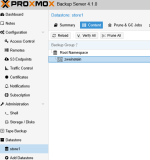
I have configured this now for the namespace
1765035809094.png

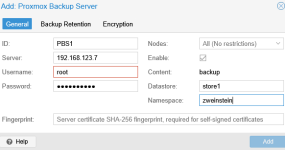
Do I first need to update the PBS before adding it in the PVE cluster?

1765035911572.png

And do I already add datastore somewhere on my Synology NAS too ?
 
Last edited:
Do I first need to update the PBS before adding it in the PVE cluster?

I have little knowledge about PVE clusters, but I would say yes. Usually it's recommended to run newest PVE and PBs versions.

From your screenshot "Add: Proxmox Backup Server" I understand that you add it as the root user.

A safer method is NOT doing so.

I recommend creating in the PBS a new user and giving him less powerful roles:
1) DatastoreBackup (with the "propagate" flag) to the namespace and
2) DatastoreAudit (with the "propagate" flag) to the "store1" datastore.

Then using this new user in the PVE during "Add: Proxmox Backup Server".

Thanks to these lower roles, your PVE won't be able to delete backups stored in the PBS if the PVE gets compromised.

See https://pbs.proxmox.com/docs/user-management.html

And do I already add datastore somewhere on my Synology NAS too ?

I don't know. Does Synology NAS support Proxmox datastores?

I might misunderstand your question or situation...