[SOLVED] PBS 4 upgrade on a Dell NX3230, doesn't fully boot.

Apr 29, 2026
3
1
3
Hi all,

Curious if anyone has run into an issue where PBS 3.x runs fine on a Dell NX3230 but a fresh install of 4.x or upgrade won't fully boot past the 'Loading Linux 7.0.0-3-pve | Loading intial ramdisk..' screen. After the automatic reboot, iDrac also throws out a "CPU 1 machine check error detected" message. Currently using the non-subscription repos. Replicated the issue on a 2nd NX3230.

The Dell server is fully updated, latest BIOS/Firmware updates. CPU: Intel(R) Xeon(R) CPU E5-2630 v3 @ 2.40GHz. PERC H730 Mini Controller.

Attempted a few recommended GRUB updates:

linux /boot/vmlinux-7.0.0-3-pve root=/dev/mapper/pbs-root ro quiet intel_iommu=off iommu=off

but no luck so far in case anyone has any ideas, much appreciated.
 
Last edited:
Welcome, @nd-2999
linux /boot/vmlinux-7.0.0-3-pve root=/dev/mapper/pbs-root ro quiet intel_iommu=off iommu=off
You can try adding nomodeset
And removing quiet
(removing quiet won't remove the reason of the issue but more output may show some hints).

Whether the issue is related to that idrac error - I don't know.
 
Welcome, @nd-2999

You can try adding nomodeset
And removing quiet
(removing quiet won't remove the reason of the issue but more output may show some hints).

Whether the issue is related to that idrac error - I don't know.
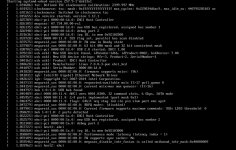
Thanks, I tried out removing quiet and adding nomodeset and attached picture right before the server reboots with the CPU 1 Machine Check error with the updated settings.
 

Attachments

  • NX3230-PBS4-Bootup-nomodeset.jpg
    NX3230-PBS4-Bootup-nomodeset.jpg
    302.1 KB · Views: 8
@nd-2999
I've just spotted in the "Known issues" of
https://pbs.proxmox.com/wiki/Roadmap#Proxmox_Backup_Server_4.1

"

Potential issues booting into kernel 6.17 on some Dell PowerEdge servers​


Some users have reported failure to boot into kernel 6.17 and machine check errors on certain Dell PowerEdge servers, while kernel 6.14 boots successfully. It is reported that enabling SR-IOV Global and I/OAT DMA in the firmware helps. See this forum thread https://forum.proxmox.com/threads/o...le-on-test-no-subscription.173920/post-817147

If enabling SR-IOV Global and I/OAT DMA does not resolve the issue, we recommend pinning the 6.14 kernel:

proxmox-boot-tool kernel pin 6.14.11-4-pve

You can list the exact available versions with proxmox-boot-tool kernel list. See the admin guide
https://pve.proxmox.com/pve-docs/pve-admin-guide.html#sysboot_kernel_pin for more details."

Sounds similar, so maybe it will help you as well.
 
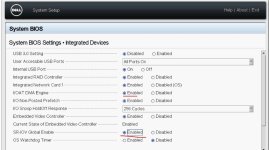
@Onslow - great news, enabling SR-IOV Global and I/OAT DMA fixed the issue and the NX3230 now boots up nicely into PBS4.

Steps for the fix:
  • Enter BIOS: Power on the NX3230 and press F2 when the Dell logo appears to enter the System Setup.
  • Navigate to Settings: Select System BIOS.
  • Locate Integrated Devices: Select Integrated Devices.
  • Set I/OAT DMA Engine: Find the I/OAT DMA Engine option and set it to Enabled.
  • Set SR-IOV Global to Enabled.
  • Save and Exit: Press F10 to save changes and exit.
thanks for the assistance,
 

Attachments

  • NX3230-BIOS-IOAT-SR-IOV-fix.jpg
    NX3230-BIOS-IOAT-SR-IOV-fix.jpg
    74.8 KB · Views: 4
Last edited:
  • Like
Reactions: Onslow
Great!
Please mark the thread as "solved" by editing the subject and selecting "[SOLVED]" from the drop-down list - to keep the forum tidy and to help others find the solution :).
 
  • Like
Reactions: nd-2999