

Hi all,
I have installed pimox on Raspberry 5 where I have a VM with Home Assistant.
I would like to use the Raspberry's built-in Bluetooth, but I can't figure out how to do it because I don't see it in the output of lsusb or even in lspci:
With rfkill and hciconfig I can see it:
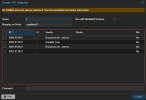
In the dashboard of Proxmox, I see that in PCI mapping window:
Thank you for the help!!
I have installed pimox on Raspberry 5 where I have a VM with Home Assistant.
I would like to use the Raspberry's built-in Bluetooth, but I can't figure out how to do it because I don't see it in the output of lsusb or even in lspci:
Bash:
# lspci
0000:00:00.0 PCI bridge: Broadcom Inc. and subsidiaries BCM2712 PCIe Bridge (rev 21)
0000:01:00.0 Non-Volatile memory controller: Sandisk Corp WD Green SN350 240GB (DRAM-less) / SN560E NVMe SSD
0001:00:00.0 PCI bridge: Broadcom Inc. and subsidiaries BCM2712 PCIe Bridge (rev 21)
0001:01:00.0 Ethernet controller: Raspberry Pi Ltd RP1 PCIe 2.0 South Bridge

# lsusb
Bus 004 Device 001: ID 1d6b:0003 Linux Foundation 3.0 root hub
Bus 003 Device 001: ID 1d6b:0002 Linux Foundation 2.0 root hub
Bus 002 Device 001: ID 1d6b:0003 Linux Foundation 3.0 root hub
Bus 001 Device 002: ID 10c4:ea60 Silicon Labs CP210x UART Bridge
Bus 001 Device 001: ID 1d6b:0002 Linux Foundation 2.0 root hub
With rfkill and hciconfig I can see it:
Bash:
# rfkill
ID TYPE      DEVICE      SOFT      HARD
 0 bluetooth hci0   unblocked unblocked
 1 wlan      phy0   unblocked unblocked

# hciconfig
hci0:   Type: Primary  Bus: UART
        BD Address: 2C:CF:67:19:7B:71  ACL MTU: 1021:8  SCO MTU: 64:1
        UP RUNNING
        RX bytes:4051 acl:0 sco:0 events:401 errors:0
        TX bytes:67983 acl:0 sco:0 commands:401 errors:0
In the dashboard of Proxmox, I see that in PCI mapping window:
Thank you for the help!!
