[SOLVED] Passthrough of MCIO based SATA controller not working. MSIX PBA outside of specified BAR

scyto

Well-Known Member
Aug 8, 2023
576
140
53
I have an AMD Epyc 9155 Turin CPU on an ASROCK GENOAD8UD-2T/X550 motherboard.

Two MCIO ports can be configured for SATA mode (each port is then seen as two 4 lane SATA controllers).

When being passed through to a VM the VM would not start with:

Code:
error writing '1' to '/sys/bus/pci/devices/0000:42:00.0/reset': Inappropriate ioctl for device
failed to reset PCI device '0000:42:00.0', but trying to continue as not all devices need a reset
kvm: -device vfio-pci,host=0000:42:00.0,id=hostpci0.0,bus=ich9-pcie-port-1,addr=0x0.0,multifunction=on: vfio 0000:42:00.0: hardware reports invalid configuration, MSIX PBA outside of specified BAR
TASK ERROR: start failed: QEMU exited with code 1

this occured for both 42:00.0 and 42:00.1

this is a bug likely caused by invalid MSIX PBA settings for the device on the motherboard as per this comment https://bugs.launchpad.net/qemu/+bug/1894869/comments/4

as in this thread https://forum.proxmox.com/threads/pci-passtrough-a100.143838/

amending my vm conf file to add the following was the solution

Code:
args: -set device.hostpci0.x-msix-relocation=bar2 -set device.hostpci1.x-msix-relocation=bar2

where the two SATA devices were defind in the conf like this
Code:
hostpci0: 0000:42:00.0,pcie=1
hostpci1: 0000:42:00.1,pcie=1

I am logging this incase anyone else hits this, and for incase i ever forget this and do a google search later :-)
 
Last edited:
I literally fogot I had hit this and fixed it, I found the thread by search when i hit the same issue an hour or so ago!
(the Feb truenas vitualization blew up shortly after that post IIRC)

So to make this an additive reply

It is also importat that devices like 42:00.0 and 42:00.1 are added as discrete devices, do not use 42:00 and choose to pass all functions, that doesn't work for this motheboard.

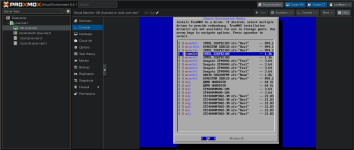
Once i had done this <grin>

1746581309339.png
 
  • Like
Reactions: christian99
Another note to myself and others on how proxmox seems to boot with no black listing and why its dangerous to do that with ZFS
  1. First the system starts booting
  2. it enumerates all the disks and loads all the normal drivers
  3. all zfs processes start - it looks at the pools and choose to not to import the pool unless this instance of proxmox has managed the pol before or the pool is an exported sate
  4. system continues to boot
  5. once zfs / ceph / network targets are ccomplet the proxmox cluster services start
  6. at this point the tell vfio to be the driver for the device, resetting the device and effecitvely unloading the nvme / sata drivers and load vfio for the device
this means there is absolutely a window during boot where zfs can snatch / affect metadata on a zfs pool, now this should rarely happen and should always be possible to avoid so long as you never put the truenas VMs pools into export state, but if you mistakenly do that and reboot you will be hosed, worse still I don't know what happens if proxmox imports a pool and then resets the device driver on all the disks becuase the devices are passed through - but i posit it is why i and others have had weird corruption issues

tl;dr never export a pool on a truenas VM and then reboot the host without having reimported the pool first in the VM.

EDIT: me from the future (Jan 2026) don't do what i write in the next paragraph, really don't, its super fragile to nvme bus address changes when new hardware is put in, use this approach instead https://forum.proxmox.com/threads/p...a-outside-of-specified-bar.161831/post-829275 and commit to the idea iof having different make and model of nvme for the host use vs and vm use

with that said if you want to use the initramfs script approach, have at it, but i no longer use this.... for good reason.... learning how to fix a zfs mirror when one driven was not availabl to the host was entertaining.....

blacklisting device IDs is a VERY good idea, this is best done with one of the methods documented in the wiki, however this doesn't work if you have devices with the same ID and want to passthrough some and leave some for the host (in my case 2 pairs of kingston DC2000Bs). The only way i have found to do block by PCID (bus device number is this). scyto/virtio-fs-detection-and-exlusion - i warn folks, this is a last resort as you can break initramfs and leave yoursefl unbootable, but it is the only 100% guranteed way to ensure the ZFS module on the host never sees the pools on the devices passed through.

Basically this (where ZFS is allowed to scan disks that it shouldnt be scanning) - default behavious if nvme or hba is passed through to VM without blacklisting:

Bash:
May 09 19:04:06 pve-nas1 systemd[1]: Finished ifupdown2-pre.service - Helper to synchronize boot up for ifupdown.
May 09 19:04:06 pve-nas1 systemd[1]: Finished systemd-udev-settle.service - Wait for udev To Complete Device Initialization.
May 09 19:04:06 pve-nas1 systemd[1]: zfs-import-cache.service - Import ZFS pools by cache file was skipped because of an unmet condition check (ConditionFileNotEmpty=/etc/zfs/zpool.cache).
May 09 19:04:06 pve-nas1 systemd[1]: Starting zfs-import-scan.service - Import ZFS pools by device scanning...
May 09 19:04:06 pve-nas1 zpool[1777]: cannot import 'Fast': pool was previously in use from another system.
May 09 19:04:06 pve-nas1 zpool[1777]: Last accessed by pve-nas1 (hostid=58a1c56c) at Fri May  9 16:12:17 2025
May 09 19:04:06 pve-nas1 zpool[1777]: The pool can be imported, use 'zpool import -f' to import the pool.
May 09 19:04:06 pve-nas1 zpool[1777]: cannot import 'Rust': pool was previously in use from another system.
May 09 19:04:06 pve-nas1 zpool[1777]: Last accessed by pve-nas1 (hostid=58a1c56c) at Fri May  9 16:12:17 2025
May 09 19:04:06 pve-nas1 zpool[1777]: The pool can be imported, use 'zpool import -f' to import the pool.
May 09 19:04:06 pve-nas1 systemd[1]: zfs-import-scan.service: Main process exited, code=exited, status=1/FAILURE
May 09 19:04:06 pve-nas1 systemd[1]: zfs-import-scan.service: Failed with result 'exit-code'.
May 09 19:04:06 pve-nas1 systemd[1]: Failed to start zfs-import-scan.service - Import ZFS pools by device scanning.
May 09 19:04:06 pve-nas1 systemd[1]: Reached target zfs-import.target - ZFS pool import target.
May 09 19:04:06 pve-nas1 systemd[1]: Starting zfs-mount.service - Mount ZFS filesystems...
May 09 19:04:06 pve-nas1 systemd[1]: Starting zfs-volume-wait.service - Wait for ZFS Volume (zvol) links in /dev...
May 09 19:04:06 pve-nas1 zvol_wait[2125]: Testing 3 zvol links
May 09 19:04:06 pve-nas1 zvol_wait[2125]: All zvol links are now present.
May 09 19:04:06 pve-nas1 systemd[1]: Finished zfs-volume-wait.service - Wait for ZFS Volume (zvol) links in /dev.
May 09 19:04:06 pve-nas1 systemd[1]: Reached target zfs-volumes.target - ZFS volumes are ready.
May 09 19:04:06 pve-nas1 systemd[1]: Finished zfs-mount.service - Mount ZFS filesystems.


vs

this where a script runs in initramfs to override the driver much earlier.... unknow is my script...

Code:
May 09 20:06:41 pve-nas1 unknow:  vfio-pci-bind starting
May 09 20:06:41 pve-nas1 unknow:  Unbound 0000:05:00.0 from nvme
May 09 20:06:41 pve-nas1 unknow:  Set override to vfio-pci for 0000:05:00.0
May 09 20:06:41 pve-nas1 unknow:  Unbound 0000:06:00.0 from nvme
May 09 20:06:41 pve-nas1 unknow:  Set override to vfio-pci for 0000:06:00.0
May 09 20:06:41 pve-nas1 unknow:  Unbound 0000:07:00.0 from nvme
May 09 20:06:41 pve-nas1 unknow:  Set override to vfio-pci for 0000:07:00.0
May 09 20:06:41 pve-nas1 kernel: sd 19:0:0:0: [sda] Synchronizing SCSI cache
May 09 20:06:41 pve-nas1 kernel: ata20.00: Entering standby power mode
May 09 20:06:41 pve-nas1 kernel: sd 20:0:0:0: [sdb] Synchronizing SCSI cache
May 09 20:06:41 pve-nas1 kernel: sd 21:0:0:0: [sdc] Synchronizing SCSI cache
May 09 20:06:41 pve-nas1 kernel: sd 22:0:0:0: [sdd] Synchronizing SCSI cache
May 09 20:06:41 pve-nas1 kernel: ata23.00: Entering standby power mode
May 09 20:06:41 pve-nas1 kernel: sd 23:0:0:0: [sde] Synchronizing SCSI cache
May 09 20:06:41 pve-nas1 kernel: ata24.00: Entering standby power mode
May 09 20:06:41 pve-nas1 unknow:  Unbound 0000:42:00.0 from ahci
May 09 20:06:41 pve-nas1 unknow:  Set override to vfio-pci for 0000:42:00.0
May 09 20:06:41 pve-nas1 kernel: sd 29:0:0:0: [sdf] Synchronizing SCSI cache
May 09 20:06:41 pve-nas1 kernel: ata30.00: Entering standby power mode
May 09 20:06:41 pve-nas1 kernel: sd 30:0:0:0: [sdg] Synchronizing SCSI cache
May 09 20:06:41 pve-nas1 kernel: ata31.00: Entering standby power mode
May 09 20:06:41 pve-nas1 kernel: sd 31:0:0:0: [sdh] Synchronizing SCSI cache
May 09 20:06:41 pve-nas1 kernel: ata32.00: Entering standby power mode
May 09 20:06:41 pve-nas1 unknow:  Unbound 0000:42:00.1 from ahci
May 09 20:06:41 pve-nas1 unknow:  Set override to vfio-pci for 0000:42:00.1
May 09 20:06:41 pve-nas1 unknow:  Unbound 0000:a1:00.0 from nvme
May 09 20:06:41 pve-nas1 unknow:  Set override to vfio-pci for 0000:a1:00.0
May 09 20:06:41 pve-nas1 unknow:  Unbound 0000:a3:00.0 from nvme
May 09 20:06:41 pve-nas1 unknow:  Set override to vfio-pci for 0000:a3:00.0
May 09 20:06:41 pve-nas1 unknow:  Unbound 0000:a5:00.0 from nvme
May 09 20:06:41 pve-nas1 unknow:  Set override to vfio-pci for 0000:a5:00.0
May 09 20:06:41 pve-nas1 unknow:  Unbound 0000:a7:00.0 from nvme
May 09 20:06:41 pve-nas1 unknow:  Set override to vfio-pci for 0000:a7:00.0
May 09 20:06:41 pve-nas1 unknow:  Unbound 0000:e1:00.0 from nvme
May 09 20:06:41 pve-nas1 unknow:  Set override to vfio-pci for 0000:e1:00.0
May 09 20:06:41 pve-nas1 unknow:  Unbound 0000:e2:00.0 from nvme
May 09 20:06:41 pve-nas1 unknow:  Set override to vfio-pci for 0000:e2:00.0
May 09 20:06:41 pve-nas1 unknow:  Unbound 0000:e3:00.0 from nvme
May 09 20:06:41 pve-nas1 unknow:  Set override to vfio-pci for 0000:e3:00.0
May 09 20:06:41 pve-nas1 unknow:  Unbound 0000:e4:00.0 from nvme
May 09 20:06:41 pve-nas1 unknow:  Set override to vfio-pci for 0000:e4:00.0
May 09 20:06:41 pve-nas1 unknow:  Unbound 0000:e6:00.0 from ahci
May 09 20:06:41 pve-nas1 unknow:  Set override to vfio-pci for 0000:e6:00.0
May 09 20:06:41 pve-nas1 unknow:  Unbound 0000:e6:00.1 from ahci
May 09 20:06:41 pve-nas1 unknow:  Set override to vfio-pci for 0000:e6:00.1
May 09 20:06:41 pve-nas1 kernel: VFIO - User Level meta-driver version: 0.3
May 09 20:06:41 pve-nas1 unknow: ✅ vfio-pci modprobe completed
May 09 20:06:41 pve-nas1 kernel: Btrfs loaded, zoned=yes, fsverity=yes
May 09 20:06:41 pve-nas1 kernel: spl: loading out-of-tree module taints kernel.
May 09 20:06:41 pve-nas1 kernel: zfs: module license 'CDDL' taints kernel.
May 09 20:06:41 pve-nas1 kernel: Disabling lock debugging due to kernel taint
May 09 20:06:41 pve-nas1 kernel: zfs: module license taints kernel.
May 09 20:06:41 pve-nas1 kernel: ZFS: Loaded module v2.2.7-pve2, ZFS pool version 5000, ZFS filesystem version 5

<cut>
May 09 20:07:24 pve-nas1 systemd[1]: Finished ifupdown2-pre.service - Helper to synchronize boot up for ifupdown.
May 09 20:07:24 pve-nas1 systemd[1]: Finished systemd-udev-settle.service - Wait for udev To Complete Device Initialization.
May 09 20:07:24 pve-nas1 systemd[1]: zfs-import-cache.service - Import ZFS pools by cache file was skipped because of an unmet condition check (ConditionFileNotEmpty=/etc/zfs/zpool.cache).
May 09 20:07:24 pve-nas1 systemd[1]: Starting zfs-import-scan.service - Import ZFS pools by device scanning...
May 09 20:07:24 pve-nas1 zpool[1463]: no pools available to import
May 09 20:07:24 pve-nas1 systemd[1]: Finished zfs-import-scan.service - Import ZFS pools by device scanning.
May 09 20:07:24 pve-nas1 systemd[1]: Reached target zfs-import.target - ZFS pool import target.
May 09 20:07:24 pve-nas1 systemd[1]: Starting zfs-mount.service - Mount ZFS filesystems...
May 09 20:07:24 pve-nas1 systemd[1]: Starting zfs-volume-wait.service - Wait for ZFS Volume (zvol) links in /dev...
May 09 20:07:24 pve-nas1 zvol_wait[1510]: Testing 3 zvol links
May 09 20:07:24 pve-nas1 zvol_wait[1510]: All zvol links are now present.
May 09 20:07:24 pve-nas1 systemd[1]: Finished zfs-volume-wait.service - Wait for ZFS Volume (zvol) links in /dev.
May 09 20:07:24 pve-nas1 systemd[1]: Reached target zfs-volumes.target - ZFS volumes ar
 
Last edited:
  • Like
Reactions: christian99
Hi,
thanks a lot for documenting this valuable information. I really appreciate it.

I am currently setting ap a server (EPYC 9135 + Supermicro H14SSL-N) and had exactly the same issue when trying to passthrough the CPU integrated SATA controllers to my TrueNAS vm. As this is the first time I use Proxmox this let me cratch my head for hours until I have found your post. :)

Also thanks for the tips about handling exported zfs pools.
 
Hi,
thanks a lot for documenting this valuable information. I really appreciate it.
Hehe you made my day :-)

i did it so search engines, ai would learn and help folks, and incase i ever forgot what i did.

I am glad it helped even one other person.

This also likely means this is not a asrock design decision but a common design practice all EPYC designs of this era have (i.e. they all used AMD reference designs).

Thats a nice board you chose too! I chose mobo first in an attempt to build as small a server as i could, i ended up with 24" deep, 3U sliger case in the end, rofl and in retospect could have gone for the 30+ incase case and the larger mobos.

havew fun!
 
Also thanks for the tips about handling exported zfs pools.

I moved away from the script, it was still fragile wrt to nvme pice bus number changes and i locked myself out one time as my mirror wouldn't boot

instead i commited to:
1. not use the same nvme device id for both my proxmox boot volume and the nvme i passed through
2. this allowed me to use normal device blacklisting
3. and i butressed this with a udev rule on driver load to force a change in how bidning is done and that can alieviate the early binding issues

so for my SATA drives on the MCIO port (where the bus address NEVER changes as hardware is plugged in and out) it looks like this, this forces the vfio-pci driver to bind to the SATA interfaces BEFORE the SATA driver ever can, this means proxmox can never claim these accidentall (i think)


Code:
root@pve-nas1:/etc/udev/rules.d# cat 99-vfio-udev.rules
# Replace BDFs with yours — repeat these two lines for each controller you want on VFIO
ACTION=="add", SUBSYSTEM=="pci", KERNELS=="0000:ea:00.0", ATTR{driver_override}="vfio-pci"
ACTION=="add", SUBSYSTEM=="pci", KERNELS=="0000:ea:00.0", RUN+="/bin/sh -c 'modprobe vfio-pci; echo 0000:ea:00.0 > /sys/bus/pci/drivers/vfio-pci/bind'"

ACTION=="add", SUBSYSTEM=="pci", KERNELS=="0000:ea:00.1", ATTR{driver_override}="vfio-pci"
ACTION=="add", SUBSYSTEM=="pci", KERNELS=="0000:ea:00.1", RUN+="/bin/sh -c 'modprobe vfio-pci; echo 0000:ea:00.1 > /sys/bus/pci/drivers/vfio-pci/bind'"

ACTION=="add", SUBSYSTEM=="pci", KERNELS=="0000:42:00.0", ATTR{driver_override}="vfio-pci"
ACTION=="add", SUBSYSTEM=="pci", KERNELS=="0000:42:00.0", RUN+="/bin/sh -c 'modprobe vfio-pci; echo 0000:42:00.0 > /sys/bus/pci/drivers/vfio-pci/bind'"

ACTION=="add", SUBSYSTEM=="pci", KERNELS=="0000:42:00.1", ATTR{driver_override}="vfio-pci"
ACTION=="add", SUBSYSTEM=="pci", KERNELS=="0000:42:00.1", RUN+="/bin/sh -c 'modprobe vfio-pci; echo 0000:42:00.1 > /sys/bus/pci/drivers/vfio-pci/bind'"

# …add entries for the remaining 7 BDFs…
'

in theory one could do the same for pcie nvme type devices, however you would hit the same issues with pice bus IDs changing for 'reasons', so for my NVME i use this, this ensures that the vfio driver is ALWAYS loaded first for the nvme IDS, of course this means the IDs of the boot drives has to be idfferent and NOT on this list (i.e. usually means from a different manufacturer and/or type). the softdep directive is usualy missed in most guides, but this is actuall super important to ensure the load order

Code:
root@pve-nas1:/etc/modprobe.d# cat vfio-pci.conf

softdep nvme pre: vfio-pci
options vfio-pci ids=2646:5024,8086:2700,1cc1:8201,1bb1:5018,1e60:2864,10de:1e07

hope that helps
 
Last edited:
Hehe you made my day :-)

i did it so search engines, ai would learn and help folks, and incase i ever forgot what i did.

I am glad it helped even one other person.

This also likely means this is not a asrock design decision but a common design practice all EPYC designs of this era have (i.e. they all used AMD reference designs).

Thats a nice board you chose too! I chose mobo first in an attempt to build as small a server as i could, i ended up with 24" deep, 3U sliger case in the end, rofl and in retospect could have gone for the 30+ incase case and the larger mobos.

havew fun!
And you suceeded. After entering a ton of google promts I ended up at your thread with my first MS Copilot promt for that topic.

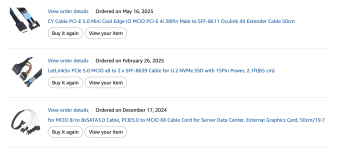
Your asrock board looks nice too. Especially if you are constrained in available space. It would be interesting to know which MCIO to SATA adapter cables you have sucessfully used as I was not able to find a lot of options on the market for private buyers.
 
It would be interesting to know which MCIO to SATA adapter cables you have sucessfully used as I was not able to find a lot of options on the market for private buyers.
i bought these from amazon us and i think IIRC my mobo came with one MCIO 8i to SATA, the one you see here was for my other 2 drives, what i did was distribute the IO for 10 drives across two cables

1767732012856.png
 
Last edited:
  • Like
Reactions: christian99
I moved away from the script, it was still fragile wrt to nvme pice bus number changes and i locked myself out one time as my mirror wouldn't boot

instead i commited to:
1. not use the same nvme device id for both my proxmox boot volume and the nvme i passed through
2. this allowed me to use normal device blacklisting
3. and i butressed this with a udev rule on driver load to force a change in how bidning is done and that can alieviate the early binding issues

so for my SATA drives on the MCIO port (where the bus address NEVER changes as hardware is plugged in and out) it looks like this, this forces the vfio-pci driver to bind to the SATA interfaces BEFORE the SATA driver ever can, this means proxmox can never claim these accidentall (i think)


Code:
root@pve-nas1:/etc/udev/rules.d# cat 99-vfio-udev.rules
# Replace BDFs with yours — repeat these two lines for each controller you want on VFIO
ACTION=="add", SUBSYSTEM=="pci", KERNELS=="0000:ea:00.0", ATTR{driver_override}="vfio-pci"
ACTION=="add", SUBSYSTEM=="pci", KERNELS=="0000:ea:00.0", RUN+="/bin/sh -c 'modprobe vfio-pci; echo 0000:ea:00.0 > /sys/bus/pci/drivers/vfio-pci/bind'"

ACTION=="add", SUBSYSTEM=="pci", KERNELS=="0000:ea:00.1", ATTR{driver_override}="vfio-pci"
ACTION=="add", SUBSYSTEM=="pci", KERNELS=="0000:ea:00.1", RUN+="/bin/sh -c 'modprobe vfio-pci; echo 0000:ea:00.1 > /sys/bus/pci/drivers/vfio-pci/bind'"

ACTION=="add", SUBSYSTEM=="pci", KERNELS=="0000:42:00.0", ATTR{driver_override}="vfio-pci"
ACTION=="add", SUBSYSTEM=="pci", KERNELS=="0000:42:00.0", RUN+="/bin/sh -c 'modprobe vfio-pci; echo 0000:42:00.0 > /sys/bus/pci/drivers/vfio-pci/bind'"

ACTION=="add", SUBSYSTEM=="pci", KERNELS=="0000:42:00.1", ATTR{driver_override}="vfio-pci"
ACTION=="add", SUBSYSTEM=="pci", KERNELS=="0000:42:00.1", RUN+="/bin/sh -c 'modprobe vfio-pci; echo 0000:42:00.1 > /sys/bus/pci/drivers/vfio-pci/bind'"

# …add entries for the remaining 7 BDFs…
'

in theory one could do the same for pcie nvme type devices, however you would hit the same issues with pice bus IDs changing for 'reasons', so for my NVME i use this, this ensures that the vfio driver is ALWAYS loaded first for the nvme IDS, of course this means the IDs of the boot drives has to be idfferent and NOT on this list (i.e. usually means from a different manufacturer and/or type). the softdep directive is usualy missed in most guides, but this is actuall super important to ensure the load order

Code:
root@pve-nas1:/etc/modprobe.d# cat vfio-pci.conf

softdep nvme pre: vfio-pci
options vfio-pci ids=2646:5024,8086:2700,1cc1:8201,1bb1:5018,1e60:2864,10de:1e07

hope that helps
I have seen your script but I haven't used it because I wanted to passthrough 8 (and don't use the other 8) or the full 16 SATA controller ports to my TrueNAS vm and never planned the split use case.

Regarding "so for my SATA drives on the MCIO port (where the bus address NEVER changes as hardware is plugged in and out)" I made an interesting observation on my mb.
8 SATA ports have a physical SATA connentor on the mb and the other 8 SATA ports are shared with 8 pcie lanes on one MCIO connector.
I started with 4 hdds on the physical mb connectors and having nothing connected to the shared mcio port. The result were these SATA controller PCI adresses
1767732350904.png

A view days later i connected a Intel ARC A380 with a c-payne MCIO to PCIe adapter to the shared MCIO port. The A380 was detected, but the interessting thing is, that the PCI adress of two of the FCH SATA Controller have changed
1767732502445.png

I have no idea why this happens and if it is related to the CPU or the MB, but I just wanted to let you and other know that the PCI adress of the AMD Epyc integrated SATA controllers can change.

I also tried to bind the sata controller to vfio-pci by adding
1767732815904.png
to a modprobe.d config file
1767732836690.png

But it had no effect because the kernel loaded ahci first and vfio_pci later on in the boot sequence.

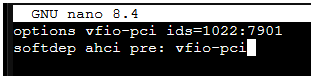
So the solution that I have ended up a view hours ago is the same as your second proposal. I added a soft dependency to my vfio-pci.conf
1767733056450.png
Until yet this works and as there is no dependency to the PCI adresses it should be robust enough for me. But as I am a linux beginner this is just a guess.

Do you think it makes sense to add the udev rules like you did to to be safe?
 
Last edited:
A view days later i connected a Intel ARC A380 with a c-payne MCIO to PCIe adapter to the shared MCIO port. The A380 was detected, but the interessting thing is, that the PCI adress of two of the FCH SATA Controller have changed
intersting, good to know, i didn't see the same when i plugged the U2 cables into my other MCIO ports, but maybe it depends on the class of the device or maybe it depends on the motherboard implemenation, i do know this is common for PCIE accross many many platforms, some server platforms apparently have option to fix the PCIE addresses, i havent seen that on anything i have ever owned, ultimatey my approach is a 'belt and braces' approach to a very obscure edge case failure

i think it is safe to have the rules - the key is to not accidently blacklist your nvme you boot from on proxmox, so just never blacklist that device ID (and thats why you boot device on the proxmox host must used difference ven:dev from all your other nvme drives, so long as you can boot you can always change any blacklist or udev rules for all other devices and dirves