Passing multiple bridges to openWRT VM issue

Proymoy

New Member
Jun 28, 2025
15
2
3
Hi,
I have OpenWRT in VM. I pass-through several hardware NICs including the one that is 'wan'. I also pass in one virtual bridge (vmbr1) which is part of 'lan' subnet. This way I can connect my other lxc or vm to 'lan'. I wanted to pass in second virtual bridge (vmbr2) for my second subnet 'sec'. But when I do that, all of the sudden my 'wan' stops working (doesn't get an ip) and thus I do not have internet conectivity and I can not use openWRT Luci interface.
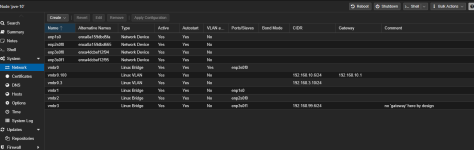
This is a screenshot of the devices added to the vm.

1768077984636.png
Any ideas what could be the issues? I tried to add the vmbr2 (which is eth4 in openwrt) to a brige for 'sec' (same config for vmbr1 and 'lan' bridge). But it didn't help. I also set manually mac addresses for each device because several had same. But it also didn't help. Both bridges (vmbr1 and 2) has the same config:
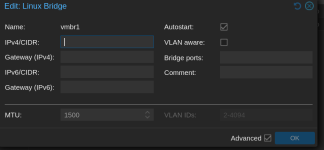
1768077938891.png
 
This looks more like an OpenWRT issue than Proxmox.. Start with the second nic as disconnected, so as to set it up nicely in OpenWRT.. Probably dealing with multiple gateways, if you have DHCP on both sides. And make sure you're not creating a loop as well..
 
I personally would not pass through the hardware. The way I do it with pfSense on my Proxmox machine is I assign each nic to a bridge, then I put each virtual NIC on the VM into the appropriate bridge. I think Proxmox does a better job of handling the hardware, and almost every VM takes virtual NICs without issue.

So in my Proxmox host, my network config looks like this:

1768955907755.png

enp3s0fo is the "LAN" Bridge. It also carries my VLAN traffic to the switch. enp2s0f0 is my primary WAN interface, and enp1s0 is my secondary WAN interface (I run redundant WAN connections, may not apply to you). enp30f1 is assigned to a fourth bridge, as a means of allowing me to log into Proxmox if I mess up pfSense, that way there I don't lose my connection to the server. It has no DHCP, I log into it using a static IP address. Its for emergencies only really.

In my VM, my configuration looks like this


1768956277281.png

these virtual NICs tie to LAN, WAN and OPT1 in pfSense.

I have two wired connection to WAN (xfinity cable and Tmobile 5G) and one connection to my switch. The port on the switch is a trunked/untagged port. All my other Proxmox nodes, my NAS, my WAP, my Ring alarm base station, etc., all plug into the switch. My WAP happens to be VLAN aware as well. I have different SSIDs for each VLAN, and most of my devices connect by wireless.

Inside of Proxmox (on this machine), the other VMs and LXCs connect to vmbr0 which is VLAN aware. They work as if they were plugged into my switch directly.

Here's my /etc/network/interfaces file if it helps


Code:
auto lo
iface lo inet loopback


# ===== LAN Trunk (X520 Port 0) =====
auto enp3s0f0
iface enp3s0f0 inet manual

auto vmbr0
iface vmbr0 inet manual
        bridge-ports enp3s0f0
        bridge-stp off
        bridge-fd 0
        bridge-vlan-aware yes
        bridge-vids 2-4092

# Primary Proxmox management on VLAN 100 (tagged on vmbr0)
auto vmbr0.100
iface vmbr0.100 inet static
        address 192.168.10.6/24
        gateway 192.168.10.1

# Proxmox host on VLAN 3 (Storage VLAN, non-routed)
auto vmbr0.3
iface vmbr0.3 inet static
        address 192.168.3.10/24


# ===== Emergency / Rescue Management (X520 Port 1) =====
# Dedicated bridge on the second port with a private subnet and NO gateway.
# Plug your laptop or an isolated switch into enp3s0f1 and set your laptop to 192.168.99.10/24, for example.
auto enp3s0f1
iface enp3s0f1 inet manual

auto vmbr3
iface vmbr3 inet static
        address 192.168.99.6/24
        bridge-ports enp3s0f1
        bridge-stp off
        bridge-fd 0
        # no 'gateway' here by design


# ===== WAN1 (Realtek 2.5g) =====
auto enp1s0
iface enp1s0 inet manual

auto vmbr1
iface vmbr1 inet manual
        bridge-ports enp1s0
        bridge-stp off
        bridge-fd 0


# ===== WAN2 (Realtek 1g) =====
auto enp2s0f0
iface enp2s0f0 inet manual

auto vmbr2
iface vmbr2 inet manual
        bridge-ports enp2s0f0
        bridge-stp off
        bridge-fd 0


source /etc/network/interfaces.d/*
 
This looks more like an OpenWRT issue than Proxmox.. Start with the second nic as disconnected, so as to set it up nicely in OpenWRT.. Probably dealing with multiple gateways, if you have DHCP on both sides. And make sure you're not creating a loop as well..
Hi yes I moved for discussions there, I still didn't find out why I can only add one network device. For reference: https://forum.openwrt.org/t/passing-multiple-network-bridges-in-proxmox-to-openwrt-vm/245161/10
 
I personally would not pass through the hardware. The way I do it with pfSense on my Proxmox machine is I assign each nic to a bridge, then I put each virtual NIC on the VM into the appropriate bridge. I think Proxmox does a better job of handling the hardware, and almost every VM takes virtual NICs without issue.
Hi, any particular reason why you have it set this way? To me it feels like if I want my openwrt be the router, just let it handle the devices directly. But also, I can not do it the way you do, because I am unable to add multiple network devices to the openWRT VM. I don't know why. (I mean I can do it, but then it just didn't work inside openWRT, no matter what I try). Your setup is interesting and very complex, I will study it further for sure, but for now I have settled on having only one network device (bridge) along with those PCIe pass-throughs and the bridge is VLAN aware and with that I am deciding in openWRT which subnet it belongs to.
 
Yes, a very specific reason, in fact. I have four network ports. I still need to be able to log into Proxmox if the router fails, perhaps to re-install, perhaps to restore the VM from backup. So that takes away one port. With three left, if I dedicate all three ports to pfSense, how will I connect my Proxmox server to the switch? Remember I have dual WANs, so with pfSense, if I pass through devices, it needs three of them. I will be out of network ports for Proxmox to use. The way I did it (which I can't take credit for. Claude.AI actually came up with the scheme for me). Proxmox uses vmbr0 to connect to the switch, as does pfSense. A linux bridge functionally serves the same purpose as a switch. By creating several virtual NICs on vmbr0, one for my 192.168.3.X network (my non-routed/dedicated storage VLAN) I can connect my Proxmox to my Synology without routing traffic through pfSense, which slows things down. And by creating a virtual NIC on my 192.168.10.X network, I have access to the Proxmox management interface from anywhere on my home lab network without having to physically plug into a NIC.
 
  • Like
Reactions: Proymoy
Yeah, I don't think I will have a problem with VM density. My router motherboard is an Asrock Industrial IMB-V2000M, with an embedded Ryzen V2718 cpu (Zen 2 cores/8 cores/16 threads). Its way overkill for running pfSense, but I picked it up for a bargain with the intention of trying to build a DIY 10gbe firewall/router. The motherboard has Realtek NICs on it, and one of them just refused to play nice with the BSD kernel. No matter what I couldn't get the 2.5gb NIC to be stable. I decided to try Proxmox and after installing the Realtek official driver with DKMS, it has been absolutely flawless. So now I have pfSense running in Proxmox using 4 cores and 4 GB of memory, and the question became, what to do with the excess compute power. I decided to move all services that have to be up all the time or that made sense to be "near" the pfSense instance. I run the cloudflared tunnel software in an LXC. I have two other LXCs, one running crowdsec and one running pihole (for experiements only really), and I have a VM that runs ansible playbooks, and a VM that that is a docker host for Uptime Kuma, Libre Speed, Vaultwarden, and Nginx Proxy Manager. I call it my "edge server". I doubt if it will run out of CPU cycles. Even though its a Zen 2 CPU, its a beast, and it draws like 15 watts.
 
Last edited:
Also, if you have a bit of CPU to spare, and 1 Gbps max, I'd say that virtio would be enough, and provide more ease of use than passthrough.. however, it won't change that you have to fix your openwrt config..
I have CPU from 2017, its ok but I don't want to tax it too much. I have 2.5 Gbps currently, in the past I had 10 Gbps and I want to have it again in a year or so.
 
Yeah, I don't think I will have a problem with VM density. My router motherboard is an Asrock Industrial IMB-V2000M, with an embeddes Ryzen V2718 cpu (Zen 2 cores/8 cores/16 threads). Its way overkill for running pfSense, but I picked it up for a bargain with the intention of trying to build a DIY 10gbe firewall/router. The motherboard has Realtek NICs on it, and one of them just refused to play nice with the BSD kernel. No matter what I couldn't get the 2.5gb NIC to be stable. I decided to try Proxmox and after installing the Realtek official driver with DKMS, it has been absolutely flawless. So now I have pfSense running in Proxmox using 4 cores and 4 GB of memory, and the question became, what to do with the excess compute power. I decided to move all services that have to be up all the time or that made sense to be "near" the pfSense instance. I run the cloudflared tunnel software in an LXC. I have two other LXCs, one running crowdsec and one running pihole (for experiements only really), and I have a VM that runs ansible playbooks, and a VM that that is a docker host for Uptime Kuma, Libre Speed, Vaultwarden, and Nginx Proxy Manager. I call it my "edge server". I doubt if it will run out of CPU cycles. Even though its a Zen 2 CPU, its a beast, and it draws like 15 watts.
Sounds good. I was also considering pfsense, but then settled on openwrt because its not BSD and I anticipated issues. But then I even added wi-fi capability so it was a good decision for me, because I heard that BSD doesn't play nice with that and I think pfsense doesn't have wifi capability (not sure about that). Anyway my router (proxomx) is old but efficient machine and for anything more taxing I am using a separate truenas system that is a modern AM4 platform (formerly my PC). I didn't want to run TrueNAS in VM that's why I have two machines instead of one.

I am curious if you are using pfsense because you wanted firewall first and foremost or if you were deciding between it and openWRT?

Also how happy are you with Cloudflare tunnel? I have Tailscale and its fine but causes some issues with immich when syncinc photos. However, that may be because I have it in docker container, I want to move it to LXC now that I have my proxmox machine fully up and running. I was considering the cloudflare as well but they have rather strict rules and streaming e.g. movie on jellyfin over it is against their rules.
 
I originally had OpenWRT running in a Nighthawk R7800 wireless router. It was OK and I even had VLANs set up. To be honest, I saw a video from Network Chuck on pfSense, and I just became obsessed with buying one of those fanless mini PCs and learning/trying pfSense. I have tried other products like OPNsense, but I keep coming back to pfSense. the interface just makes sense to me, and gradually I have been learning more and more about it to the point that I really have it just the way I like it now. pfSense ran great on a N100 fanless PC, but I am a home labber, and I always have an itch to upgrade, and as I said above, I got to the point where I wanted to build something that would handle 10g LAN connections.

I am super happy with the cloudflare tunnel. I run two websites, my personal blog, and my wife runs a food blog, and I also run a discourse forum for her. For those use cases its fantastic.

One of the main benefits I think of Tailscale, which I use and I love, is that it can be installed on pfSense. To me that's the best solution, to run it on your firewall/router. Running it there allows me to use the "advertise routes" feature, which allows me to basically pick which VLANs are open on Taiscale, and when I connect from outside my home, my devices function exactly like I am at home on my own network. I have never had any issues with speed or other performance issues while on Tailscale. I use it as an exit node when I am in places like the airport as well.

I love TrueNAS for storage, but I am not a very big fan of using it to run VMs or containers. I actually do run TrueNAS in a VM, but almost all of my apps are docker containers running in a Debian instance on Proxmox. I have my GPU passed through to the Docker VM, and I manage everything with Portainer.

My home lab is basically six or so devices. I have my "edge server" hosting pfSense as I said above. That connects to my 10g switch and most everything else hangs off of the switch. I have a TP-Link TL-WA3001 wireless access point that handles my wifi. It is VLAN aware, so I have different SSIDs for each VLAN. My main proxmox server and my Synology NAS are also connected to the switch.

I think pfSense gives a lot better control over network segmentation and VLANs, which is one of the main reasons I never went back to openWRT
 
  • Like
Reactions: Proymoy and Gilou
All right, yeah I got into it when I was watching some video about pfsense on protectli (I think you mean same or similar) I wanted to buy it and then when I was speccing it I discovered it can get really expensive so I went different routes. Anyway, then I chose openWRT for its Linux-basedness :D and I thought I won't even bother trying pfSense, but to be honest you have kinda intrigued me. Thank you for a lots of interesting ideas and a window to your environment, how it can realistically be used.

About tailscale, this is exactly how I use it too with the routes and exit node. To be precise I have it paired with proton VPN, so on my phone I have an access to my network as if I am home and I have proton VPN as my exit node. Currently I have it on my pi running as a docker container with gluetun that handles the proton VPN exit, but I am migrating it to proxmox LXC where I plan on running wireguard (+WG dashboard that I recently discovered) for my proton VPN exit + tailscale for the local network access.

That TP link as an access point that is with original firmware/software or you also have something custom on it?
Thanks!
 
Nope, look it up. That is the standard feature set...no bad fo $89.

As far as tail scale, I don't think it's a great idea to pile a VPN on top of a VPN. All you need is Tailscale. Tailscale is in fact based on wireguard
 
  • Like
Reactions: Proymoy
As far as tail scale, I don't think it's a great idea to pile a VPN on top of a VPN. All you need is Tailscale. Tailscale is in fact based on wireguard
The reason I do this is so that my ISP doesn't snoop around. And to be able to reach some content of my birth country. Its only an exit node. They have something similar built in with mullvad, I just do this with proton myself, because I have a subscription.
 
I would use one or the other, not both. Tailscale traffic is fully encrypted. You could always buy a cloud server in your home country and run Tailscale on it.
 
  • Like
Reactions: UdoB