

Hello together,
I am testing Proxmox Backup Server for production use ... the server runs as VM on a Proxmox VE node ... the backup datastore is mounted (CIFS) from a QNAP NAS storage. Backup and restore jobs seem to work.
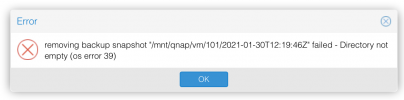
At the moment I am facing a problem (os error 39) by deleting backups from a deprecated VM on the backup server. Any advice?
... the corresponding snapshot directories are empty.
Best regards,
mscd
I am testing Proxmox Backup Server for production use ... the server runs as VM on a Proxmox VE node ... the backup datastore is mounted (CIFS) from a QNAP NAS storage. Backup and restore jobs seem to work.
At the moment I am facing a problem (os error 39) by deleting backups from a deprecated VM on the backup server. Any advice?
... the corresponding snapshot directories are empty.
Best regards,
mscd
Attachments
Last edited:

