OPNSense installation issues

USLTE

New Member
Jun 23, 2020
4
0
1
53
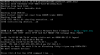
I am a total noob to Proxmox, but like it already. I am trying to install OPNSense and just get a boot loop in console with error: No bootable disc. Here's what I have done so far.
  • Uploaded OPNSense to <local - content>
  • I have uploaded BOTH the .img file and .iso which both give the same result.
  • Create VM using ISO/IMG file.
  • Open console then click START
That is where I get the ProxMox bios screen followed by no bootable disc message. I have tried older versions of proxmox and still get same result. Screenshot below for reference. Thanks for any help!

Capture.PNG
 
try to click right and Reboot on the VM
if not work post config VM qm config VMID
 
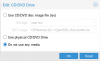
Did you a OPNSense already installed? if yes try to disable CD/DVD go to Datacenter -> NodeName -> VMID -> Hardware -> CD/DVD click edit and select Do not use any media then ok

like this image :)


DeepinScreenshot_select-area_20200625091446.png
 
I found the issue. The installation media could not be read by VM. I'm not sure why the .img file did not work and I even saved the .img to .iso using several different methods and the .iso would not work either. Eventually I ended up browsing the repo to find a .iso which I downloaded and it worked!