Hello,
I have a problem with starting a restored openvz machine. I've just installed a new machine (second) with proxmox 2.1 (pve-manager/2.1/f9b0f63a) and I have another (first) system with proxmox 2.1 (pve-manager/2.1/f9b0f63a).
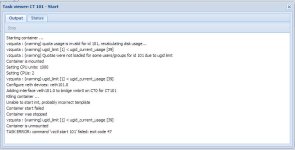
When I create a backup of a container on the first machine and restoring it on the new second system and then starting the container, I get this error message in the webinterface:
How do I solve this issue? The second system has different hardware specifications. I've also tried to restore the same container on the same system (first) to a new id. This works without problems. So, something must be wrong on the new (second) system.
pveversion -v (first):
pveversion -v (second, new):
I have a problem with starting a restored openvz machine. I've just installed a new machine (second) with proxmox 2.1 (pve-manager/2.1/f9b0f63a) and I have another (first) system with proxmox 2.1 (pve-manager/2.1/f9b0f63a).
When I create a backup of a container on the first machine and restoring it on the new second system and then starting the container, I get this error message in the webinterface:
Code:
Starting container ...
Container is mounted
Container start failed (try to check kernel messages, e.g. "dmesg | tail")
Container is unmounted
TASK ERROR: command 'vzctl start 999' failed: exit code 7
Code:
~# dmesg | tail
warning: `vzctl' uses 32-bit capabilities (legacy support in use)
Failed to initialize the ICMP6 control socket (err -105).
CT: 999: stopped
CT: 999: failed to start with err=-105
Failed to initialize the ICMP6 control socket (err -105).
CT: 999: stopped
CT: 999: failed to start with err=-105
Failed to initialize the ICMP6 control socket (err -105).
CT: 999: stopped
CT: 999: failed to start with err=-105
How do I solve this issue? The second system has different hardware specifications. I've also tried to restore the same container on the same system (first) to a new id. This works without problems. So, something must be wrong on the new (second) system.
pveversion -v (first):
Code:
pve-manager: 2.1-1 (pve-manager/2.1/f9b0f63a)
running kernel: 2.6.32-11-pve
proxmox-ve-2.6.32: 2.0-66
pve-kernel-2.6.32-11-pve: 2.6.32-66
lvm2: 2.02.95-1pve2
clvm: 2.02.95-1pve2
corosync-pve: 1.4.3-1
openais-pve: 1.1.4-2
libqb: 0.10.1-2
redhat-cluster-pve: 3.1.8-3
resource-agents-pve: 3.9.2-3
fence-agents-pve: 3.1.7-2
pve-cluster: 1.0-26
qemu-server: 2.0-39
pve-firmware: 1.0-15
libpve-common-perl: 1.0-27
libpve-access-control: 1.0-21
libpve-storage-perl: 2.0-18
vncterm: 1.0-2
vzctl: 3.0.30-2pve5
vzprocps: 2.0.11-2
vzquota: 3.0.12-3
pve-qemu-kvm: 1.0-9
ksm-control-daemon: 1.1-1
pveversion -v (second, new):
Code:
pve-manager: 2.1-1 (pve-manager/2.1/f9b0f63a)
running kernel: 2.6.32-11-pve
proxmox-ve-2.6.32: 2.0-66
pve-kernel-2.6.32-11-pve: 2.6.32-66
lvm2: 2.02.95-1pve2
clvm: 2.02.95-1pve2
corosync-pve: 1.4.3-1
openais-pve: 1.1.4-2
libqb: 0.10.1-2
redhat-cluster-pve: 3.1.8-3
resource-agents-pve: 3.9.2-3
fence-agents-pve: 3.1.7-2
pve-cluster: 1.0-26
qemu-server: 2.0-39
pve-firmware: 1.0-15
libpve-common-perl: 1.0-27
libpve-access-control: 1.0-21
libpve-storage-perl: 2.0-18
vncterm: 1.0-2
vzctl: 3.0.30-2pve5
vzprocps: 2.0.11-2
vzquota: 3.0.12-3
pve-qemu-kvm: 1.0-9
ksm-control-daemon: 1.1-1