[SOLVED] only one VM can start with Spice remote

abayoumy

Member
Nov 18, 2022
14
1
8
Hi
I have Windows VM with Spice remote and working fine.
once i set another VM to use Spice , it's fail to start with error

kvm: warning: Spice: reds.c:2655:reds_init_socket: binding socket to 127.0.0.1:61000 failed
kvm: warning: Spice: reds.c:3516:do_spice_init: Failed to open SPICE sockets
kvm: failed to initialize spice server
TASK ERROR: start failed: QEMU exited with code 1

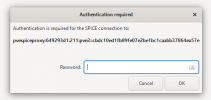
I tried this command, VM start but spice request password that i don't know !
qm set <vmid> -args '-spice tls-port=61000,addr=::1,tls-ciphers=HIGH,seamless-migration=on'
 
Hi,
Code:
root@pve2:~# qm config 211
agent: enabled=1
args: -spice tls-port=61000,addr=::1,tls-ciphers=HIGH,seamless-migration=on
boot: c
bootdisk: scsi0
cipassword: **********
ciuser: abayoumy
cores: 2
cpu: host
ide2: local-lvm:vm-211-cloudinit,media=cdrom,size=4M
ipconfig0: ip=10.0.0.13/24,gw=10.0.0.1,ip6=auto
memory: 4069
meta: creation-qemu=7.2.0,ctime=1687080259
name: elk02
net0: virtio=02:22:3B:C6:B7:84,bridge=vmbr0
numa: 0
scsi0: local-lvm:vm-211-disk-0,size=10G
scsihw: virtio-scsi-pci
serial0: socket
smbios1: uuid=cb4e10e0-f5da-4067-9aef-24545d86578e
sockets: 2
sshkeys: ssh-ed25519%20AAAAC3NzaC1lZDI1NTE5AAAAINr7JrFzSbXZlgH%2BM%2BQS6TvpbIEHL7S%2F76BAflXDnF6J%20gb-laptop%0A
vga: qxl,memory=16
vmgenid: 4f8e384a-4d8b-4776-8f9d-135d7af66854

thx for help :)2023-06-21 09_08_31-Authentication required.png
 
Last edited:
Thank you for the output!

What version of the virt-viewer you are using virt-viewer -V?

args: -spice tls-port=61000,addr=::1,tls-ciphers=HIGH,seamless-migration=on
Does it work if you get rid of spice args from the VM config?
 
Hi,
virt-viewer.exe version 11.0-256

spice args changed because i can start the VM but i dont know what the password it's requested or how to reset ?!
 
Thank you for the output!

What version of the virt-viewer you are using virt-viewer -V?


Does it work if you get rid of spice args from the VM config?

Thank you, I resolve it :)

firest i checked lisining port for working machine
Code:
root@pve2:~# netstat -tnlp | grep :61
tcp        0      0 127.0.0.1:61000         0.0.0.0:*

so i changed the arg command to :
qm set <vmid> -args '-spice tls-port=61001,addr=127.0.0.1,seamless-migration=on'
and now working perfect
 
  • Like
Reactions: Moayad