

Only 3 resolution when VirtIO-GPU or VirtGL-GPU enabled in Windows Guest

dfc643

New Member
Sep 13, 2022
4
1
3
Hi everyone,

I find there only 3 resolution when VirtIO-GPU or VirtGL-GPU enabled in Windows guest.
1920x1080,
1280x1024,
1024x768

how to add more modes in Windows guest when uses virtio-gpu or virgl as video backend?
just like:
1280x720
1280x800
1366x768
1440x900

thanks.

------

only 3 resolution mdoes:
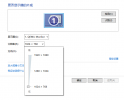
微信截图_20221013210310.png
virtio driver was installed and it works fine:
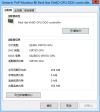
微信截图_20221013210324.png

and the virgl driver missing opengl 2.0+ or vulkan supports.
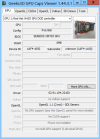
微信截图_20221013210352.png
 
neither virtio-gpu nor the virgl gpu have proper windows driver, both are currently linux only, so i guess that's the reason why windows falls back to only some resolutions (and no proper opengl support)
also vulkan is not supported for either of those gpus (not even on linux)
 
neither virtio-gpu nor the virgl gpu have proper windows driver, both are currently linux only, so i guess that's the reason why windows falls back to only some resolutions (and no proper opengl support)
also vulkan is not supported for either of those gpus (not even on linux)
Are there plans to provide vulkan support for linux VMs using AMD Radeon cards (perhaps as an alternative to PCI passthrough)?
 
I set my gpu to 'virtio' but my windows only show 'Microsoft compatible Video Adaptor' and the driver 'virgpudo' can not be installed.

So how can you do that?

Hope you can help me to get one VirtIO-GPU. :)
 
what i wrote here:
neither virtio-gpu nor the virgl gpu have proper windows driver, both are currently linux only, so i guess that's the reason why windows falls back to only some resolutions (and no proper opengl support)
also vulkan is not supported for either of those gpus (not even on linux)
is still valid