Nvidia vGPU issues

nerdbot5

New Member
Feb 22, 2024
1
0
1
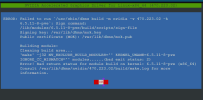
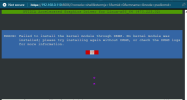
hello, I'm working at my workplace, and we have deployed Proxmox PVE as a secondary hypervisor, and we purchased a tesla p40, we are trying to enable vpu support, i have followed the instructions on the documentation page, but when i go to load the KVM drivers it fails to load nvidia.ko what am i missing or have i done wrong.
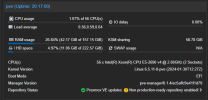
We are all up to date, latest kernel version and PVE Version.
any help or comments would be appreciated.
Note: DKMS seems to be installed, but says its not...
 

Attachments

  • Screenshot 2024-02-22 102650.png
    Screenshot 2024-02-22 102650.png
    28.9 KB · Views: 9
  • Screenshot 2024-02-22 102718.png
    Screenshot 2024-02-22 102718.png
    26.7 KB · Views: 9
  • Screenshot 2024-02-22 102731.png
    Screenshot 2024-02-22 102731.png
    26.1 KB · Views: 9
Did you check the make.log file that is mentioned in the error message? Please have a look to find the cause of the problem.
Only NVidia can update their proprietary drivers and the first guess is always that their drivers (from October 31) are not compatible with Linux kernel 6.5.11.
The second guess (or when building open-source drivers) is that the kernel headers are not installed (apt install proxmox-headers-6.5).
 
from the screenshot i see you try to install the 470 version driver for nvidia...
2 problems with that:

1. i think this is not the vgpu driver found here: https://docs.nvidia.com/grid/
2. 470 is probably too old to support the 6.5 kernel. eg. the current v16 vgpu driver is version 535 and that should work with the 6.5 kernel