

I can't install the guest driver for an NVIDIA vGPU in a VM.
I'm using PVE 8:
The server has an NVIDIA H100 94GB GPU:
I followed the documentation to enable vGPUs: https://pve.proxmox.com/wiki/NVIDIA_vGPU_on_Proxmox_VE
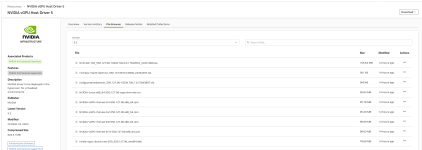
I installed the NVIDIA vGPU Host Driver 5 downloaded from NVIDIA AI Enterprise
The driver installation seems fine:
And the vGPUs are enabled:
Since mediated devices are not possible, I followed the Vendor-Specific method described here: https://forum.proxmox.com/threads/vgpu-with-nvidia-on-kernel-6-8.150840/
I created Ubuntu 22.10 VMs and modified the .conf files to allocate a vGPU:
Once the VMs are started, I can see that the vGPUs are in use:
In the VM, once Ubuntu 22.10 is installed and running, I can see the vGPU:
Then I installed the guest driver retrieved from the NVIDIA AI Enterprise site (see previous capture):
After a reboot, I get an error:
I really can't figure out which driver to install on the VMs.
Thanks in advance for your help.
I'm using PVE 8:
Bash:
# pveversion
pve-manager/8.2.7/3e0176e6bb2ade3b (running kernel: 6.8.12-2-pve)
The server has an NVIDIA H100 94GB GPU:
Bash:
# lspci -kknnd 10de:2321
b4:00.0 3D controller [0302]: NVIDIA Corporation GH100 [10de:2321] (rev a1)
        Subsystem: NVIDIA Corporation GH100 [H100L 94GB] [10de:1839]
I followed the documentation to enable vGPUs: https://pve.proxmox.com/wiki/NVIDIA_vGPU_on_Proxmox_VE
I installed the NVIDIA vGPU Host Driver 5 downloaded from NVIDIA AI Enterprise
Bash:
./NVIDIA-Linux-x86_64-550.90.05-vgpu-kvm-aie.run --dkms --no-drmThe driver installation seems fine:
Bash:
# nvidia-smi
Thu Oct 24 15:44:30 2024
+-----------------------------------------------------------------------------------------+
| NVIDIA-SMI 550.90.05              Driver Version: 550.90.05      CUDA Version: N/A      |
|-----------------------------------------+------------------------+----------------------+
| GPU  Name                 Persistence-M | Bus-Id          Disp.A | Volatile Uncorr. ECC |
| Fan  Temp   Perf          Pwr:Usage/Cap |           Memory-Usage | GPU-Util  Compute M. |
|                                         |                        |               MIG M. |
|=========================================+========================+======================|
|   0  NVIDIA H100 NVL                On  |   00000000:B4:00.0 Off |                    0 |
| N/A   44C    P0             67W /  400W |       0MiB /  95830MiB |      0%      Default |
|                                         |                        |             Disabled |
+-----------------------------------------+------------------------+----------------------+

+-----------------------------------------------------------------------------------------+
| Processes:                                                                              |
|  GPU   GI   CI        PID   Type   Process name                              GPU Memory |
|        ID   ID                                                               Usage      |
|=========================================================================================|
|  No running processes found                                                             |
+-----------------------------------------------------------------------------------------+

# nvidia-smi vgpu
Thu Oct 24 16:17:31 2024
+-----------------------------------------------------------------------------+
| NVIDIA-SMI 550.90.05              Driver Version: 550.90.05                 |
|---------------------------------+------------------------------+------------+
| GPU  Name                       | Bus-Id                       | GPU-Util   |
|      vGPU ID     Name           | VM ID     VM Name            | vGPU-Util  |
|=================================+==============================+============|
|   0  NVIDIA H100 NVL            | 00000000:B4:00.0             |   0%       |
+---------------------------------+------------------------------+------------+
And the vGPUs are enabled:
Bash:
#
# lspci -kd 10de:2321
b4:00.0 3D controller: NVIDIA Corporation GH100 (rev a1)
        Subsystem: NVIDIA Corporation GH100 [H100L 94GB]
        Kernel driver in use: nvidia
        Kernel modules: nvidiafb, nouveau, nvidia_vgpu_vfio, nvidia
b4:00.2 3D controller: NVIDIA Corporation GH100 (rev a1)
        Subsystem: NVIDIA Corporation GH100 [H100L 94GB]
        Kernel driver in use: nvidia
        Kernel modules: nvidiafb, nouveau, nvidia_vgpu_vfio, nvidia
b4:00.3 3D controller: NVIDIA Corporation GH100 (rev a1)
        Subsystem: NVIDIA Corporation GH100 [H100L 94GB]
        Kernel driver in use: nvidia
        Kernel modules: nvidiafb, nouveau, nvidia_vgpu_vfio, nvidia
b4:00.4 3D controller: NVIDIA Corporation GH100 (rev a1)
        Subsystem: NVIDIA Corporation GH100 [H100L 94GB]
        Kernel driver in use: nvidia
        Kernel modules: nvidiafb, nouveau, nvidia_vgpu_vfio, nvidia
b4:00.5 3D controller: NVIDIA Corporation GH100 (rev a1)
        Subsystem: NVIDIA Corporation GH100 [H100L 94GB]
        Kernel driver in use: nvidia
        Kernel modules: nvidiafb, nouveau, nvidia_vgpu_vfio, nvidia
b4:00.6 3D controller: NVIDIA Corporation GH100 (rev a1)
        Subsystem: NVIDIA Corporation GH100 [H100L 94GB]
        Kernel driver in use: nvidia
        Kernel modules: nvidiafb, nouveau, nvidia_vgpu_vfio, nvidia
b4:00.7 3D controller: NVIDIA Corporation GH100 (rev a1)
        Subsystem: NVIDIA Corporation GH100 [H100L 94GB]
        Kernel driver in use: nvidia
        Kernel modules: nvidiafb, nouveau, nvidia_vgpu_vfio, nvidia
...
Since mediated devices are not possible, I followed the Vendor-Specific method described here: https://forum.proxmox.com/threads/vgpu-with-nvidia-on-kernel-6-8.150840/
Bash:
# cat /sys/bus/pci/devices/0000\:b4\:00.2/nvidia/creatable_vgpu_types
ID    : vGPU Name
1068  : NVIDIA H100L-4C
1069  : NVIDIA H100L-6C
1070  : NVIDIA H100L-11C
1071  : NVIDIA H100L-15C
1072  : NVIDIA H100L-23C
1073  : NVIDIA H100L-47C
1074  : NVIDIA H100L-94C
...
# echo 1072 > /sys/bus/pci/devices/0000\:b4\:00.2/nvidia/current_vgpu_type
# echo 1072 > /sys/bus/pci/devices/0000\:b4\:00.3/nvidia/current_vgpu_type
# echo 1072 > /sys/bus/pci/devices/0000\:b4\:00.4/nvidia/current_vgpu_type
I created Ubuntu 22.10 VMs and modified the .conf files to allocate a vGPU:
Bash:
# cat /etc/pve/qemu-server/103.conf
args: -device vfio-pci,sysfsdev=/sys/bus/pci/devices/0000:b4:00.4 -uuid 2277c881-63ef-4432-bb0e-b3d4886056ba
boot: order=scsi0;ide2;net0
cores: 1
cpu: x86-64-v2-AES
ide2: none,media=cdrom
memory: 2048
meta: creation-qemu=9.0.2,ctime=1729686686
name: Ubuntu-24.10
net0: virtio=BC:24:11:52:B8:DA,bridge=vmbr0
numa: 0
ostype: l26
scsi0: local-lvm:vm-103-disk-0,iothread=1,size=32G
scsihw: virtio-scsi-single
smbios1: uuid=2f13d8c3-a52b-4f2f-8480-acf69b12c478
sockets: 1
vmgenid: 2277c881-63ef-4432-bb0e-b3d4886056ba
Once the VMs are started, I can see that the vGPUs are in use:
Bash:
# nvidia-smi vgpu
Thu Oct 24 17:00:29 2024
+-----------------------------------------------------------------------------+
| NVIDIA-SMI 550.90.05              Driver Version: 550.90.05                 |
|---------------------------------+------------------------------+------------+
| GPU  Name                       | Bus-Id                       | GPU-Util   |
|      vGPU ID     Name           | VM ID     VM Name            | vGPU-Util  |
|=================================+==============================+============|
|   0  NVIDIA H100 NVL            | 00000000:B4:00.0             |   0%       |
|      3251634210  NVIDIA H100... | d688...  VM01,debug... |      0%    |
|      3251634216  NVIDIA H100... | 2277...  Ubuntu-24.10,deb... |      0%    |
+---------------------------------+------------------------------+------------+

# nvidia-smi vgpu -q
...
    vGPU ID                               : 3251634216
        VM UUID                           : 2277c881-63ef-4432-bb0e-b3d4886056ba
        VM Name                           : Ubuntu-24.10,debug-threads=on
        vGPU Name                         : NVIDIA H100L-23C
        vGPU Type                         : 1072
        vGPU UUID                         : b36f6e57-9213-11ef-ab63-278c9fcae3f5
        Guest Driver Version              : N/A
        License Status                    : N/A (Expiry: N/A)
        GPU Instance ID                   : N/A
        Placement ID                      : 24
        Accounting Mode                   : N/A
        ECC Mode                          : Disabled
        Accounting Buffer Size            : 4000
        Frame Rate Limit                  : N/A
        PCI
            Bus Id                        : 00000000:00:00.0
        FB Memory Usage
            Total                         : 23552 MiB
            Used                          : 0 MiB
            Free                          : 23552 MiB
        Utilization
            Gpu                           : 0 %
            Memory                        : 0 %
            Encoder                       : 0 %
            Decoder                       : 0 %
            Jpeg                          : 0 %
            Ofa                           : 0 %
        Encoder Stats
            Active Sessions               : 0
            Average FPS                   : 0
            Average Latency               : 0
        FBC Stats
            Active Sessions               : 0
            Average FPS                   : 0
            Average Latency               : 0
In the VM, once Ubuntu 22.10 is installed and running, I can see the vGPU:
Bash:
root@ubuntu-2210:~# lspci -kd 10de:2321
00:04.0 3D controller: NVIDIA Corporation GH100 [H100L 94GB] (rev a1)
        Subsystem: NVIDIA Corporation Device 185e
Then I installed the guest driver retrieved from the NVIDIA AI Enterprise site (see previous capture):
Bash:
# apt install ./nvidia-vgpu-ubuntu-aie-550_550.90.05_amd64.debAfter a reboot, I get an error:
Bash:
root@ubuntu-2210:~# nvidia-smi
NVIDIA-SMI has failed because it couldn't communicate with the NVIDIA driver. Make sure that the latest NVIDIA driver is installed and running.
root@ubuntu-2210:~# dmesg
...
[  163.108601] NVRM: The NVIDIA GPU 0000:00:04.0 (PCI ID: 10de:2321)
               NVRM: installed in this vGPU host system is not supported by
               NVRM: proprietary nvidia.ko.
...
root@ubuntu-2210:~# lspci -kd 10de:2321
00:04.0 3D controller: NVIDIA Corporation GH100 [H100L 94GB] (rev a1)
        Subsystem: NVIDIA Corporation Device 185e
        Kernel modules: nvidiafb, nouveau, nvidia_vgpu_vfio, nvidia
root@ubuntu-2210:~# lsmod | grep -i nvidia
nvidia_vgpu_vfio      122880  0
vfio_pci_core          94208  1 nvidia_vgpu_vfio
mdev                   24576  1 nvidia_vgpu_vfio
vfio                   69632  3 vfio_pci_core,nvidia_vgpu_vfio,vfio_iommu_type1
I really can't figure out which driver to install on the VMs.
Thanks in advance for your help.