Not able to access- local gateway, Public DNS- get "Destination Host Unreachable", no PVE GUI

jsmags

New Member
Nov 14, 2026
3
0
1
Hi,
I looked at 100+ articles on similar issues and checked the following (and related settings)- but, no avail:

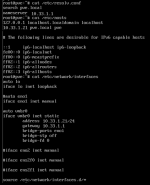
/etc/hosts
/etc/network/interfaces
/etc/resolv.conf

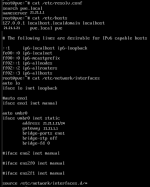
[Screenshot attached]

Interestingly, my nodes and containers seem to work just fine, except I am not able to access the PVE GUI and I am not able to ping local DNS and Public DNS or any public IP addresses. Appreciate any help- thank you!!!
 

Attachments

  • jsmags-Nov 13 2026-Unreachable Error-1a.png
    jsmags-Nov 13 2026-Unreachable Error-1a.png
    95.3 KB · Views: 0
Hi @jsmags , welcome to the forum!

Do you actually work for DoD? If you do - I would delete everything here immediately. If you don't - is your PVE on public network directly connected to the internet? If it is - I would disconnect it now, I mean no offense but based on your question you should not be running a system directly connected to the internet.

If your system sits on one of the private subnets - there is no point in obfuscating the IPs. It only prevents others who may want to help from actually helping.

So, a few questions:
- What exactly are you doing to access the PVE UI that fails? How exactly does it fail - what is the error?
- What is the IP address and Subnet of your PVE system? What is the local DNS? What is the actual Gateway?
- What exactly happens when you try to ping? Can you show us? Can you use text instead of screenshots?
- What IPs/Subnet/GW does another client on your system have that works? I.e. the one you are trying to access the UI from.
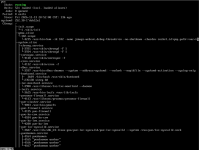
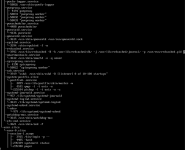
- Can you show us the running state of the system?
ip a
ip route


Blockbridge : Ultra low latency all-NVME shared storage for Proxmox - https://www.blockbridge.com/proxmox
 
Hi @jsmags , welcome to the forum!

Do you actually work for DoD? If you do - I would delete everything here immediately. If you don't - is your PVE on public network directly connected to the internet? If it is - I would disconnect it now, I mean no offense but based on your question you should not be running a system directly connected to the internet.

If your system sits on one of the private subnets - there is no point in obfuscating the IPs. It only prevents others who may want to help from actually helping.

So, a few questions:
- What exactly are you doing to access the PVE UI that fails? How exactly does it fail - what is the error?
- What is the IP address and Subnet of your PVE system? What is the local DNS? What is the actual Gateway?
- What exactly happens when you try to ping? Can you show us? Can you use text instead of screenshots?
- What IPs/Subnet/GW does another client on your system have that works? I.e. the one you are trying to access the UI from.
- Can you show us the running state of the system?
ip a
ip route


Blockbridge : Ultra low latency all-NVME shared storage for Proxmox - https://www.blockbridge.com/proxmox
Thank you so much for your kind response!

No, I don't work for DOD; thanks for the explanation- I will not obfuscate going forward.

Please see responses below- thank you!!!

- What exactly are you doing to access the PVE UI that fails? How exactly does it fail - what is the error?
https://<ipaddress>:8006/
Error: "Hmmm… can't reach this page
10.33.1.21 took too long to respond

- What is the IP address and Subnet of your PVE system? What is the local DNS? What is the actual Gateway?
IP: 10.33.1.21
Subnet: 10.33.1.1/24
DNS: 10.33.1.1
Gateway: 10.33.1.1
[Please see attached]

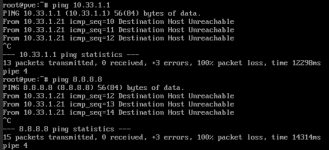
- What exactly happens when you try to ping? Can you show us? Can you use text instead of screenshots?
ping 10.33.1.1
PING 10.33.1.1 (10.33.1.1) 56(84) bytes of data.
From 10.33.1.21 icmp_seq=10 Destination Host Unreachable
From 10.33.1.21 icmp_seq=11 Destination Host Unreachable
From 10.33.1.21 icmp_seq=12 Destination Host Unreachable


ping 8.8.8.8
PING 8.8.8.8 (8.8.8.8) 56(84) bytes of data.
From 10.33.1.21 icmp_seq=12 Destination Host Unreachable
From 10.33.1.21 icmp_seq=13 Destination Host Unreachable
From 10.33.1.21 icmp_seq=14 Destination Host Unreachable
[also in screenshot]

- What IPs/Subnet/GW does another client on your system have that works? I.e. the one you are trying to access the UI from.
This is another server on Proxmox where the GUI works:
[B]cat /etc/hosts[/B]
127.0.0.1 localhost.localdomain localhost
10.33.1.30 pve.local pve

# The following lines are desirable for IPv6 capable hosts

::1 ip6-localhost ip6-loopback
fe00::0 ip6-localnet
ff00::0 ip6-mcastprefix
ff02::1 ip6-allnodes
ff02::2 ip6-allrouters
ff02::3 ip6-allhosts

[B]cat /etc/network/interfaces[/B]
auto lo
iface lo inet loopback

iface eno3 inet manual

auto vmbr0
iface vmbr0 inet static
address 10.33.1.30/24
gateway 10.33.1.1
bridge-ports eno3
bridge-stp off
bridge-fd 0

iface eno4 inet manual

iface eno1 inet manual

iface eno2 inet manual


source /etc/network/interfaces.d/*


ping 10.33.1.1
PING 10.33.1.1 (10.33.1.1) 56(84) bytes of data.
64 bytes from 10.33.1.1: icmp_seq=1 ttl=64 time=0.488 ms
64 bytes from 10.33.1.1: icmp_seq=2 ttl=64 time=0.421 ms
64 bytes from 10.33.1.1: icmp_seq=3 ttl=64 time=0.418 ms

ping 8.8.8.8
PING 8.8.8.8 (8.8.8.8) 56(84) bytes of data.
64 bytes from 8.8.8.8: icmp_seq=1 ttl=117 time=4.58 ms
64 bytes from 8.8.8.8: icmp_seq=2 ttl=117 time=6.14 ms
64 bytes from 8.8.8.8: icmp_seq=3 ttl=117 time=4.71 ms

ip route

ip route
default via 10.33.1.1 dev vmbr0 proto kernel onlink
10.33.1.0/24 dev vmbr0 proto kernel scope link src 10.33.1.30


- Can you show us the running state of the system?
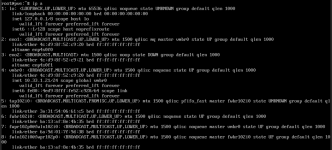
ip a
1794675321186.png
ip route
1794675337833.png


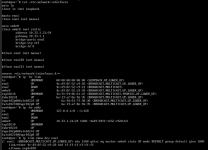
Also, I saw lspci -v command used on one of the posts and tried the same on my end- here are the results- not sure what the "Error...Operation not permitted" is about:
1794675811876.png
Also, results from ip -br link, ip -br addr (in context of /etc/network/interfaces)
1794676600016.png

...appreciate it much- thank you!
 

Attachments

  • jsmags-Nov 13 2026-Unreachable Error-1-FULL.png
    jsmags-Nov 13 2026-Unreachable Error-1-FULL.png
    97.7 KB · Views: 0
  • Unreachable.png
    Unreachable.png
    61.5 KB · Views: 0
  • 1794675098142.png
    1794675098142.png
    215.4 KB · Views: 0
  • 1794675124321.png
    1794675124321.png
    209.7 KB · Views: 0
  • 1794675150630.png
    1794675150630.png
    15.3 KB · Views: 0
  • 1794675398292.png
    1794675398292.png
    19.3 KB · Views: 0
Last edited:
The screenshot helps: eno1 has carrier and is already attached to vmbr0. The unreachable message for the gateway comes from the affected host itself. Since the other PVE host can ping that gateway, I'd check whether the affected host can resolve the gateway's MAC address before changing DNS or the web UI configuration.

On the affected host, substitute your gateway's IPv4 address in these three commands:

Bash:
ip -4 route get <gateway-IP>
ping -n -c 2 <gateway-IP>
ip -4 neigh show to <gateway-IP>

The route lookup should show the expected management device and source IP. For the setup in your screenshot, that would be dev vmbr0 and the affected host's management IP. If the neighbor entry on that device stays INCOMPLETE or ends up FAILED after the ping, Linux hasn't resolved the gateway's MAC on that path. With carrier already present, compare the affected switch port's access VLAN or tagging with the working host's port. If you get a MAC address, compare it with the gateway entry on the working host. A matching MAC narrows down the problem, but doesn't establish that ping or HTTPS works. Debian ip-route manual · Debian ip-neighbour manual

OpenAI Codex assisted with drafting this reply.
 
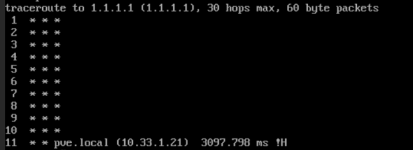
I tried traceroute from the issue prone pve host and noticed that it does not return the route as do other proxmox installations:

1794685317643.png

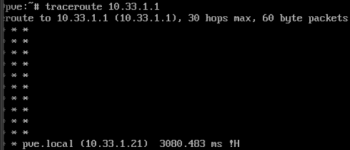
Same result for default gateway:
1794685384757.png
 
Last edited:
Hi,

Are you sur your network configuration you posted ?

You have posted 2 /etc/network/interfaces with 2 different configurations.

Note : avoid mixing screens and text; all text is better.

Best regards,