

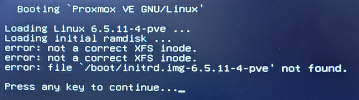
As the title suggests, after a grueling weekend of getting all of my VMs up and running, Monday brought me down when the node decided to die and not boot. Please see the picture. Installed Proxmox on Saturday with the latest ISO - spent the weekend configuring - not sure what happened but Monday night, bam, everything down and I'm getting this error (below).
I'm a complete Proxmox novice and have been digging through the forums tirelessly to find a solution. I have used Linux for a few years, but I'm still a novice - things need to be spoon fed to me as it doesn't come as easy.
Have tried:
- Boot repair live ISO, doesn't want to recognize the drive
- Proxmox live ISO, tried mounting drives, giving me errors when mounting
- When I try to press any key to continue, everything freezes
Any/all suggestions would be greatly appreciated.
What I haven't tried is copy/pasting initrd.img file from the live ISO, into the /boot/ folder on the NVME (don't have the knowledge to know if that's a feasible solution or not).
Using XFS filesystem on an NVME, on an HP elitedesk, Ryzen 5 processor. Thank you everyone.
I'm a complete Proxmox novice and have been digging through the forums tirelessly to find a solution. I have used Linux for a few years, but I'm still a novice - things need to be spoon fed to me as it doesn't come as easy.
Have tried:
- Boot repair live ISO, doesn't want to recognize the drive
- Proxmox live ISO, tried mounting drives, giving me errors when mounting
- When I try to press any key to continue, everything freezes
Any/all suggestions would be greatly appreciated.
What I haven't tried is copy/pasting initrd.img file from the live ISO, into the /boot/ folder on the NVME (don't have the knowledge to know if that's a feasible solution or not).
Using XFS filesystem on an NVME, on an HP elitedesk, Ryzen 5 processor. Thank you everyone.
Last edited:
