

[SOLVED] NodeMesh Fabirc Question

mouse51180

New Member
Dec 10, 2025
8
0
1
Question:
I thought when the nodes were configured in a Node Mesh setup, that they would be able to traverse to other nodes from any interface in the mesh setup. So if one path was broken, it could contact the other nodes by traversing through a different node not directly attached to it.

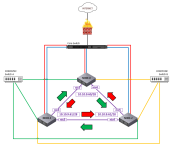
Example: (see diagram below)
Node-0 can reach Node-2 directly over nic4. Should nic4 become inoperable, should Node-0 be able to reach Node-2 by going out over nic5 through Node-1 and then over to Node-2?


When testing this in my environment. If I am in the Node-0 console and I run a ping -I nic4 10.10.9.62 it is successful, but if I run ping -I nic5 10.10.9.62 it times out.
Additionally, in the same example, if I am on Node-0 and I try to ping Node-1 over nic4 (ping -I nic4 10.10.9.61)it times out as well.

Is there some sort of routing that needs to be configured as well to allow this to work or do I not fully understand how the mesh setup functions?

1770908626504.png
 
Hello,
I don’t claim this is exact, but at first glance it looks like a routing problem. Add the appropriate destination via the interface where you expect it to occur. You can reduce the network mask if you don’t need it to be that large, or for communication between them you can use /30 or /29 from different networks. It looks more organized. Example: 172.16.node.0/30.
 
I left it as a /28 for more nodes to be added at a later time. When the mesh was configured, it looked like Proxmox setup all the routing needed during the wizard configuration, but that is what I curious about...if it wasnt and there is more routing that needs to be manually entered in...or possibly the "nic5" connection is not active until the "nic4" connection is broke? just trying to get a better understanding of what I should be seeing versus what I am expecting to see.
 
I am completely new to Proxmox and my Linux is limited...so be gentle.


Code:
Linux pve-node0 6.17.9-1-pve #1 SMP PREEMPT_DYNAMIC PMX 6.17.9-1 (2026-01-12T16:25Z) x86_64

The programs included with the Debian GNU/Linux system are free software;
the exact distribution terms for each program are described in the
individual files in /usr/share/doc/*/copyright.

Debian GNU/Linux comes with ABSOLUTELY NO WARRANTY, to the extent
permitted by applicable law.
root@pve-node0:~# route -n
-bash: route: command not found
 
Code:
root@pve-node0:~# ip route show
default via 10.9.9.1 dev vmbr0 proto kernel onlink
10.10.9.0/28 dev vmbr0 proto kernel scope link src 10.10.9.10
10.10.9.16/28 dev nic0 proto kernel scope link src 10.10.9.20
10.10.9.32/28 dev nic1 proto kernel scope link src 10.10.9.40
10.10.9.61 nhid 29 via 10.10.9.61 dev nic5 proto openfabric src 10.10.9.60 metric 20 onlink
10.10.9.62 nhid 30 via 10.10.9.62 dev nic4 proto openfabric src 10.10.9.60 metric 20 onlink
root@pve-node0:~#
 
I dont know why, but it keeps telling me "show" command not found.
Am I in the wrong directory?

show open<tab> does not return any values
show <tab> returns the last line of this code

Code:
root@pve-node0:~# show openfabric topology
-bash: show: command not found
root@pve-node0:~# show openfabric
-bash: show: command not found
root@pve-node0:~# show openfabric neighbor
-bash: show: command not found
root@pve-node0:~# show .
./             ../            .bash_history  .bashrc        .config/       .forward       .history_frr   .profile       .rnd           .ssh/          .wget-hsts
 
Alright. It appears to be working. I think I was not giving it enough time to re-establish the connections when I was pulling the cables out to test and then plugging them back in.

You can see in my second attempt to ping below it fails 8 times...then I tried it again after waiting a little longer and connection was returned.

Rich (BB code):
root@pve-node0:~# ip link show nic4 && ip link show nic5
6: nic4: <BROADCAST,MULTICAST,UP,LOWER_UP> mtu 1500 qdisc mq state UP mode DEFAULT group default qlen 1000
    link/ether 14:23:f3:2a:13:80 brd ff:ff:ff:ff:ff:ff
    altname enp200s0f0np0
    altname enx1423f32a1380
7: nic5: <NO-CARRIER,BROADCAST,MULTICAST,UP> mtu 1500 qdisc mq state DOWN mode DEFAULT group default qlen 1000
    link/ether 14:23:f3:2a:13:81 brd ff:ff:ff:ff:ff:ff
    altname enp200s0f1np1
    altname enx1423f32a1381
root@pve-node0:~# ping 10.10.9.62
PING 10.10.9.62 (10.10.9.62) 56(84) bytes of data.
64 bytes from 10.10.9.62: icmp_seq=1 ttl=64 time=0.134 ms
64 bytes from 10.10.9.62: icmp_seq=2 ttl=64 time=0.077 ms
64 bytes from 10.10.9.62: icmp_seq=3 ttl=64 time=0.078 ms
^C
--- 10.10.9.62 ping statistics ---
3 packets transmitted, 3 received, 0% packet loss, time 2084ms
rtt min/avg/max/mdev = 0.077/0.096/0.134/0.026 ms
root@pve-node0:~#
root@pve-node0:~#
root@pve-node0:~#
root@pve-node0:~# ip link show nic4 && ip link show nic5
6: nic4: <NO-CARRIER,BROADCAST,MULTICAST,UP> mtu 1500 qdisc mq state DOWN mode DEFAULT group default qlen 1000
    link/ether 14:23:f3:2a:13:80 brd ff:ff:ff:ff:ff:ff
    altname enp200s0f0np0
    altname enx1423f32a1380
7: nic5: <BROADCAST,MULTICAST,UP,LOWER_UP> mtu 1500 qdisc mq state UP mode DEFAULT group default qlen 1000
    link/ether 14:23:f3:2a:13:81 brd ff:ff:ff:ff:ff:ff
    altname enp200s0f1np1
    altname enx1423f32a1381
root@pve-node0:~# ping 10.10.9.62
PING 10.10.9.62 (10.10.9.62) 56(84) bytes of data.
^C
--- 10.10.9.62 ping statistics ---
8 packets transmitted, 0 received, 100% packet loss, time 7195ms

root@pve-node0:~# ping 10.10.9.62
PING 10.10.9.62 (10.10.9.62) 56(84) bytes of data.
64 bytes from 10.10.9.62: icmp_seq=1 ttl=63 time=0.168 ms
64 bytes from 10.10.9.62: icmp_seq=2 ttl=63 time=0.127 ms
64 bytes from 10.10.9.62: icmp_seq=3 ttl=63 time=0.133 ms
^C
--- 10.10.9.62 ping statistics ---
3 packets transmitted, 3 received, 0% packet loss, time 2037ms
rtt min/avg/max/mdev = 0.127/0.142/0.168/0.018 ms
root@pve-node0:~#

Thanks for the help