No NIC connection with Asus NUC14MNK

waterchill

New Member
Mar 12, 2025
17
0
1
Hi friends,

I'm new to proxmox and I'm going to make my first install and have some serious problems. On this NUC there is a RTL 8125 Chip. In the installation I don't see an eth0 or so only the wifi module. Actually I spend 3 days to get a connection without any result. No wifi and no ethernet. Can someone help me out? Or should I throw this NUC away and buy other one? Thank you
 
Hi @waterchill , welcome to the forum.

You can give PVE-on-Debian install a try: https://pve.proxmox.com/wiki/Install_Proxmox_VE_on_Debian_12_Bookworm

Additionally, as an experiment you can try latest Ubuntu install, to see if NIC is detected at all.

Finally, you could plug this into google "proxmox 8125". There are a few results that may be helpful:
https://www.reddit.com/r/Proxmox/comments/1d3l242/any_issues_with_rtl8125b_nics_on_latest_proxmox/
etc

Cheers


Blockbridge : Ultra low latency all-NVME shared storage for Proxmox - https://www.blockbridge.com/proxmox
 
The problem of the most solutions is that they need an internet connection. I don't have one, because wifi fails and ethernet isn't working
 
The debian installation says, no ethernet card was detected. In the whole list no 8125 driver can be found
 
So I have tried Ubuntu, Debian and Kali. Ethernet not working. Installed old version of Win10 -> working without driver
 
That indicates that PVE's Ubuntu Kernel is not unique in having an issue with your PC.

I'd try latest Ubuntu, as they are more forward-looking in Kernel releases, to see whether that changes anything.


Based on your most recent update, you have a few options:
a) Reach out to manufacture and inquire whether any particular Kernel version is recommended
b) If PCI slots are available - add a more sane NIC
c) Look into a USB based NIC
d) Get a new PC
e) Find and contact the maintainer of the related Kernel driver, perhaps they can offer guidance

Cheers


Blockbridge : Ultra low latency all-NVME shared storage for Proxmox - https://www.blockbridge.com/proxmox
 
Unpack the driver and untar it. You will find README in the unpacked location.

To be able to follow the steps you are going to need PVE Kernel source and compiler tools, so you can build your own Kernel.

It is a somewhat involved procedure, but there are tutorials out there to help.
I have not reviewed this thread in details but it seems like a good start: https://forum.proxmox.com/threads/proxmox-ve-8-0-mainline-kernel-builds.135375/

Good luck

P.S. - you are going to need a working network interface to get all these files...


Blockbridge : Ultra low latency all-NVME shared storage for Proxmox - https://www.blockbridge.com/proxmox
 
Last edited:
Got today USB2LAN adapter and it is working. Some questions:

Q1: Do I have a disadvantage with an adapter? Ok one USB slot is occupied but something else?
Q2: Is there a support for proxmox where I can drop a message that the can develop a driver for future versions?
Q3: Are there nightly/beta builds of proxmox?
 
Q1: Do I have a disadvantage with an adapter?
It's impossible to say one way or another. Everything depends on your use-case, stability of the hardware, stability of the Kernel driver, combination of all of the above
1 Gbps (Gigabit per second) = 1000 Mbps (~112 MB/s)
USB 3.1 Gen 1 (5 Gbps) → ~500 MB/s real throughput
USB 3.1 Gen 2 (10 Gbps) → ~1.2 GB/s real throughput
USB 3.2 Gen 2x2 (20 Gbps) → ~2.4 GB/s real throughput

So from throughput perspective you should be fine.
Q2: Is there a support for proxmox where I can drop a message that the can develop a driver for future versions?
https://www.proxmox.com/en/about/open-source/developers
Q3: Are there nightly/beta builds of proxmox?
There is a "test" repository. However, it is not nearly as bleeding edge as you would think of in "nightly" builds.
https://pve.proxmox.com/wiki/Package_Repositories#sysadmin_test_repo

Your use case requires a vendor-provided kernel driver, which means you would need to compile a custom kernel. It’s unlikely that Proxmox developers would introduce a dependency on a third-party source package when building their standard kernel.

For a more streamlined solution, consider reaching out to your NIC's manufacturer and advocating for them to contribute their updated driver to the upstream kernel. If successful, it could eventually become part of the standard PVE kernel in the future.


Blockbridge : Ultra low latency all-NVME shared storage for Proxmox - https://www.blockbridge.com/proxmox
 
Thanks for your support. Theoretically I got it to work. Here is what I did:

Downloaded the driver here and unzip it: https://www.realtek.com/Download/List?cate_id=584

Copy to USB stick and copy from USB stick to proxmox folder

echo 'deb http://download.proxmox.com/debian/pve bullseye pve-no-subscription' > /etc/apt/sources.list.d/pve-enterprise.list

chmod +x autorun.sh

./autorun.sh

Then with ip a spot the new NIC in my case enp1s0

nano /etc/network/interfaces

my old config:

auto lo
iface lo inet loopback

iface enxc84d4426a297 inet manual

auto vmbr0
iface vmbr0 inet static
address 192.168.171.200/24
gateway 192.168.171.1
bridge-ports enxc84d4426a297
bridge-stp off
bridge-fd 0


New config:

auto lo
iface lo inet loopback

iface enp1s0 inet manual

auto vmbr0
iface vmbr0 inet static
address 192.168.171.200/24
gateway 192.168.171.1
bridge-ports enp1s0
bridge-stp off
bridge-fd 0


Reboot

The problem is now: This will work after reboot but only if I let the usb2lan adapter plugged in and lan connector is plugged into the NUC directly. After proxmox is online, I can disconnect the adapter and it is still working until next reboot. Without this adapter there is no connection. So it looks like the adapter is only needed for rebooting. Any ideas on this issue? Is there something other I have to change?
 
echo 'deb http://download.proxmox.com/debian/pve bullseye pve-no-subscription' > /etc/apt/sources.list.d/pve-enterprise.list
That should probably be / have been bookworm , as is the latest Proxmox install.

Any ideas on this issue? Is there something other I have to change?
Shutdown. Remove USB adapter, leaving only RTL NIC attached. Reboot & then show output (from a physically connected monitor) of:
Code:
ip a

cat /etc/network/interfaces
 
Got it to work with this command:

nano /etc/udev/rules.d/10-network.rules

SUBSYSTEM=="net", ACTION=="add", ATTR{address}=="XX:XX:XX:XX:XX:XX", NAME="enp1s0"

update-initramfs -u
reboot
 
Problem is half solved. It will not survive a normal "reboot" execution. I have to switch the NUC complete off then on and then it will work. Any ideas on this?
 
Today I started from scratch with a bigger ssd. This is the guide to get it to work, but will not survive a reboot:

Copy from USB:

lsblk
mkdir -p /mnt/usb
mount /dev/sda2 /mnt/usb

cp -r /mnt/usb/realtek /var/lib/vz/dump/

nano /etc/apt/sources.list.d/pve-no-subscription.list
insert:
deb http://download.proxmox.com/debian/pve bookworm pve-no-subscription

apt update

apt install pve-headers-$(uname -r)

apt install -y wget pve-headers-$(uname -r) build-essential dkms

cd ..
cd /var/lib/vz/dump/realtek
chmod +x autorun.sh
./autorun.sh

echo 'grub-efi-amd64 grub2/force_efi_extra_removable boolean true' | debconf-set-selections -v -u
apt install --reinstall grub-efi-amd64

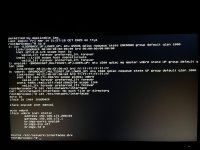
And here is the picture:
 

Attachments

  • IMG_4693.jpg
    IMG_4693.jpg
    766.9 KB · Views: 10
It looks like that there is a difference between reboot directly from NUC or from web interface. Rebooting physically on the NUC ethernet will survive. Rebooting from browser -> ethernet will not survive. I'm completely confused