No internet in new LXCs

sunnystew22

New Member
Jun 7, 2026
5
1
3
I've been having this weird issue today. I've tried rebooting my server several times, and have read quite a few posts to no avail.
My LXCs and VMs have internet but if I try to create a new LXC, I have no internet. Not a DNS issue either, as pinging 8.8.8.8 fails.
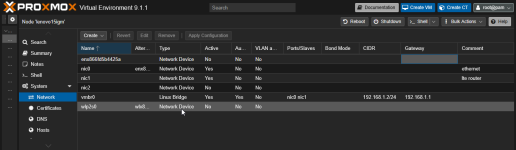
I do have to mention that I am bridging 2 NICs with vmbr0 so I can provide internet from my (Ethernet port-less) LTE modem-router to another router.

vmbr0 settings:
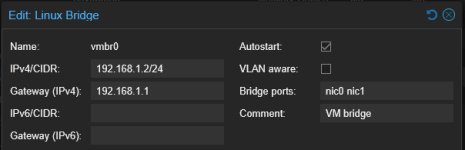
1780848516322.png

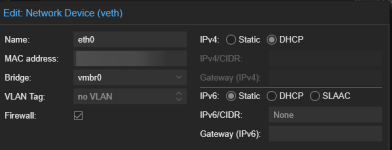
LXC network settings:

1780848899853.png
 
You did not mention it so ...

does LXC get IPv4 in 192.168.1.0/24 range via DHCP ?
does ping 192.168.1.2 work ?
does ping 192.168.1.1 work ?
did you create LXC via restore from a backup not ticking that "unique" option? (maybe two guests with same MAC addresses)

BR
Marcus
 
To answer your questions:
1. Yes, the LXC (or VM) gets a DHCP IP.
2. Yes, I can ping my Proxmox instance.
3. Yes, I can ping my gateway just fine.
4. No, I clicked create CT and manually created new LXCs. Although now that I look at it I should check the LXC/VM MAC addresses.
 
Well, on VMs I found out how to solve the issue. I just changed the adapter type to Intel E1000 and it worked.
I still need to know about LXCs though. I had deleted all my LXCs before, because I'd messed stuff up on them and then created a new LXC, when this started happening.
 
If you can ping your gateway 192.168.1.1 your LXC is OK as gateway is already located outside of PVE.

So if your routers do not block anything of this client / IP you should be fine.
Maybe some old entries that belong to this IP?
 
Rofl MacGyver :D

For LXC I would separate this into two checks: if the container can ping 192.168.1.1 but not 8.8.8.8, the bridge is at least passing local L2 traffic and the problem may be upstream of Proxmox.
From inside the CT, check `ip r` and then ping 8.8.8.8 while watching on the host with something like `tcpdump -ni vmbr0 host <CT-IP>`. If the echo requests leave vmbr0 but no replies come back, I would look at the LTE router / second router NAT or firewall rules for that new IP/MAC. If they do not leave vmbr0, then `pct config <vmid>` plus `/etc/network/interfaces` would be the useful next bits to post.
Also, for the two physical NICs on one bridge: if this is meant to behave like a small switch, a bond (then vmbr0 on top of that bond) is usually less surprising than putting both NICs directly into the bridge.