

[SOLVED] No cpu usage info and "failed to parse api response" in overview tab
- Thread starter deusesone
- Start date
You are using an out of date browser. It may not display this or other websites correctly.
You should upgrade or use an alternative browser.
You should upgrade or use an alternative browser.
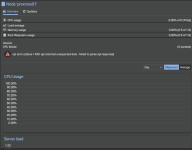


pve on nodes - 7.4
https://forum.proxmox.com/threads/proxmox-datacenter-manager-0-9-beta-released.171742Q: What Proxmox VE version is supported?
A: The minimum required Proxmox VE version is 8. We will support all actively supported Proxmox VE releases, but encourage frequent upgrades of both PDM and PVE as new features are often developed in lockstep.
PVE 7 is EOL since 2024-07:
https://pve.proxmox.com/pve-docs/chapter-pve-faq.html -> Point 10
Last edited:

thanks!

PDM 0.9 beta
dpkg -l "proxmox-datacenter*" or at least the full version number would be much more helpful.dpkg -l "proxmox-datacenter*"or at least the full version number would be much more helpful.
Output:
root@pdm:~# dpkg -l "proxmox-datacenter*"Desired=Unknown/Install/Remove/Purge/Hold| Status=Not/Inst/Conf-files/Unpacked/halF-conf/Half-inst/trig-aWait/Trig-pend|/ Err?=(none)/Reinst-required (Status,Err: uppercase=bad)||/ Name Version Architecture Description+++-=================================-============-============-=============================================================ii proxmox-datacenter-manager 0.9.0 amd64 Manage multiple Proxmox VE cluster and other Proxmox projectsii proxmox-datacenter-manager-client 0.9.0 amd64 CLI Client for the Proxmox Datacenter Managerii proxmox-datacenter-manager-ui 0.9.0 amd64 Web UI to for the Proxmox Datacenter Managerroot@pdm:~#Anything else that could give a clue ?
What i see in the GUI, i first thought i was something with permissions but i have granted all permissions and still no-go:
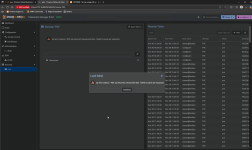
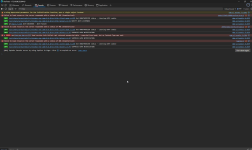
I do see these in console, which clearly states it got a 401 but i logged in with my PVE root user, i let it auto create its token and i have tried to solve it by granting Administrator permission to the token:
I do have to note that "normally" i go to the PVE through a reverse proxy but in this case for PDM because its not supported i just entered the IP address of the node.
Last edited:
FYI: I also got this error when I do a clean install of PVE (nested) and try to add it to PDM.Output:
root@pdm:~# dpkg -l "proxmox-datacenter*"
Desired=Unknown/Install/Remove/Purge/Hold
| Status=Not/Inst/Conf-files/Unpacked/halF-conf/Half-inst/trig-aWait/Trig-pend
|/ Err?=(none)/Reinst-required (Status,Err: uppercase=bad)
||/ Name Version Architecture Description
+++-=================================-============-============-=============================================================
ii proxmox-datacenter-manager 0.9.0 amd64 Manage multiple Proxmox VE cluster and other Proxmox projects
ii proxmox-datacenter-manager-client 0.9.0 amd64 CLI Client for the Proxmox Datacenter Manager
ii proxmox-datacenter-manager-ui 0.9.0 amd64 Web UI to for the Proxmox Datacenter Manager
root@pdm:~#
Anything else that could give a clue ?
What i see in the GUI, i first thought i was something with permissions but i have granted all permissions and still no-go:
View attachment 93466
I do see these in console, which clearly states it got a 401 but i logged in with my PVE root user, i let it auto create its token and i have tried to solve it by granting Administrator permission to the token:
View attachment 93467
I do have to note that "normally" i go to the PVE through a reverse proxy but in this case for PDM because its not supported i just entered the IP address of the node.
EDIT: I am sorry >> updated to PDM 0.9.4, all problems solved!
Last edited: