

I recently did a fresh install of Proxmox 7 and switched from using legacy bios to UEFI.
I used these instructions to configure intel_iommu for systemd-boot.
https://pve.proxmox.com/wiki/Pci_passthrough
Everything is working except for the my Plex VM which uses GPU passthrough but the only part that isn't working is XOrg. I get the dreaded black screen when I try to view console window through Proxmox web interface. Also note that this is a VM that I restored from my Proxmox 6 environment and now have running in my Proxmox 7 environment. This used to work fine in my Proxmox 6 environment.
From what I can tell the Plex VM and all of the Nvidia drivers are loaded correctly.
nvidia-smi returns the following and my Plex server is actively using it to do transcodes.
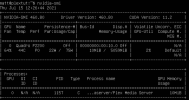
The only part that isn't working is the "black screen" when I try to view the VM from the Proxmox console. Like I said Plex and everything else seems to be happy just not XOrg. ctrl + alt + F2 properly takes me to the tty2 login screen, etc.
Any insight you can provide would be appreciated.
-Matt
I used these instructions to configure intel_iommu for systemd-boot.
https://pve.proxmox.com/wiki/Pci_passthrough
Everything is working except for the my Plex VM which uses GPU passthrough but the only part that isn't working is XOrg. I get the dreaded black screen when I try to view console window through Proxmox web interface. Also note that this is a VM that I restored from my Proxmox 6 environment and now have running in my Proxmox 7 environment. This used to work fine in my Proxmox 6 environment.
From what I can tell the Plex VM and all of the Nvidia drivers are loaded correctly.
nvidia-smi returns the following and my Plex server is actively using it to do transcodes.
The only part that isn't working is the "black screen" when I try to view the VM from the Proxmox console. Like I said Plex and everything else seems to be happy just not XOrg. ctrl + alt + F2 properly takes me to the tty2 login screen, etc.
Any insight you can provide would be appreciated.
-Matt
Last edited: