New install not using full hard drive space

danfratamico

New Member
Dec 1, 2025
8
0
1
I installed PVE 9.1.1 as a VM on ESXi to test it out. I attached a new 60 GB disk to the VM. Installed using ext4 and did not mess with the advanced hard drive options during setup. How can I get PVE to use the full 60 GB?

"pve" node max size26.28 GB
"local" pve node max size28.22 GB
"local-lvm" pve node max size32.88 GB
 
It is using the full size. The "local-lvm" is a logical volume where you are supposed to put your VM disks. Please read the manual:
https://pve.proxmox.com/pve-docs/chapter-pvesm.html
Thanks, I will read it over. Question - so if my local-lvm is where I want most of the space allocated, why is it only showing 32 GB max? I would expect much closer to 60 GB. I want to be able to use the full size.
 
You can't with this kind of storage setup. You can only change which storage gets how much. ZFS gives you the option to use all space with each storage and also gives you more space due to compression but you probably don't want to run that on a virtual disk. Yes, technically you can remove local-lvm and only use local but I don't like that.
So when I install Proxmox on a bare metal with a hardware RAID setup, I will run into the same scenario? I don't have any need to use ZFS.
 
Yes. The underlying hardware makes no difference here. This is how the default LVM/ext4 setup works. I think everyone could use ZFS but with HW RAID it's a bad idea anyways.
What you can do though is to create a volume and file system on the data volume that's backing local-lvm. local-lvm is for block storage and local is for file storage. They are backed by separate volumes and cannot directly share space. Check lvs.
Please don't quote whole messages.
 
Last edited:
  • Like
Reactions: news
So when I install Proxmox on a bare metal with a hardware RAID setup, I will run into the same scenario? I don't have any need to use ZFS.
Use the advance disk settings during installation and there you can specify the size of the swap and root/boot drive, then the balanced will be assigned to local-lvm. There use can also set zfs, drive mirroring etc.
 
Use the advance disk settings during installation and there you can specify the size of the swap and root/boot drive, then the balanced will be assigned to local-lvm. There use can also set zfs, drive mirroring etc.
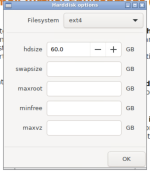
If I want to use the full 60 GB, any idea what I need to plug in here?

Screenshot 2025-12-01 at 1.17.26 PM.png
 
If I want to use the full 60 GB, any idea what I need to plug in here?
Set the swap to 0 (as it will default to 8GB)
Set the maxroot to 56GB (leave 4GB free), in case of drive full, you will appreciate having some free space which can be converted.

However, I'm not sure why you are trying to do this, you can get away with 16GB (32GB if you also want to store the installation ISO's *) for the maxroot (where only the OS should be stored). The rest will then be assigned to local-lvm where you can store the VM's/CT's guests which you create in Proxmox.

* Note: Proxmox will need some space to store the VM/CT installation media either on that same drive, or on some other storage space which you would have to create separately.

Why do you need all the space allocated to root, when the VM's/CT's which you create will each be allocated their own disk image? Are you trying to create enough space for a single VM on a single 60Gb drive? I suspect that if that is the case, you are going to run out of space very soon and then going to have to find some other workaround on the functioning system.

Those are just my observations, for whatever they are worth.

 
  • Like
Reactions: leesteken
Set the swap to 0 (as it will default to 8GB)
Set the maxroot to 56GB (leave 4GB free), in case of drive full, you will appreciate having some free space which can be converted.

However, I'm not sure why you are trying to do this, you can get away with 16GB (32GB if you also want to store the installation ISO's *) for the maxroot (where only the OS should be stored). The rest will then be assigned to local-lvm where you can store the VM's/CT's guests which you create in Proxmox.

* Note: Proxmox will need some space to store the VM/CT installation media either on that same drive, or on some other storage space which you would have to create separately.

Why do you need all the space allocated to root, when the VM's/CT's which you create will each be allocated their own disk image? Are you trying to create enough space for a single VM on a single 60Gb drive? I suspect that if that is the case, you are going to run out of space very soon and then going to have to find some other workaround on the functioning system.

Those are just my observations, for whatever they are worth.

All I'm trying to do is maximize the storage size for my VMs. If I have a total of 10 TB in a RAID, I don't want to lose out on 5 TB as that seems like what would happen.
 
All I'm trying to do is maximize the storage size for my VMs. If I have a total of 10 TB in a RAID, I don't want to lose out on 5 TB as that seems like what would happen.
You have to proved some space for the Proxmox OS itself, What VM are you trying to create which needs the full 60GB, perhaps there is an alternative way to achieve what you want to do. If you have 10TB in a networked share you can place VM's or anything else you want to there, all you need to do is to add the storage in Proxmox as NFS or SMB shared space.

That approach will be far better in the long run, than trying to squeeze every MB out of that 60GB drive. I have in a few cases had to resized boot drives after failing to allocate enough space for the root partition. Plus if that 60GB is SSD/NVMe you will find that the life expectancy reduces with the drive capacity.

My suggestions are from lived experience of 4 years with Proxmox, but you are welcome to ignore.
 
Last edited:
You have to proved some space for the Proxmox OS itself, What VM are you trying to create which needs the full 60GB, perhaps there is an alternative way to achieve what you want to do. If you have 10TB in a networked share you can place VM's or anything else you want to there, all you need to do is to add the storage in Proxmox as NFS or SMB shared space.

That approach will be far better in the long run, than trying to squeeze every MB out of that 60GB drive. I have in a few cases had to resized boot drives after failing to allocate enough space for the root partition. So my suggestions are from lived experience.
I'm essentially planning on migrating all my 25+ VMs from ESXi to a new server running PVE. On the ESXi server, I have about 1 TB (hardware RAID) of total space and most of it, minus what ESXi needs, can be used to store my VM disks. How do I accomplish this with PVE?
 
if youre going to deploy on a server and migrate, you might consider the below storage setup, it keeps things really simple

2x SSD drives in raid 1 solely for the OS/isos
All the rest of your drives in a separate volume for VM storage, whatever RAID level you like

For VMWare setups having dedicated drives for the OS separate from the VM storage is all i ever really see, so you should try to do the same with proxmox
 
Last edited:
You really need to read that manual. PVE tends to use block storage for VM's, not a filesystem. It is different from VMWare that way.
Ok, so from what I read, if I install PVE on a new server with 10 TB of total space, by default the root drive will be 98 GB? The rest will be allocated for my VMs? If this is true, I think I will be fine with Proxmox consuming only 98 GB.
 
I'm essentially planning on migrating all my 25+ VMs from ESXi to a new server running PVE. On the ESXi server, I have about 1 TB (hardware RAID) of total space and most of it, minus what ESXi needs, can be used to store my VM disks. How do I accomplish this with PVE?
That requirement is so very different from everything indicated in this threat. Why on earth are you trying to squeeze every MB out of a 60GB drive, if I were in your shoes I would only consider that drive for the root, and ignore whatever space is left over, as you have to make space for 1TB of VM's elsewhere in any case.
 
That requirement is so very different from everything indicated in this threat. Why on earth are you trying to squeeze every MB out of a 60GB drive, if I were in your shoes I would only consider that drive for the root, and ignore whatever space is left over, as you have to make space for 1TB of VM's elsewhere in any case.
As I mentioned before, the 60 GB is just for testing as I'm running PVE in a VM. My full setup will be setting up PVE on baremetal with 10 TB in a RAID.
 
As I mentioned before, the 60 GB is just for testing as I'm running PVE in a VM. My full setup will be setting up PVE on baremetal with 10 TB in a RAID.
There is nothing about the bare metal & 10TB until I asked.
Therefore the post comes across as if you are trying to squeeze a Proxmox installation complete with VM stores, onto a single 60GB drive.!