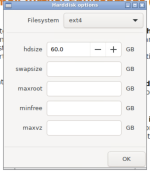
Set the swap to 0 (as it will default to 8GB)
Set the maxroot to 56GB (leave 4GB free), in case of drive full, you will appreciate having some free space which can be converted.
However, I'm not sure why you are trying to do this, you can get away with 16GB (32GB if you also want to store the installation ISO's *) for the maxroot (where only the OS should be stored). The rest will then be assigned to local-lvm where you can store the VM's/CT's guests which you create in Proxmox.
* Note: Proxmox will need some space to store the VM/CT installation media either on that same drive, or on some other storage space which you would have to create separately.
Why do you need all the space allocated to root, when the VM's/CT's which you create will each be allocated their own disk image? Are you trying to create enough space for a single VM on a single 60Gb drive? I suspect that if that is the case, you are going to run out of space very soon and then going to have to find some other workaround on the functioning system.
Those are just my observations, for whatever they are worth.