Networking Proxmox

amitp123

New Member
Jun 16, 2025
10
0
1
Hi All

Just wanted some help on networking.
We have a synergy Frame and configured to 8 ports as per below :-

2 nics for mgt - working
2 nics for vmotion - non tagged and no gateway required
2 seperate nics for iscsi - working
2 nics for data or vm traffic - need to test

i have managed to get the mgt,iscsi and vm traffic working but vmotion as its non tagged i have no idea if i should setup as bond or bridge?
On ESX the vmotion was with no vlan id.

Any help appreciated.
 
Hi,

just create a bond with the two interfaces as slave ports and assign an IP to it, that's it. Bonding mode depends on the switch capabilities and configuration.
Aside of that, what you do want to achieve with connecting these two interfaces to Proxmox VE node? There is no vmotion, so what do you want to do with this connection?
 
Hey Thanks for the reply we were trying to replicate the same setup as esx, where we had nics for vmotion,management, iscsi etc.

I have read threads that you can setup a seperate vmotion network if needed so is that incorrect and the migration of vms is done via management network only?

If you have some docs for this i would be interested to read this.

Thanks for coming back to me.
 
So do i still have to setup the bonds etc for this or can i just add the up address in amd it will work?

Sorry for the condsuin moving from Esx to proxmox is a new challenge
 
If you want migration to use both "vmotion" interfaces, you still need to set up a bond, and set an IP on that bond on each node. And of course, set that IP/network in the migration network in datacenter options.

A bridge is only required if you want to attach a VM to that bond, and in that case, one can assume you don't want/need it ;)
 
Ok one last question the vlan is untagged so how do u setup untagged bond?

Unless you can't do that just reading loads of threads which say different things.

I can send confing on here if you are happy to check it.

Thanks for your help really appreciated.
 
well.. if it's untagged, just set it up as a bond (say bond0), and set an IP on it, that will be untagged by default (all those things are using straight Linux networking stack). If you wanted a VLAN, then once the bond is set up, you can add a VLAN to it. But here, just use bondX directly, it's untagged by default :P
 
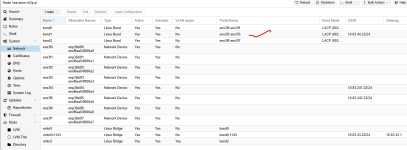
Morning here is my config
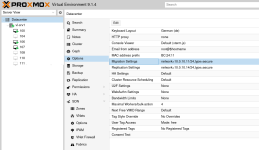
I have setup a bond1 with the 2 interfaces for migration and the added it to the migration option as well.
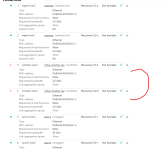
Little bit stumped as to why its not working the interfaces are showing down on the server side.


1769160871372.png

1769160721300.png
 
Hi,
I'm not sure about what I'm seeing there.. if you use LACP, make sure it's enabled on the switch though..
cat /proc/net/bonding/bond1 will tell you what pve sees.
ip link / ip a wlil tell you more about your NICs, but configuration seems OK..
 
Apologies i should have stated whats used where.

bond0 is used for management with ens3f0 and ens3f1(common in the screenshot) i have created vmbr0 for bond0 and then a vmbr0v1143 - This works fine.

bond1 - migration network i have assigned ens3f2 and ens3f3 - this for some reason i cannot get to work (vmotion-nic2 and nic3 on the screenshot)

iscsia and iscsib are fine i can ping those

bond2 not included in the pic is for data so VM's.

So my issue is only with bond1 as i can't seem to bring that up and checked with networks who have stated its LACP enabled.

I mean it would be nice to set it up but i have no idea why i can't get it to work.
 
Check the status with the commands I gave you hehe, dmesg can also give you precious information. You could also try to bring only one interface up in the bond, or even disable LACP and try to see if the NIC actually works.. also, I hate to consider this, but.. check that everything is properly wired!

I'm not sure what you mean by PS support, but if you need further assistance remotely, it is possible indeed.. or you can use a Proxmox subscription to have them help you.. or both.. ;)