

I am clearly doing something dumb, and just have not figured it out
My proxmox server is at a local DC
It is connected to my home router via Route Based IPSEC
From the CLI of the Proxmox server, I can ping any host on my home subnet, no issues
From home subnet I can access any proxmox VM with no issues, including my windows server 2025 VM
The problem is, when I try to go the other way
I cannot ping or connect from ANY proxmox VM to my home subnet
Proxmox CLI just fine
Actual VMs, nope.
PROXMOX PING:
PING 192.168.2.1 (192.168.2.1) 56(84) bytes of data.
64 bytes from 192.168.2.1: icmp_seq=1 ttl=63 time=3.61 ms
64 bytes from 192.168.2.1: icmp_seq=2 ttl=63 time=3.65 ms
64 bytes from 192.168.2.1: icmp_seq=3 ttl=63 time=3.38 ms
Proxmox TRACEROUTE
traceroute to 192.168.2.97 (192.168.2.97), 30 hops max, 60 byte packets
1 sophos.********.ca (192.168.1.1) 0.470 ms 0.408 ms 0.375 ms
2 * * *
3 192.168.2.97 (192.168.2.97) 3.899 ms 4.139 ms 3.870 ms
root@pve:~#
Windows Server 2025 VM CMD Prompt
Pinging 192.168.2.97 with 32 bytes of data:
Reply from 192.168.1.1: Destination host unreachable.
Reply from 192.168.1.1: Destination host unreachable.
Reply from 192.168.1.1: Destination host unreachable.
Reply from 192.168.1.1: Destination host unreachable.
Ping statistics for 192.168.2.97:
Packets: Sent = 4, Received = 4, Lost = 0 (0% loss),
Ubuntu VM
PING 192.168.2.79 (192.168.2.79) 56(84) bytes of data.
From 192.168.1.1 icmp_seq=1 Destination Host Unreachable
From 192.168.1.1 icmp_seq=2 Destination Host Unreachable
From 192.168.1.1 icmp_seq=3 Destination Host Unreachable
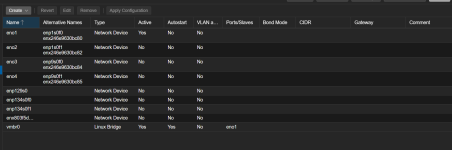
My proxmox server is at a local DC
It is connected to my home router via Route Based IPSEC
From the CLI of the Proxmox server, I can ping any host on my home subnet, no issues
From home subnet I can access any proxmox VM with no issues, including my windows server 2025 VM
The problem is, when I try to go the other way
I cannot ping or connect from ANY proxmox VM to my home subnet
Proxmox CLI just fine
Actual VMs, nope.
PROXMOX PING:
PING 192.168.2.1 (192.168.2.1) 56(84) bytes of data.
64 bytes from 192.168.2.1: icmp_seq=1 ttl=63 time=3.61 ms
64 bytes from 192.168.2.1: icmp_seq=2 ttl=63 time=3.65 ms
64 bytes from 192.168.2.1: icmp_seq=3 ttl=63 time=3.38 ms
Proxmox TRACEROUTE
traceroute to 192.168.2.97 (192.168.2.97), 30 hops max, 60 byte packets
1 sophos.********.ca (192.168.1.1) 0.470 ms 0.408 ms 0.375 ms
2 * * *
3 192.168.2.97 (192.168.2.97) 3.899 ms 4.139 ms 3.870 ms
root@pve:~#
Windows Server 2025 VM CMD Prompt
Pinging 192.168.2.97 with 32 bytes of data:
Reply from 192.168.1.1: Destination host unreachable.
Reply from 192.168.1.1: Destination host unreachable.
Reply from 192.168.1.1: Destination host unreachable.
Reply from 192.168.1.1: Destination host unreachable.
Ping statistics for 192.168.2.97:
Packets: Sent = 4, Received = 4, Lost = 0 (0% loss),
Ubuntu VM
PING 192.168.2.79 (192.168.2.79) 56(84) bytes of data.
From 192.168.1.1 icmp_seq=1 Destination Host Unreachable
From 192.168.1.1 icmp_seq=2 Destination Host Unreachable
From 192.168.1.1 icmp_seq=3 Destination Host Unreachable
