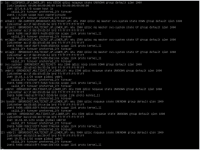
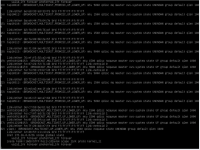
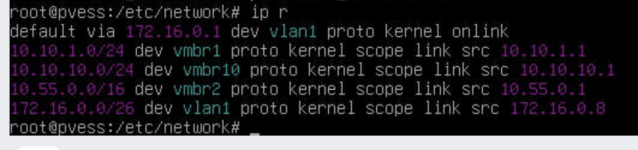
I've just updated Proxmox host, incl. kernel 6.17.4 and after reboot, host lost network access. Strange is that VMs using the same OVS bridge, still have network access. Rebooted host once again to boot using previous kernel and it didn't help. How to troubleshoot/fix it? Access to host is only through oob console...
EDIT:
That's how my config looks like and stopped working after recent libpve-network packages update:
EDIT:
That's how my config looks like and stopped working after recent libpve-network packages update:
Code:
# network interface settings; autogenerated
# Please do NOT modify this file directly, unless you know what
# you're doing.
#
# If you want to manage parts of the network configuration manually,
# please utilize the 'source' or 'source-directory' directives to do
# so.
# PVE will preserve these directives, but will NOT read its network
# configuration from sourced files, so do not attempt to move any of
# the PVE managed interfaces into external files!

auto lo
iface lo inet loopback

auto enlag3
iface enlag3 inet manual
#Lagg1 - PVE

auto enlag4
iface enlag4 inet manual
#Lagg2 - PVE

auto enlan2
iface enlan2 inet manual
#Lagg3 - PVE

auto enbak1
iface enbak1 inet manual
    ovs_type OVSPort
    ovs_bridge vmbr1
#extra

auto vlan1
iface vlan1 inet static
    address 172.16.0.8/24
    gateway 172.16.0.1
    ovs_type OVSIntPort
    ovs_bridge vmbr0
    ovs_options tag=1
#UI

auto bond0
iface bond0 inet manual
    ovs_bonds enlan2 enlag3 enlag4
    ovs_type OVSBond
    ovs_bridge vmbr0
    ovs_options bond_mode=balance-tcp other_config:lb-output-action=true other_config:lacp-time=fast lacp=active
#switch

auto vmbr0
iface vmbr0 inet manual
    ovs_type OVSBridge
    ovs_ports bond0 vlan1
    up ovs-vsctl set Bridge ${IFACE} rstp_enable=true other_config:rstp-priority=8192 other_config:rstp-forward-delay=4 other_config:rstp-max-age=6
    post-up sleep 10
#Trunk

auto vmbr1
iface vmbr1 inet static
    address 10.10.1.1/24
    ovs_type OVSBridge
    ovs_ports enbak1
#extra

auto vmbr10
iface vmbr10 inet static
    address 10.10.10.1/24
    ovs_type OVSBridge
#ZS

auto vmbr2
iface vmbr2 inet static
    address 10.55.0.1/16
    ovs_type OVSBridge
    ovs_mtu 9000
#Storage Net - kernel

source /etc/network/interfaces.d/*
Last edited: