Hello all,
I have a Problem I definetly not understand.
I migrated a Windows 2022 server from VMWare to Proxmox.
Oracle Virtual Box runs fine on it. VMWare Workstation not.
Starting a VM in VM Workstation gives the error
"VMware Workstation and Hyper-V are not compatible. Remove the Hyper-V role from the system before running VMware Workstation."
followed by
"Transport (VMDB) error -14: Pipe connection has been broken."
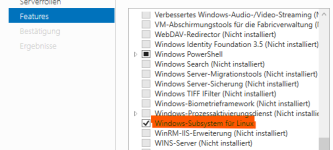
The Hyper-V components are definetly not activated in the VM otherwise Oracle Virtual box would not work.
To be sure cat /sys/module/kvm_amd/parameters/nested gives 1 as result.
The config of the VM looks
agent: 1
bios: ovmf
boot:
cores: 2
cpu: host,hidden=1,flags=+svm
efidisk0: zPool01:vm-131-disk-0,efitype=4m,ms-cert=2023k,pre-enrolled-keys=1,size=1M
machine: q35
memory: 8192
meta: creation-qemu=11.0.3,ctime=1791265786
name: client02-sim
net0: virtio=BC:24:11:B9:F9:F2,bridge=vmbr1,firewall=1
numa: 0
ostype: win11
scsi0: zPool01:vm-131-disk-1,iothread=1,size=50G
scsi1: zPool01:vm-131-disk-2,iothread=1,size=600G
scsihw: virtio-scsi-single
smbios1: uuid=128dcb5c-7daf-4843-a508-3c25d8a42801
sockets: 1
vmgenid: 36e57fc2-77d1-4dbb-bb09-33ed7d7280f1
Any suggestion how to go on and troubleshoot? I am running out of ideas
Thanks
I have a Problem I definetly not understand.
I migrated a Windows 2022 server from VMWare to Proxmox.
Oracle Virtual Box runs fine on it. VMWare Workstation not.
Starting a VM in VM Workstation gives the error
"VMware Workstation and Hyper-V are not compatible. Remove the Hyper-V role from the system before running VMware Workstation."
followed by
"Transport (VMDB) error -14: Pipe connection has been broken."
The Hyper-V components are definetly not activated in the VM otherwise Oracle Virtual box would not work.
To be sure cat /sys/module/kvm_amd/parameters/nested gives 1 as result.
The config of the VM looks
agent: 1
bios: ovmf
boot:
cores: 2
cpu: host,hidden=1,flags=+svm
efidisk0: zPool01:vm-131-disk-0,efitype=4m,ms-cert=2023k,pre-enrolled-keys=1,size=1M
machine: q35
memory: 8192
meta: creation-qemu=11.0.3,ctime=1791265786
name: client02-sim
net0: virtio=BC:24:11:B9:F9:F2,bridge=vmbr1,firewall=1
numa: 0
ostype: win11
scsi0: zPool01:vm-131-disk-1,iothread=1,size=50G
scsi1: zPool01:vm-131-disk-2,iothread=1,size=600G
scsihw: virtio-scsi-single
smbios1: uuid=128dcb5c-7daf-4843-a508-3c25d8a42801
sockets: 1
vmgenid: 36e57fc2-77d1-4dbb-bb09-33ed7d7280f1
Any suggestion how to go on and troubleshoot? I am running out of ideas
Thanks