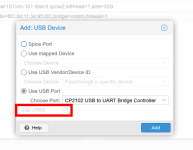
Hello, I have an old system that does just one specific job where I need a one-wire controller. We had this VM working on ESXI with the one-wire controller attached as usb devioce to the machin (not passthrough) and this worked flawlessly. Now I moved this system to PVE and I struggle to get the 1wire controller detected inside the VM.
I added it as USB device as mapped device, via vendor id, and via port, but it never shoewd up. It does not matter whether I do this before or after turning on the VM.
I added the virtio stuff to the centos5 ramdisk, but I am not sure whether this also includes the usb drivers, I am not that familiar with the virtio stuff.
I also tried to pass the entire controller through as PCI device, but then the VM did not boot at all and I also needed to reboot PVE to get the usb controller "back".
(No, we cannot easily upgrade this VM to something newer as the software components used do not exist or have chenged a lot and yes this VM is in a secured VLAN and does nothing which is security relevant).
Any advice what I am missing here?
I added it as USB device as mapped device, via vendor id, and via port, but it never shoewd up. It does not matter whether I do this before or after turning on the VM.
I added the virtio stuff to the centos5 ramdisk, but I am not sure whether this also includes the usb drivers, I am not that familiar with the virtio stuff.
I also tried to pass the entire controller through as PCI device, but then the VM did not boot at all and I also needed to reboot PVE to get the usb controller "back".
(No, we cannot easily upgrade this VM to something newer as the software components used do not exist or have chenged a lot and yes this VM is in a secured VLAN and does nothing which is security relevant).
Any advice what I am missing here?