Multiple VM's migrated themselves, are now stuck on a node with no access to ZFS storage

nightchrono

New Member
Nov 24, 2025
16
2
1
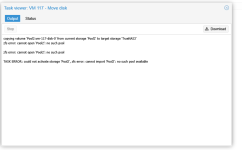
I have a three node cluster, pve, pve2, and pve3-1. I have a local ZFS pool on pve (Pool2). I also have a TrueNAS mount for shared storage between the three of them (TrueNAS3). Somehow overnight, a number of my mission critical VM's migrated from pve to pve2 and pve3-1. I had rebuilt "pve3" into "pve3-1" recently and probably had some stale HA rules that I forgot to clean up. The issue is, all of them had their storage on the local ZFS pool on pve (Pool2). So now when I try to migrate the VM's back, or move the virtual disk from "pool2" to "TrueNAS3" I get failures.
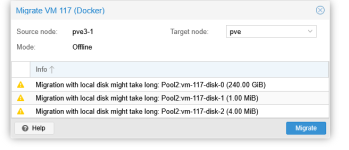
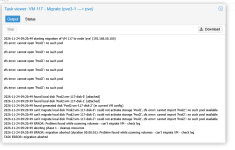
1.png
2.png
3.png

How do I get my VM's back on the "pve" node where they belong?
 
Last edited:
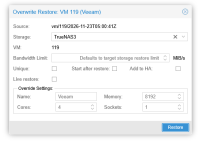
Sorry to double post, I had an idea and wanted a second opinion before I pulled the trigger. One of the affected VM's is my Veeam vm. I take daily snapshots of it using PBS. I think I can restore it using PBS and just pointing the storage destination to "TrueNAS3". If I can get Veeam back, I can use it to restore Docker. I still need to somehow fix my Primary DC that got caught up in this move. I don't want to have to deal with the mismatch of databases between a restored Primary DC and the secondary that has been running this whole time.

4.png
 
I figured out a solution and wanted to share it for anyone who stumbles across this thread in the future.

On one of the nodes a VM was mistakenly migrated to, I opened up it's conf file (/etc/pve/qemu-server/119.conf) with nano in the console, took a backup (copy/pasted into notepad), and commented out the disk lines. Then I was able to migrate back to the PVE node where the disk images are stored on the local ZFS pool. When I edited the conf when it was back on "pve" the formatting of the commented out lines got screwy, but thankfully I had the copy/paste in notepad on my pc. I put back the disk lines and the VM's were able to boot without issue.