Thank you all for the help and the configurations, I have gotten iGPU passthrough and hardware encoding working on my virtualized Debian VM running jellyfin in a docker container! Yes I know, lots of nested virtualization/containerization. Yes, I know that I am crazy


MS-A2 Minisforum (AMD Ryzen™ 9 9955HX + Radeon™ 610M) – The “I Finally Stopped Crying” Zero-Artifact iGPU Passthrough Thread
- Thread starter futiless
- Start date
You are using an out of date browser. It may not display this or other websites correctly.
You should upgrade or use an alternative browser.
You should upgrade or use an alternative browser.
Running docker in a vm is not crazy but best practiceThank you all for the help and the configurations, I have gotten iGPU passthrough and hardware encoding working on my virtualized Debian VM running jellyfin in a docker container! Yes I know, lots of nested virtualization/containerization. Yes, I know that I am crazy
 Running docker in lxcs is more problematic since such setups are more likely to break after updates. Main reason to do this nontheless is if one want to use a iGPU without passthrough to a vm or share with with multiple lxcs and the application is only available as docker container. This is not needed for jellyfin since it's also available as a deb-package but some other applucations like immich. So this is something to consider of you want to switch back to a lxc-based setup for your docker containers.
Last edited:
New to virtualization here haha, so managing the nested nature of this project has been hard.
Reason for doing it with VM instead of LXC: needing access to stable proprietary AMF drivers for AMD VCN hardware encoding on another service (not jellyfin) that's currently provided as a docker image. So far, I have been unsuccessful with LXCs due to the finnicky nature of AMF drivers and their need to have a very specific environment. The isolated kernel of the VM has made that easier, because I really don't want to install bullsh*t AMF drivers + AMDGPU stack on my proxmox host. I am sure that there are ways I could do it more efficiently, always looking to learn!
With this guide I have successfully passed through the iGPU to the Debian VM and am utilizing it concurrently in two separate docker containers on that VM. Seems like magic to me!
Thanks again for everyone's hard work!
Reason for doing it with VM instead of LXC: needing access to stable proprietary AMF drivers for AMD VCN hardware encoding on another service (not jellyfin) that's currently provided as a docker image. So far, I have been unsuccessful with LXCs due to the finnicky nature of AMF drivers and their need to have a very specific environment. The isolated kernel of the VM has made that easier, because I really don't want to install bullsh*t AMF drivers + AMDGPU stack on my proxmox host. I am sure that there are ways I could do it more efficiently, always looking to learn!
With this guide I have successfully passed through the iGPU to the Debian VM and am utilizing it concurrently in two separate docker containers on that VM. Seems like magic to me!
Thanks again for everyone's hard work!
I am sure that there are ways I could do it more efficiently, always looking to learn!
Nothing wrong with passthrough to a VM
As said if you happen to run docker containers this is best practice anyhow. If you want to also use something like Immich (which also profits from a GPU but is only available as docker image) this is absolutely the way to go. But Jellyfin also supports installing on Debian/Ubuntu with a regular package without docker: https://jellyfin.org/docs/general/installation/linuxThis would also work with a Debian LXC. But as said: If you want to run docker workloads which profits from the GPU anyhow, no need to change your setup
I just want to mention it so you know that you have this option if you ever feel that you might want to get back to lxcs. I wouldn't use lxc (if possible) to host docker containers though.With this guide I have successfully passed through the iGPU to the Debian VM and am utilizing it concurrently in two separate docker containers on that VM.
One caveat is that you can't use the Proxmox console via an attached monitor anymore as long as the VM is running. This is usually not a problem (since you will done most of your admin work via ssh or the PVE web ui anyhow) but might be if you ever need to do troubleshooting.
Thanks again for everyone's hard work!
You are welcome, enjoy your new homeserver


Hey guys, trying to passthrough my 9800x3d iGPU to a debian VM but facing some difficulties, any help would be appreciated
I don't see anything on the monitor connected with DP to motherboard
From inside vm using ssh
I don't see anything on the monitor connected with DP to motherboard
Code:
root@pve:~# lspci -nnk | grep -iA 3 "VGA\|Display\|Audio"
03:00.0 VGA compatible controller [0300]: Advanced Micro Devices, Inc. [AMD/ATI] Navi 22 [Radeon RX 6700/6700 XT/6750 XT / 6800M/6850M XT] [1002:73df] (rev c0)
        Subsystem: Micro-Star International Co., Ltd. [MSI] Device [1462:3985]
        Kernel driver in use: amdgpu
        Kernel modules: amdgpu
03:00.1 Audio device [0403]: Advanced Micro Devices, Inc. [AMD/ATI] Navi 21/23 HDMI/DP Audio Controller [1002:ab28]
        Subsystem: Advanced Micro Devices, Inc. [AMD/ATI] Navi 21/23 HDMI/DP Audio Controller [1002:ab28]
        Kernel driver in use: snd_hda_intel
        Kernel modules: snd_hda_intel
04:00.0 Non-Volatile memory controller [0108]: MAXIO Technology (Hangzhou) Ltd. NVMe SSD Controller MAP1602 (DRAM-less) [1e4b:1602] (rev 01)
--
12:00.0 VGA compatible controller [0300]: Advanced Micro Devices, Inc. [AMD/ATI] Granite Ridge [Radeon Graphics] [1002:13c0] (rev cb)
        Subsystem: Gigabyte Technology Co., Ltd Device [1458:d000]
        Kernel driver in use: vfio-pci
        Kernel modules: amdgpu
12:00.1 Audio device [0403]: Advanced Micro Devices, Inc. [AMD/ATI] Radeon High Definition Audio Controller [Rembrandt/Strix] [1002:1640]
        Subsystem: Advanced Micro Devices, Inc. [AMD/ATI] Radeon High Definition Audio Controller [Rembrandt/Strix] [1002:1640]
        Kernel driver in use: vfio-pci
        Kernel modules: snd_hda_intel
12:00.2 Encryption controller [1080]: Advanced Micro Devices, Inc. [AMD] Family 19h PSP/CCP [1022:1649]
--
12:00.6 Audio device [0403]: Advanced Micro Devices, Inc. [AMD] Family 17h/19h/1ah HD Audio Controller [1022:15e3]
        DeviceName: Realtek ALC1220
        Subsystem: Gigabyte Technology Co., Ltd Device [1458:a194]
        Kernel driver in use: snd_hda_intel
root@pve:~# cat /etc/modules
# /etc/modules is obsolete and has been replaced by /etc/modules-load.d/.
# Please see modules-load.d(5) and modprobe.d(5) for details.
#
# Updating this file still works, but it is undocumented and unsupported.
vfio
vfio_iommu_type1
vfio_pci

root@pve:~# cat /etc/modprobe.d/vfio.conf
options vfio-pci ids=1002:13c0,1002:1640 disable_vga=1
softdep amdgpu pre: vfio-pci
softdep snd_hda_intel pre: vfio-pci
root@pve:~# cat /etc/default/grub | grep -i LINUX_DEFAULT
GRUB_CMDLINE_LINUX_DEFAULT="quiet iommu=pt"
Code:
root@pve:~# cat /etc/kernel/cmdline
cat: /etc/kernel/cmdline: No such file or directory
root@pve:~# cat /etc/pve/qemu-server/100.conf
acpi: 1
agent: 1,type=virtio
bios: ovmf
boot: order=virtio0;ide2;net0
cores: 2
cpu: host
hookscript: local:snippets/ryzen_igpu_reset.sh
hostpci0: 0000:12:00.0,pcie=1,romfile=vbios_9800x3d.bin,x-vga=1
hostpci1: 0000:12:00.1,pcie=1,romfile=AMDGopDriver_9800x3d.rom
ide2: local:iso/debian-13.3.0-amd64-netinst.iso,media=cdrom,size=754M
machine: q35
memory: 2048
meta: creation-qemu=10.1.2,ctime=1771671221
name: Airplay
net0: virtio=BC:24:11:BE:ED:D7,bridge=vmbr0,firewall=1
numa: 0
ostype: l26
scsihw: virtio-scsi-pci
serial0: socket
smbios1: uuid=b47722d0-8bbe-472f-8740-f58b34891776
sockets: 1
vga: none
virtio0: local-lvm:vm-100-disk-0,iothread=1,size=12G
vmgenid: eb904b64-1d66-417f-b4a5-5133cc04fb2d
Code:
root@pve:~# cat /var/lib/vz/snippets/ryzen_igpu_reset.sh
#!/bin/bash

GPU_PCI="0000:12:00.0"
AUDIO_PCI="0000:12:00.1"

log() {
    echo "$(date '+%Y-%m-%d %H:%M:%S') - $*" >> /var/log/hook_igpu.log
}

phase="$2"
vmid="$1"

log "Hook called for VM $vmid - phase: $phase"

case "$phase" in
    "pre-start")
        log "Preparing iGPU for VM start..."

        if [ -d "/sys/bus/pci/drivers/amdgpu" ] && \
           grep -q "$GPU_PCI" /sys/bus/pci/drivers/amdgpu/bind 2>/dev/null; then
            log "Unbinding GPU from amdgpu..."
            echo "$GPU_PCI" > /sys/bus/pci/drivers/amdgpu/unbind || true
        fi

        if [ -d "/sys/bus/pci/drivers/snd_hda_intel" ] && \
           grep -q "$AUDIO_PCI" /sys/bus/pci/drivers/snd_hda_intel/bind 2>/dev/null; then
            log "Unbinding Audio from snd_hda_intel..."
            echo "$AUDIO_PCI" > /sys/bus/pci/drivers/snd_hda_intel/unbind || true
        fi

        sleep 2

        log "pre-start completed"
        ;;

    "post-stop")
        log "Restoring iGPU after VM shutdown..."

        echo "$GPU_PCI" > /sys/bus/pci/drivers/vfio-pci/unbind 2>/dev/null || true
        echo "$AUDIO_PCI" > /sys/bus/pci/drivers/vfio-pci/unbind 2>/dev/null || true

        sleep 2

        echo "$GPU_PCI" > /sys/bus/pci/drivers/amdgpu/bind 2>/dev/null || true
        echo "$AUDIO_PCI" > /sys/bus/pci/drivers/snd_hda_intel/bind 2>/dev/null || true

        echo 1 > "/sys/bus/pci/devices/$GPU_PCI/reset" 2>/dev/null || true

        log "post-stop completed – host GPU should be usable again"
        ;;

    *)
        log "Unhandled phase: $phase"
        ;;
esac

exit 0
From inside vm using ssh
Code:
akshay@node-1w7jr9qtefrwm4cbzckxfcwtj:~$ lspci -nnk
00:00.0 Host bridge [0600]: Intel Corporation 82G33/G31/P35/P31 Express DRAM Controller [8086:29c0]
    Subsystem: Red Hat, Inc. QEMU Virtual Machine [1af4:1100]
00:1a.0 USB controller [0c03]: Intel Corporation 82801I (ICH9 Family) USB UHCI Controller #4 [8086:2937] (rev 03)
    Subsystem: Red Hat, Inc. QEMU Virtual Machine [1af4:1100]
    Kernel driver in use: uhci_hcd
    Kernel modules: uhci_hcd
00:1a.1 USB controller [0c03]: Intel Corporation 82801I (ICH9 Family) USB UHCI Controller #5 [8086:2938] (rev 03)
    Subsystem: Red Hat, Inc. QEMU Virtual Machine [1af4:1100]
    Kernel driver in use: uhci_hcd
    Kernel modules: uhci_hcd
00:1a.2 USB controller [0c03]: Intel Corporation 82801I (ICH9 Family) USB UHCI Controller #6 [8086:2939] (rev 03)
    Subsystem: Red Hat, Inc. QEMU Virtual Machine [1af4:1100]
    Kernel driver in use: uhci_hcd
    Kernel modules: uhci_hcd
00:1a.7 USB controller [0c03]: Intel Corporation 82801I (ICH9 Family) USB2 EHCI Controller #2 [8086:293c] (rev 03)
    Subsystem: Red Hat, Inc. QEMU Virtual Machine [1af4:1100]
    Kernel driver in use: ehci-pci
    Kernel modules: ehci_pci
00:1b.0 Audio device [0403]: Intel Corporation 82801I (ICH9 Family) HD Audio Controller [8086:293e] (rev 03)
    Subsystem: Red Hat, Inc. QEMU Virtual Machine [1af4:1100]
    Kernel driver in use: snd_hda_intel
    Kernel modules: snd_hda_intel
00:1c.0 PCI bridge [0604]: Red Hat, Inc. QEMU PCIe Root port [1b36:000c]
    Subsystem: Red Hat, Inc. Device [1b36:0000]
    Kernel driver in use: pcieport
00:1c.1 PCI bridge [0604]: Red Hat, Inc. QEMU PCIe Root port [1b36:000c]
    Subsystem: Red Hat, Inc. Device [1b36:0000]
    Kernel driver in use: pcieport
00:1c.2 PCI bridge [0604]: Red Hat, Inc. QEMU PCIe Root port [1b36:000c]
    Subsystem: Red Hat, Inc. Device [1b36:0000]
    Kernel driver in use: pcieport
00:1c.3 PCI bridge [0604]: Red Hat, Inc. QEMU PCIe Root port [1b36:000c]
    Subsystem: Red Hat, Inc. Device [1b36:0000]
    Kernel driver in use: pcieport
00:1d.0 USB controller [0c03]: Intel Corporation 82801I (ICH9 Family) USB UHCI Controller #1 [8086:2934] (rev 03)
    Subsystem: Red Hat, Inc. QEMU Virtual Machine [1af4:1100]
    Kernel driver in use: uhci_hcd
    Kernel modules: uhci_hcd
00:1d.1 USB controller [0c03]: Intel Corporation 82801I (ICH9 Family) USB UHCI Controller #2 [8086:2935] (rev 03)
    Subsystem: Red Hat, Inc. QEMU Virtual Machine [1af4:1100]
    Kernel driver in use: uhci_hcd
    Kernel modules: uhci_hcd
00:1d.2 USB controller [0c03]: Intel Corporation 82801I (ICH9 Family) USB UHCI Controller #3 [8086:2936] (rev 03)
    Subsystem: Red Hat, Inc. QEMU Virtual Machine [1af4:1100]
    Kernel driver in use: uhci_hcd
    Kernel modules: uhci_hcd
00:1d.7 USB controller [0c03]: Intel Corporation 82801I (ICH9 Family) USB2 EHCI Controller #1 [8086:293a] (rev 03)
    Subsystem: Red Hat, Inc. QEMU Virtual Machine [1af4:1100]
    Kernel driver in use: ehci-pci
    Kernel modules: ehci_pci
00:1e.0 PCI bridge [0604]: Intel Corporation 82801 PCI Bridge [8086:244e] (rev 92)
00:1f.0 ISA bridge [0601]: Intel Corporation 82801IB (ICH9) LPC Interface Controller [8086:2918] (rev 02)
    Subsystem: Red Hat, Inc. QEMU Virtual Machine [1af4:1100]
    Kernel driver in use: lpc_ich
    Kernel modules: lpc_ich
00:1f.2 SATA controller [0106]: Intel Corporation 82801IR/IO/IH (ICH9R/DO/DH) 6 port SATA Controller [AHCI mode] [8086:2922] (rev 02)
    Subsystem: Red Hat, Inc. QEMU Virtual Machine [1af4:1100]
    Kernel driver in use: ahci
    Kernel modules: ahci
00:1f.3 SMBus [0c05]: Intel Corporation 82801I (ICH9 Family) SMBus Controller [8086:2930] (rev 02)
    Subsystem: Red Hat, Inc. QEMU Virtual Machine [1af4:1100]
    Kernel driver in use: i801_smbus
    Kernel modules: i2c_i801
01:00.0 VGA compatible controller [0300]: Advanced Micro Devices, Inc. [AMD/ATI] Granite Ridge [Radeon Graphics] [1002:13c0] (rev cb)
    Subsystem: Gigabyte Technology Co., Ltd Device [1458:d000]
    Kernel driver in use: amdgpu
    Kernel modules: amdgpu
02:00.0 Audio device [0403]: Advanced Micro Devices, Inc. [AMD/ATI] Radeon High Definition Audio Controller [Rembrandt/Strix] [1002:1640]
    Subsystem: Advanced Micro Devices, Inc. [AMD/ATI] Radeon High Definition Audio Controller [Rembrandt/Strix] [1002:1640]
    Kernel driver in use: snd_hda_intel
    Kernel modules: snd_hda_intel
05:01.0 PCI bridge [0604]: Red Hat, Inc. QEMU PCI-PCI bridge [1b36:0001]
05:02.0 PCI bridge [0604]: Red Hat, Inc. QEMU PCI-PCI bridge [1b36:0001]
05:03.0 PCI bridge [0604]: Red Hat, Inc. QEMU PCI-PCI bridge [1b36:0001]
05:04.0 PCI bridge [0604]: Red Hat, Inc. QEMU PCI-PCI bridge [1b36:0001]
06:03.0 Unclassified device [00ff]: Red Hat, Inc. Virtio memory balloon [1af4:1002]
    Subsystem: Red Hat, Inc. Device [1af4:0005]
    Kernel driver in use: virtio-pci
06:08.0 Communication controller [0780]: Red Hat, Inc. Virtio console [1af4:1003]
    Subsystem: Red Hat, Inc. Device [1af4:0003]
    Kernel driver in use: virtio-pci
06:0a.0 SCSI storage controller [0100]: Red Hat, Inc. Virtio block device [1af4:1001]
    Subsystem: Red Hat, Inc. Device [1af4:0002]
    Kernel driver in use: virtio-pci
06:12.0 Ethernet controller [0200]: Red Hat, Inc. Virtio network device [1af4:1000]
    Subsystem: Red Hat, Inc. Device [1af4:0001]
    Kernel driver in use: virtio-pci
Last edited:
@futiless @uzumo Hello, I've get mental with the MS-A2 igpu passthrough to windows in these few weeks. I'm quite new to proxmox but I'm starting to understand how it works. That being said I might need some help still for the shutdown/rebooting part. I've been able to generate a script in order to make the passthrough almost automatic to the VM. The script download the files needed and modify grup and the vfio group, generate a folder in the main root of proxmox with the windows .bat scripts to be loaded into windows. What I can't understand still is how to make the proxmox host to detach the igpu to make it possible shutdown and restart in windows honestly. At the moment being this is my needs: 3 VM in proxmox, one of which should be a windows to be a touchscreen orchestrator of the other 2 linux machine via a custom touchscreen plugin for chrome. I've been able with this script to support "reboot" in windows without artifcats, but , when I do shutdown from windows or from proxmox to the windows machine, the machine restart with the famous error 43. In short , the script make the igpu passthrough and create the 2 windows .bat files which than I move into startup/shutdown menu with gpedit.msc . Can you please explain in detail how to achieve the shutdown stage properly with easy guidelines ? My goal is to create a full integrated script which make this easy to be achived, especially because I've to reproduce the workflow on many MS-A2 Machine for this project I have, any support is much appreciated. I'm attaching my script here, you can just skip the part of the touchscreen addition by simply select "n" in the installing, I've also created a "clear all" part to delete whatever had been done by the script, it use a backup the script create of the vm selected for the passthrough and modify all the files accordingly to revert any change.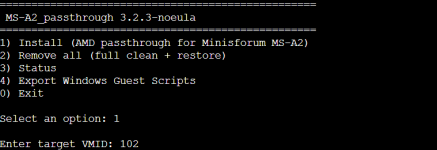

Attachments
Last edited:
@futiless I think I've replied myself , I've deeply red the guidance here: https://github.com/isc30/ryzen-gpu-passthrough-proxmox/issues/131#issue-3266798285 . I've been able to make a new script, it should work with 9955hx and 610M . Basically it's needed to copy the files in windows for the startup/shutdown in
C:\Windows\System32\GroupPolicy\Machine\Scripts\ and then gpedit.msc to address the two files needed. The script had the install/remove menu still. So basically you have to chmod +x MS-A2_igpu.sh on the Proxmox host. Running this ( ./MS-A2_igpu.sh ) you just have to select the VM ID you want to passthrough the igpu to, there will be a part asking for the video usbtouchscreen passthrough, you can of course skip that, it's just something for my project so nevermind. To me this script work very great , I've tried to restart/reboot and shutdown both host side and windows side and it works pretty good. The remove all feature helps also if something isn't working. Of course is fully based for just the MS-A2, I'm not a developer, dunno about you, but if you want/can modify this in order to make it work for all the other users I think it will be great ! thank you for this guide, it saved me so much time!
C:\Windows\System32\GroupPolicy\Machine\Scripts\ and then gpedit.msc to address the two files needed. The script had the install/remove menu still. So basically you have to chmod +x MS-A2_igpu.sh on the Proxmox host. Running this ( ./MS-A2_igpu.sh ) you just have to select the VM ID you want to passthrough the igpu to, there will be a part asking for the video usbtouchscreen passthrough, you can of course skip that, it's just something for my project so nevermind. To me this script work very great , I've tried to restart/reboot and shutdown both host side and windows side and it works pretty good. The remove all feature helps also if something isn't working. Of course is fully based for just the MS-A2, I'm not a developer, dunno about you, but if you want/can modify this in order to make it work for all the other users I think it will be great ! thank you for this guide, it saved me so much time!
Attachments
Last edited:
This script is brilliant. Have you put more time in it that you wouldn't mind sharing.. Please friend don't keep that private ! Consdier making a new thread with a full guide I think you will get a good reaction froim the entire Proxmox community.@futiless I think I've replied myself , I've deeply red the guidance here: https://github.com/isc30/ryzen-gpu-passthrough-proxmox/issues/131#issue-3266798285 . I've been able to make a new script, it should work with 9955hx and 610M . Basically it's needed to copy the files in windows for the startup/shutdown in
C:\Windows\System32\GroupPolicy\Machine\Scripts\ and then gpedit.msc to address the two files needed. The script had the install/remove menu still. So basically you have to chmod +x MS-A2_igpu.sh on the Proxmox host. Running this ( ./MS-A2_igpu.sh ) you just have to select the VM ID you want to passthrough the igpu to, there will be a part asking for the video usbtouchscreen passthrough, you can of course skip that, it's just something for my project so nevermind. To me this script work very great , I've tried to restart/reboot and shutdown both host side and windows side and it works pretty good. The remove all feature helps also if something isn't working. Of course is fully based for just the MS-A2, I'm not a developer, dunno about you, but if you want/can modify this in order to make it work for all the other users I think it will be great ! thank you for this guide, it saved me so much time!
Sorry I have been focused on other proijects in my spare time and never did get around to reading this. We really need the cleanest script possible that can be executed from command line or popup menu for switching between VM mode and passthrough mode. With a command line open we could offer essentially to different {roxmox IDs one which loads passthrough mode via command line scripting and the other which goes into passthrough mode with the same volumes but different command line scripting to prepare virtIO or stand VGA etc for remote desktop like Proxmox was primarily intended.. As both have a distinct purpose but need the same vm and not a copy for various reasons.
Whilst still juggling all the passthrough jungle and avoiding whatever it is that causes devices to need manual start exactly..
Although it would seem to me YOU are the closest anyone has come to this.!!!!!!!!!!!!!!!!
Last edited: