Most data storage with 64gb non-ecc and no HA

NetTech86

New Member
Mar 22, 2026
6
0
1
New build with ASUS Z890 motherboard, Intel 265K, 64GB non-ecc ram and 9400-16 HBA.

Was hoping to get 60-80 TB (usable not raw) storage with this setup but all the ZFS talk recommends against it in other forums.
Backups will be JBOD offsite.

Need suggestions please?
 
The failure case would be to allow two hard drive failures without data loss. I was going to purchase six 20 TB drives in raid Z2 but I'm very concerned that I won't have enough memory or type of memory to have a stable system.

To be clear, the intention of this system is to be a more robust version of and off the shelf NAS. The primary reason I went with proxmox is because the ease of snapshots backups etc versus your classic Ubuntu server install.
 
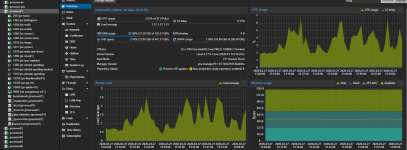
I have like 30TB, no problem, using about 32GB ARC Cache, several containers and a beefy windows VM - though with ECC would have been better .... :

You need to take care about block sizes, if you have a lot of small files ...

1774616666417.png1774616712693.png
 
Last edited:
I have like 30TB, no problem, using about 32GB ARC Cache, several containers and a beefy windows VM - though with ECC would have been better .... :
View attachment 96770View attachment 96771
Too late for me to go down the ECC road. I would have to start from scratch because my motherboard doesn't support it and I've already got 700 invested in my ram already.

I may have to ditch ZFS all together and just do something like btrfs but I can't seem to get a straight answer if 60 terabytes usable will be stable with 64 GB of memory.
 
I may have to ditch ZFS all together
ECC is no special requirement for ZFS. Every filesystem benefits from having it.

but I can't seem to get a straight answer if 60 terabytes usable will be stable with 64 GB of memory.
How do those two numbers relate? If your question would be about speed, we can answer that, but stability?

EDIT: typos and grammar
 
  • Like
Reactions: Johannes S and UdoB
I dont see any reason why it should be not stable - there are many knobs to turn to adjust ZFS ARC Cache to Your needs - as long as memory is stable, not a problem. I would always prefer ZFS over BTRFS but thats my personal opinion.
 
The relation between 60 TB usable and 64 GB of RAM comes from countless other posts that I've read that suggests 1 GB of RAM per raw storage terabyte without the detailed facts supporting it.

75% of all my data is write once, then read by many so I don't think I have to be too concerned about corrupt data, at least I hope not. I'm going to set up some maintenance jobs for my ZFS health so I get an email as soon as any error comes in.
 
Six 20 TB drives in RAIDZ2 gets you roughly 74 TB usable with solid redundancy, survives two drive failures, and 6-wide is the sweet spot for that RAID level. Not too wide that a rebuild takes forever, not so narrow you're throwing away half your capacity.

64 GB RAM is fine. Forget the old "1 GB per TB" rule, that's cargo-cult math from the Solaris era. For a NAS or bulk storage box you won't come close to needing more, just cap the ARC around 50 GB so the OS has breathing room.

On block size: leave it at the 128K default unless you're running a database on it. If you are, match ZFS recordsize to the DB page size (8K for Postgres, 16K for InnoDB), otherwise every tiny random write drags a massive block along for the ride. For video or backup storage, crank it up to 1M and let compression do its thing with zstd.

Skip deduplication entirely. It sounds appealing but it'll eat your RAM alive and slow everything down. Compression gives you most of the space savings with none of the pain.

Biggest gotcha with 20 TB drives: when one dies, the resilver (rebuild) can run 24–36 hours. RAIDZ2 gives you a second parity drive as insurance during that window - which at this drive size isn't optional, it's the whole point.

 
Last edited:
  • Like
Reactions: UdoB
Six 20 TB drives in RAIDZ2 gets you roughly 74 TB usable with solid redundancy, survives two drive failures, and 6-wide is the sweet spot for that RAID level. Not too wide that a rebuild takes forever, not so narrow you're throwing away half your capacity.

64 GB RAM is fine. Forget the old "1 GB per TB" rule, that's cargo-cult math from the Solaris era. For a NAS or bulk storage box you won't come close to needing more, just cap the ARC around 50 GB so the OS has breathing room.

On block size: leave it at the 128K default unless you're running a database on it. If you are, match ZFS recordsize to the DB page size (8K for Postgres, 16K for InnoDB), otherwise every tiny random write drags a massive block along for the ride. For video or backup storage, crank it up to 1M and let compression do its thing with zstd.

Skip deduplication entirely. It sounds appealing but it'll eat your RAM alive and slow everything down. Compression gives you most of the space savings with none of the pain.

Biggest gotcha with 20 TB drives: when one dies, the resilver (rebuild) can run 24–36 hours. RAIDZ2 gives you a second parity drive as insurance during that window - which at this drive size isn't optional, it's the whole point.

Excellent info! Thank you!
 
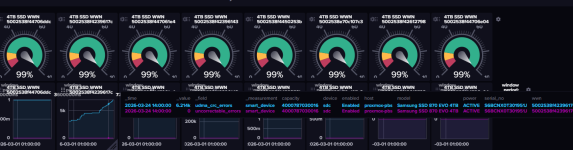
one note - a major painpoint for me where the SFF-8654 cables which are usually used on the Broadcom 9600-16i HBA´s - almost all cables I have, on at least one channel I have high UDMA errors - up to a point where ZFS marks the disk as defect. This is a big problem because You will have to find a cable where all 8 channels are good if You use all 8 channels per cable. Keep an eye on UDMA Error count, especially under load. See my influxdb udma-crc-errors rising steadily under load ....

1774637624575.png