Migration & Backup issues with NFS Dell unity storage

Nov 26, 2025
2
0
1
Hello everyone,

We have a Dell Unity storage system that exports an NFS 4.2 volume to our Proxmox 8.4.1 cluster.
The VMs with their disk images on it run normally without any issues.

The problems are :
- When the Proxmox backup job is triggered, the disk images read by the hypervisors only contain zeros.
- When the disk image is moved out of the Dell Unity storage, the destination disk is also full of zeros and the VM ceases to function.

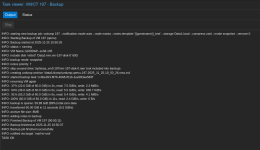
On the joined picture, you can see the backup size before we moved to the unity storage and after.

The strange thing is that accessing the disk image from any Hypervisor Shell works correctly.
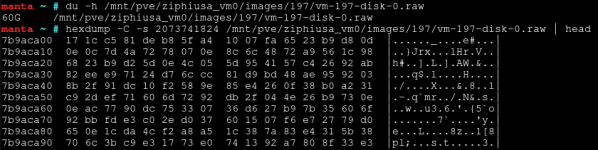
- "du -h" shows the correct size
- "hexdump" at a random place shows the data
- "cp" of the disk image to another location (out of the Dell Unity storage) copies the expected data

Also, it seems that some VMs are not affected.

What could cause 'vzdump' and the disk move to fail like that?
Do these commands or features access the storage differently?

Thank you in advance for your help.
 

Attachments

  • Capture d’écran du 2025-11-26 11-44-35.png
    Capture d’écran du 2025-11-26 11-44-35.png
    82.8 KB · Views: 9
  • Capture d’écran du 2025-11-26 12-01-42.png
    Capture d’écran du 2025-11-26 12-01-42.png
    50.2 KB · Views: 9
  • Capture d’écran du 2025-11-26 12-04-31.png
    Capture d’écran du 2025-11-26 12-04-31.png
    43.4 KB · Views: 9
How is the NFS 4.2 volume mounted ? The NFS share mount could be tested with something like mount -o vers=4.2,nosharecache,noac . This has to do with QEMU block-level operation expecting sparse file handling and hole punching. Commands like vzdump and qimg-convert don't act like the file copy commands, that's why you see such difference.

You can check NFS 4.2 docs about the mount options, I lack the time to elaborate here.

Make sure your Unity storage software (UnityOS) is up to date too - NFS 4.2 is supported since v5.5 - you can see some useful info here.


Fabián Rodríguez | Le Goût du Libre Inc. | Montreal, Canada | Mastodon
Proxmox Silver Partner, server and desktop enterprise support in French, English and Spanish
 
Last edited:
Thanks @MagicFab, changing the mount options seems to improve the situation.
However it does not explain, for me, while some VM with the old mount option have no issue. So I am somehow still on the fence before declaring the issue solved. Could this be related to the fact that we use on the Unity deduplication and compression? This is a cluster, would it make sense to investigate iSCSI instead of NFS? Thanks for the advice.
 
Hi @criva , can you clarify what has changed? You mentioned that "situation has improved" - does it mean the backup is no longer reading zeroes?
I'd be surprised if NAS dedup/compression is playing a role in serving client hosts zeroes instead of valid data. That would be a critical issue in NAS functionality and best addressed with NAS vendor.

Have you resolved the question brought up in comment #3? Was it just an incorrect screenshot?


Blockbridge : Ultra low latency all-NVME shared storage for Proxmox - https://www.blockbridge.com/proxmox
 
Hi @criva , can you clarify what has changed? You mentioned that "situation has improved" - does it mean the backup is no longer reading zeroes?
I'd be surprised if NAS dedup/compression is playing a role in serving client hosts zeroes instead of valid data. That would be a critical issue in NAS functionality and best addressed with NAS vendor.

Have you resolved the question brought up in comment #3? Was it just an incorrect screenshot?


Blockbridge : Ultra low latency all-NVME shared storage for Proxmox - https://www.blockbridge.com/proxmox
The situation is improved means that my colleague has placed a VM disk on another nfs share with the different mount options and vzdump seems to work correctly and consistently. However as this is a single example and we also have examples working properly with the current mount options, we still cannot decide if this really solve the issue.

I understand that Unity and Proxmox treat blocks differently and indeed the specific disk seems to be sparse (the screenshot is correct) , but I guess my colleague @sorsi can answer on this better
 
@criva hi, it's still not clear if your Unity software has been updated. I lack the time to explore this further, but what you describe is consistent with Unity NFS implementation having some bug that may be addressed in the lasted version as I mentioned before. At this point it's not a Proxmox VE issue, but upgrading Proxmox to the latest version or testing this on server with the latest version would also help ruling out using Proxmox 8.4.x.


Fabián Rodríguez | Le Goût du Libre Inc. | Montreal, Canada | Mastodon
Proxmox Silver Partner, server and desktop enterprise support in French, English and Spanish
 
Hi everyone,

Many thanks for your help.

Let me add a few precision to our setup :
- The unity software is at the lastest version available for it (5.5.1.0.5.025).
- We are using two NFS 4.2 shares, shared to the entire cluster.
- We use RAW format for the disk files.
- We use basic data reduction (meaning compression & basic deduplication in Unity)
- We use the snapshot function of unity (my tests show no changes in the behavior when not used)

@MagicFab
As you pointed the mount options, my plan was to modify them.
I disabled, deleted the snapshots and I did change the options on one of our NFS share as follows :
Code:
options noac,actimeo=0,rsize=65536,wsize=65536
Unfortunately, same problem:
Two VMs are on that NFS share, the first backups well not the other...