Migrate Physical Server as a Proxmox VM

PratishG

New Member
Dec 26, 2024
5
0
1
Hi we are trying to migrate a Physical Windows 2019 Server into Proxmox VE as a VM.

So far I've done the following, in order
  1. Ran Disk2VHD on the Physical Windows Server to create a VHDX File of the Boot drive
  2. Ran Qemu-img to convert from VHDX File to a qcom2 file
  3. Imported the qcom2 file into our proxmox server
  4. Created a new VM with UEFI Boot (matched Bios Boot as the current Physical Server)
  5. Once the server was imported, see it as unattached drive, edited it and set it as SATA1 and made it the first boot option.
However the VM doesn't boot into windows, it says no Bootable Option or Device was found
 
What about boot server with a usb live-linux and dd the win disk pipe ssh to pve .raw file ?
 
What about boot server with a usb live-linux and dd the win disk pipe ssh to pve .raw file ?
I'll be honest, I'm not sure what that means or how to do that.
Do you have a link to a guide or something I can follow to do what you suggested and try that?

Appreciate the reply
 
Download any linux live distro and save on usb stick.
Have enough filesystem space in your pve to save your win-disk on.
Shutdown your win server and boot from your usb stick.
Look inside linux which is your win disk (eg with "fdisk -l" which is probably sdb.
Be sure you can reach your pve host by ping ip-of-pve successfull.
dd if=/dev/sdb bs=1024k | ssh ip-of-pve cat - >/path_with_space/win-srv.raw
 
  • Like
Reactions: Kingneutron
Did you create an EFI disk in the VM?

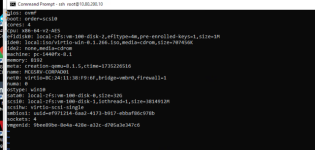
Maybe you post your <VMID>.conf file so you can get help.
 
Download any linux live distro and save on usb stick.
Have enough filesystem space in your pve to save your win-disk on.
Shutdown your win server and boot from your usb stick.
Look inside linux which is your win disk (eg with "fdisk -l" which is probably sdb.
Be sure you can reach your pve host by ping ip-of-pve successfull.
dd if=/dev/sdb bs=1024k | ssh ip-of-pve cat - >/path_with_space/win-srv.raw
I'll have to try this the next time I'm physically on location, than you