Memtest as default eEFInd option

MichalCirrus

Active Member
Dec 3, 2019
6
2
43
49
Server with:
pve-manager/9.2.3/d0fde103346cf89a (running kernel: 7.0.6-2-pve)
when booted goes into memtest.

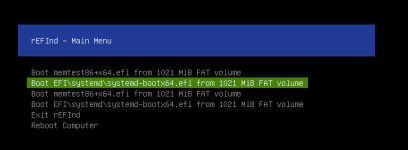
Main menu looks like this:


How to remove memtest from this menu or move memtest under systemd-bootx64?
 

Attachments

  • OVH-rEFInd-memtest-error.png
    OVH-rEFInd-memtest-error.png
    38.4 KB · Views: 12
Last edited:
it seems there was supposed to be an image there, but it's not. usually pve is booted with grub, so how did you install pve on that machine?
 
I saw this on a system hosted at OVH (in case that's your host-location as well) - solution there was to - make the system boot from the harddisk (not from the NIC).

else systemd-boot and grub in pve are configured to prefer the kernel - if you have a rEFInd in between - you need to adopt its configuration to put the memtest entry below that.


`efibootmgr -v` output would help to maybe analyze this further.

I hope this helps!
 
This sever is in OVH (Advance)
How to make system boot from harddisk? In BIOS or in OVH manager?

Code:
# efibootmgr -v
BootCurrent: 0002
Timeout: 1 seconds
BootOrder: 0002,0003,0007,0000,0008,0009,0001
Boot0000* Linux Boot Manager    HD(2,GPT,72f25387-3f68-4339-9d6a-2a7579b51452,0x800,0x200000)/File(\EFI\systemd\systemd-bootx64.efi)
      dp: 04 01 2a 00 02 00 00 00 00 08 00 00 00 00 00 00 00 00 20 00 00 00 00 00 87 53 f2 72 68 3f 39 43 9d 6a 2a 75 79 b5 14 52 02 02 / 04 04 46 00 5c 00 45 00 46 00 49 00 5c 00 73 00 79 00 73 00 74 00 65 00 6d 00 64 00 5c 00 73 00 79 00 73 00 74 00 65 00 6d 00 64 00 2d 00 62 00 6f 00 6f 00 74 00 78 00 36 00 34 00 2e 00 65 00 66 00 69 00 00 00 / 7f ff 04 00
Boot0001* UEFI: Built-in EFI Shell      VenMedia(5023b95c-db26-429b-a648-bd47664c8012)0000424f
      dp: 04 03 14 00 5c b9 23 50 26 db 9b 42 a6 48 bd 47 66 4c 80 12 / 7f ff 04 00
    data: 00 00 42 4f
Boot0002* UEFI: PXE IPv4 Broadcom Network Device - 9C:6B:00:66:F5:90    PciRoot(0x0)/Pci(0x1,0x2)/Pci(0x0,0x0)/MAC(9c6b0066f590,1)/IPv4(0.0.0.00.0.0.0,0,0)0000424f
      dp: 02 01 0c 00 d0 41 03 0a 00 00 00 00 / 01 01 06 00 02 01 / 01 01 06 00 00 00 / 03 0b 25 00 9c 6b 00 66 f5 90 00 00 00 00 00 00 00 00 00 00 00 00 00 00 00 00 00 00 00 00 00 00 00 00 00 00 01 / 03 0c 1b 00 00 00 00 00 00 00 00 00 00 00 00 00 00 00 00 00 00 00 00 00 00 00 00 / 7f ff 04 00
    data: 00 00 42 4f
Boot0003* UEFI: PXE IPv4 Broadcom Network Device - 9C:6B:00:67:03:1B    PciRoot(0x0)/Pci(0x1,0x2)/Pci(0x0,0x1)/MAC(9c6b0067031b,1)/IPv4(0.0.0.00.0.0.0,0,0)0000424f
      dp: 02 01 0c 00 d0 41 03 0a 00 00 00 00 / 01 01 06 00 02 01 / 01 01 06 00 01 00 / 03 0b 25 00 9c 6b 00 67 03 1b 00 00 00 00 00 00 00 00 00 00 00 00 00 00 00 00 00 00 00 00 00 00 00 00 00 00 01 / 03 0c 1b 00 00 00 00 00 00 00 00 00 00 00 00 00 00 00 00 00 00 00 00 00 00 00 00 / 7f ff 04 00
    data: 00 00 42 4f
Boot0007* Linux Boot Manager    HD(2,GPT,e5106543-6dba-4b06-9238-b39c42234b3a,0x800,0x200000)/File(\EFI\systemd\systemd-bootx64.efi)
      dp: 04 01 2a 00 02 00 00 00 00 08 00 00 00 00 00 00 00 00 20 00 00 00 00 00 43 65 10 e5 ba 6d 06 4b 92 38 b3 9c 42 23 4b 3a 02 02 / 04 04 46 00 5c 00 45 00 46 00 49 00 5c 00 73 00 79 00 73 00 74 00 65 00 6d 00 64 00 5c 00 73 00 79 00 73 00 74 00 65 00 6d 00 64 00 2d 00 62 00 6f 00 6f 00 74 00 78 00 36 00 34 00 2e 00 65 00 66 00 69 00 00 00 / 7f ff 04 00
Boot0008* UEFI OS       HD(2,GPT,72f25387-3f68-4339-9d6a-2a7579b51452,0x800,0x200000)/File(\EFI\BOOT\BOOTX64.EFI)0000424f
      dp: 04 01 2a 00 02 00 00 00 00 08 00 00 00 00 00 00 00 00 20 00 00 00 00 00 87 53 f2 72 68 3f 39 43 9d 6a 2a 75 79 b5 14 52 02 02 / 04 04 30 00 5c 00 45 00 46 00 49 00 5c 00 42 00 4f 00 4f 00 54 00 5c 00 42 00 4f 00 4f 00 54 00 58 00 36 00 34 00 2e 00 45 00 46 00 49 00 00 00 / 7f ff 04 00
    data: 00 00 42 4f
Boot0009* UEFI OS       HD(2,GPT,e5106543-6dba-4b06-9238-b39c42234b3a,0x800,0x200000)/File(\EFI\BOOT\BOOTX64.EFI)0000424f
      dp: 04 01 2a 00 02 00 00 00 00 08 00 00 00 00 00 00 00 00 20 00 00 00 00 00 43 65 10 e5 ba 6d 06 4b 92 38 b3 9c 42 23 4b 3a 02 02 / 04 04 30 00 5c 00 45 00 46 00 49 00 5c 00 42 00 4f 00 4f 00 54 00 5c 00 42 00 4f 00 4f 00 54 00 58 00 36 00 34 00 2e 00 45 00 46 00 49 00 00 00 / 7f ff 04 00
    data: 00 00 42 4f
 
I had to remove memtest86+ package and run script to remove memtest from ESP
Code:
/EFI/memtest86+x64.efi
/loader/entries/memtest86+x64.efi.conf
/memtest86+x64.efi

BIOS manipulations break OVH Boot modes and not recommneded by OVH
 
  • Like
Reactions: sbraz
Hello,

I encountered the same problem after updating to Proxmox 9.2, whereas in Proxmox 9.1 the issue doesn't occur.
Since this happened on two different machines, with two mothercard series, I used IPMI to try to figure out what rEFINd was doing.
Then we discussed it on the OVH mailing list.

OVH offers a guide explaining how the startup process works on their machines : https://docs.ovhcloud.com/en/guides/bare-metal-cloud/dedicated-servers/boot-process

The diagram helps you better understand how it works.
There is the sanboot process between firmware patching via PXE and rEFINd.
If an "efiBootloaderPath" boot string is defined, that is the one that is executed. If it doesn't exist on the OVH back end (since it is stored there and not on the machine) or does not work, that is when rEFINd is launched to scan the disks.

If I understand correctly, it's likely the most recent date that wins. And since memtest seems to be added to the ESP during the Proxmox update to 9.2 (I don't know why, it doesn't seem to be documented?), it has a more recent date than the systemd-boot history.
So it's chosen first.

As far as I know, the use of sanboot within rEFINd dates back to 2024.
I think it was introduced precisely to allow for better control over the boot selection in rEFINd.

It's important to note that the "efiBootloaderPath" value is automatically set by OVH during an installation performed through their system.
However, this is not the case when performing a manual installation via IPMI.
But, there is an API endpoint for changing this value : https://api.eu.ovhcloud.com/console/?section=/dedicated/server&branch=v1#put-/dedicated/server/-serviceName-

At first glance, according to the OVH guys, the correct value for Proxmox without GRUB would be efiBootloaderPath = "\efi\systemd\systemd-bootx64.efi", like we can see on the rEFINd screenshot (or "\efi\proxmox\grubx64.efi" for GRUB installation. But need to confirm).

I pointed out that it wasn"t really a good idea for this to be hidden and non-editable in the manager. Although there is a guide, unless you"re specifically looking for it, you wouldn't have a clue about it.
And having a "Custom Installation" option instead of "OS: Not Installed" would be a real plus. At that point, users would be able to select this setting in the GUI.

The feedback was generally well-received and passed on to the team.
We'll see.

Rather than simply removing memtest from the machine, I hope this post will help others at OVH in the future.

 
Last edited:
Then we discussed it on the OVH mailing list.

OVH offers a guide explaining how the startup process works on their machines : https://docs.ovhcloud.com/en/guides/bare-metal-cloud/dedicated-servers/boot-process

The diagram helps you better understand how it works.
There is the sanboot process between firmware patching via PXE and rEFINd.
If an "efiBootloaderPath" boot string is defined, that is the one that is executed. If it doesn't exist on the OVH back end (since it is stored there and not on the machine) or does not work, that is when rEFINd is launched to scan the disks.
Thanks for digging into this, and the pointers to the OVH documentation!
I was not aware that there is a way to explicitly tell which boot-entry to load - so that seems like a workaround if you want to keep the option to boot into rescue mode without going through the BIOS to change the boot-order to NIC before! I did not test this yet - but we consider adding it to the known issues for PVE 9.2.

If I understand correctly, it's likely the most recent date that wins. And since memtest seems to be added to the ESP during the Proxmox update to 9.2 (I don't know why, it doesn't seem to be documented?), it has a more recent date than the systemd-boot history.
So it's chosen first.
That could be - my guess was that it chooses the first entry alphabetically - (memtest comes before systemd-boot) - but did not look into it in all details.
however - `proxmox-boot-tool init` (and `reinit` for that matter) copies the memtest entry, before it installs systemd-boot (or grub when secure-boot is enabled) - so I'm not sure if it's purely based on timestamp of the efi-binary.

Thanks again!
 
  • Like
Reactions: Johannes S
Hi,
I work at OVHcloud and I just replied to @adofou's thread on the OVH mailing list. I'll try to clarify some things here too.
I think it was introduced precisely to allow for better control over the boot selection in rEFINd.
Exactly! Before 2024, iPXE didn't support EFI System Partition scanning and we used to rely on rEFInd because there was no way we could tell iPXE "scan all ESPs and just load <filename>.efi".
We plan on decommissionning rEFInd at some point but we'll have to be careful because lots of customers still rely on it as they haven't changed their server's efiBootloaderPath parameter (which, I agree, should be easier for customers to find).

but we consider adding it to the known issues for PVE 9.2.
That's much better than changing the boot order, please let me know if I can help :)

I'm not sure if it's purely based on timestamp of the efi-binary
We checked rEFInd's source a while back to debug this but I don't remember the details. Still, on @adofou's server, memtest was indeed the newest EFI application and it was installed in 2 locations, which looks a bit weird to me:
Code:
2026-04-13 21:38:04.0000000000  /mnt/nvme0n1p2/EFI/BOOT/BOOTX64.EFI
2026-04-13 21:38:04.0000000000  /mnt/nvme0n1p2/EFI/systemd/systemd-bootx64.efi
2026-06-13 22:27:28.0000000000  /mnt/nvme0n1p2/EFI/memtest86+x64.efi
2026-06-13 22:27:28.0000000000  /mnt/nvme0n1p2/memtest86+x64.efi
 
Last edited: