

Hello forum,
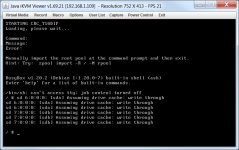
I have been having some issues getting my system to boot. Since it was installed a few weeks ago I have been having to manually mount rpool at boot time. I would get a message stating "Manually import the pool at the command prompt and exit" (screen dump attached).
I wasn't too bothered about this as this is a test system. I am learning/testing Proxmox and was not planning on rebooting too often anyway, however, I stupidly decided to try and fix it hoping an update might fix the issue. Part of the update came up with messages about changes to the boot settings (GRUB) and I chose to keep the existing settings. Now trying to mount the pool manually just doesn't work. Doh !
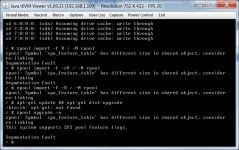
I can reinstall, its not a problem as the VM's are stored on a FreeNAS SAN, however, I would like to understand what has happened so I don't make the same mistake again. Here is a screen shot of the error messages.
If anyone can point me in the right direction would be greatly appreciated.
I have been having some issues getting my system to boot. Since it was installed a few weeks ago I have been having to manually mount rpool at boot time. I would get a message stating "Manually import the pool at the command prompt and exit" (screen dump attached).
I wasn't too bothered about this as this is a test system. I am learning/testing Proxmox and was not planning on rebooting too often anyway, however, I stupidly decided to try and fix it hoping an update might fix the issue. Part of the update came up with messages about changes to the boot settings (GRUB) and I chose to keep the existing settings. Now trying to mount the pool manually just doesn't work. Doh !
I can reinstall, its not a problem as the VM's are stored on a FreeNAS SAN, however, I would like to understand what has happened so I don't make the same mistake again. Here is a screen shot of the error messages.
If anyone can point me in the right direction would be greatly appreciated.