Hello,
please forgive me as I am very little knowledgeable on Linux and Proxmox, and for the fact my thread will likely be full of incorrect technical references.
I used to have a MiniPC with 2 data HDD under NTFS (movies and media) connected from external USB dock, because the MiniPC didn't have SATA ports.
My configuration was :
-1 : Proxmox on bare MiniPC
---1.1 : OpenMediaVault ("OMV") as a VM, accessing the 2 HDDs and configured to share them under both "NFS" and "SMB" systems
---1.2 : Jellyfin as a container
Basically, I could then have both HDD mounted in Proxmox so Jellyfin LXC could access them. And I could, at the same time, have both HDD appear on my Windows PC, in the "network", thanks to the SMB filesharing that I had created under OMV.
I have now replaced my MiniPC with a fully-fledged PC, so I can directly connect the 2x HDDs through SATA rather than external USB dock.
Is it possible to simplify the software side of my configuration (remove OMV) and keep having access to the HDD both under Proxmox and Windows ?
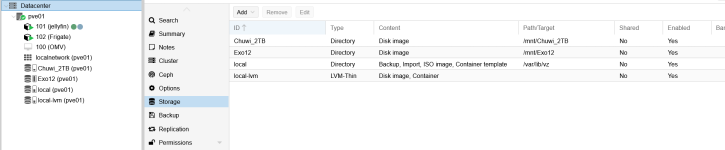
Right now, I was able to permanently mount the HDDs under Proxmox (fstab file), and Jellyfin can access the media library as before.
However, I am stuck into finding a way to share HDDs towards Windows network as before.
Can it be done through Proxmox or do I have to reinstall OMV ?
Thank you very much for your patience and explanations,
Hamlet
please forgive me as I am very little knowledgeable on Linux and Proxmox, and for the fact my thread will likely be full of incorrect technical references.
I used to have a MiniPC with 2 data HDD under NTFS (movies and media) connected from external USB dock, because the MiniPC didn't have SATA ports.
My configuration was :
-1 : Proxmox on bare MiniPC
---1.1 : OpenMediaVault ("OMV") as a VM, accessing the 2 HDDs and configured to share them under both "NFS" and "SMB" systems
---1.2 : Jellyfin as a container
Basically, I could then have both HDD mounted in Proxmox so Jellyfin LXC could access them. And I could, at the same time, have both HDD appear on my Windows PC, in the "network", thanks to the SMB filesharing that I had created under OMV.
I have now replaced my MiniPC with a fully-fledged PC, so I can directly connect the 2x HDDs through SATA rather than external USB dock.
Is it possible to simplify the software side of my configuration (remove OMV) and keep having access to the HDD both under Proxmox and Windows ?
Right now, I was able to permanently mount the HDDs under Proxmox (fstab file), and Jellyfin can access the media library as before.
However, I am stuck into finding a way to share HDDs towards Windows network as before.
Can it be done through Proxmox or do I have to reinstall OMV ?
Thank you very much for your patience and explanations,
Hamlet