LXC - Omada memory leak?

Other7544

Member
Apr 7, 2023
9
0
6
Proxmox newbie here, although I have been using it for Home Assistant for a couple of years, but almost a set and forget aside from updates. I recently moved Omada from my Synology NAS to Proxmox on a newish Lenovo mini because the new Omada versions won't run on a Celeron CPU. The used memory just keeps rising to the point where it maxes out and the CPU then jumps from 1.5% to 100%. A reboot brings it back to earth and it starts again.

I've looked at several threads including:

In line with that thread, I have increased the RAM and Swap File size, but the trend is still up.
The Proxmox overview :
CPU(s)​

16 x 13th Gen Intel(R) Core(TM) i5-13400T (1 Socket)​
Kernel Version​

Linux 6.17.13-2-pve (2026-03-13T08:06Z)​
Boot Mode​

EFI (Secure Boot)​
Manager Version​

pve-manager/9.1.6/71482d1833ded40​
The Omada version is 6.1.0.19.

My Container Summary:
CPU usage 1.08% of 2 CPU(s)
Memory usage 57.60% (2.30 GiB of 4.00 GiB)
SWAP usage 0.00% (0 B of 1.00 GiB)

Memory use started at about 1.96gb. The memory limit was set at 3gb and Swap 512mb. It would fill up in about 36 hours and the swap was running at about 15% (not 0% like now)

In the past ten minutes the top -co%MEM result has gone from
MiB Mem : 4096.0 total, 1208.4 free, 2339.9 used, 547.8 buff/cache
MiB Swap: 1024.0 total, 1024.0 free, 0.0 used. 1756.1 avail Mem
to
MiB Mem : 4096.0 total, 1199.7 free, 2344.3 used, 552.1 buff/cache
MiB Swap: 1024.0 total, 1024.0 free, 0.0 used. 1751.7 avail Mem

At first I thought it was the issue with the Intel NIC offloading and tried the offloading fix but that did not help the memory issue. I have PBS running in a VM alongside the Omada container and it is fine.

I am assuming this is an Omada issue, not a Proxmox issue, but grateful for any help. Otherwise it's a reboot every two days.
 
Hi Other7544,

For the sake of context, what is Omada?

Seeing the memory usage comes as a surprise, I guess it was running with a low limit on the Synology? Did it run virtualized there, or bare metal (I have 0 experience with Synology...)

I'd say the i5 is quite powerful. Could it be that the application was always held back by the limitations of the Celeron, thereby not claiming more RAM? Is it worth a try to allow much more RAM for the container, and see whether it plateaus at a sustainable level?
 
  • Like
Reactions: Johannes S
Omada is a software controller for TP-Link's range of Omada switches, router, APs etc.

It was running in Synology's version of Docker. It was v5 which uses an older version of the MongDB. Omada v6 needs a new version of MongoDB and that will not run in a Celeron, hence the move to the i5. The v5 version was running quite happily on a small allocation of RAM and I thought was quite low weight. v6 is a fairly big update. It ran without issue in the Synology "Container Manager".

BTW - since my original post memory use has jumped to 71%, including a big hop up 90 minutes ago. I can't see anything the logs to show why.
 
Please share the full top -co%MEM and docker stats output from inside the CT. You see what was asked in the linked thread. Provide the same here.
 
Last edited:
I think the guilty party is Omada as @Neobin has shown in the links. A daily reboot is probably the answer until they fix Omada.

I don't get anything from docker stats and I can't see where it was asked for in the original link.

top -co%MEM
Full Result (There's been a reboot since the original truncated results - it has jumped):

top - 10:02:26 up 14:15, 1 user, load average: 0.16, 0.17, 0.09
Tasks: 21 total, 1 running, 20 sleeping, 0 stopped, 0 zombie
%Cpu(s): 0.7 us, 0.7 sy, 0.0 ni, 98.5 id, 0.2 wa, 0.0 hi, 0.0 si, 0.0 st
MiB Mem : 4096.0 total, 340.2 free, 3087.3 used, 668.6 buff/cache
MiB Swap: 1024.0 total, 1024.0 free, 0.0 used. 1008.7 avail Mem

PID USER PR NI VIRT RES SHR S %CPU %MEM TIME+ COMMAND
289 omada 20 0 14.4g 2.7g 24928 S 1.3 66.9 11:28.42 omada -cwd /opt/tplink/EAPControl+
445 omada 20 0 3736840 337064 92996 S 0.7 8.0 5:09.70 /opt/tplink/EAPController/bin/mon+
154 mongodb 20 0 2670788 177692 87560 S 0.3 4.2 4:35.53 /usr/bin/mongod --config /etc/mon+
1 root 20 0 167624 11900 8892 S 0.0 0.3 0:00.22 /sbin/init
52 root 20 0 33016 10836 9776 S 0.0 0.3 0:00.09 /lib/systemd/systemd-journald
152 root 20 0 15460 9164 7832 S 0.0 0.2 0:00.00 sshd: /usr/sbin/sshd -D [listener+
104 systemd+ 20 0 17924 8788 7636 S 0.0 0.2 0:00.08 /lib/systemd/systemd-networkd
96 root 20 0 16604 7640 6640 S 0.0 0.2 0:00.08 /lib/systemd/systemd-logind
7876 postfix 20 0 43064 7044 6380 S 0.0 0.2 0:00.00 pickup -l -t unix -u -c
380 postfix 20 0 43108 6992 6316 S 0.0 0.2 0:00.02 qmgr -l -t unix -u
8300 root 20 0 11564 5284 3216 R 0.0 0.1 0:00.01 top -co%MEM
559 root 20 0 8012 4804 3476 S 0.0 0.1 0:00.00 -bash
92 message+ 20 0 9108 4788 4216 S 0.0 0.1 0:00.00 /usr/bin/dbus-daemon --system --a+
376 root 20 0 42680 4684 4052 S 0.0 0.1 0:00.12 /usr/lib/postfix/sbin/master -w
150 root 20 0 9140 4408 3888 S 0.0 0.1 0:00.00 /bin/login -f
93 root 20 0 5884 3564 2724 S 0.0 0.1 0:00.00 dhclient -4 -v -i -pf /run/dhclie+
91 root 20 0 6624 2660 2412 S 0.0 0.1 0:00.06 /usr/sbin/cron -f
149 root 20 0 5512 2072 1944 S 0.0 0.0 0:00.00 /sbin/agetty -o -p -- \u --noclea+
 
Last edited:
Please use code blocks. This is unreadable. I just assumed you use docker since it was mentioned above. Since you're not using that image please share the start parameters.
 
Last edited:
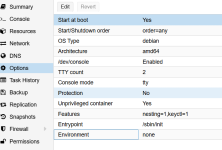
Sorry - formatting fixed. On start parameters I don't know how to get/display that unless it is these:
arch: amd64
cores: 2
hostname: omada
memory: 4096
net0: name=eth0,bridge=vmbr0,hwaddr=BC:24:11:56:F4:19,ip=dhcp,type=veth
onboot: 1
ostype: debian
rootfs: local-lvm:vm-101-disk-0,size=8G
swap: 512
tags: community-script;controller;tp-link
timezone: Australia/Brisbane
unprivileged: 1

[ATTACH type="full" width="523px" size="709x480"]96968[/ATTACH]
 

Attachments

  • 1775265469389.png
    1775265469389.png
    56.2 KB · Views: 1
In case anyone's curious about those parameters
Bash:
# pgrep -af omada
6505 omada -cwd /opt/tplink/EAPController/lib -pidfile /var/run/omada.pid -home /usr/lib/jvm/temurin-21-jdk-amd64/ -cp /usr/share/java/commons-daemon.jar:/opt/tplink/EAPController/lib/*:/opt/tplink/EAPController/properties -outfile /opt/tplink/EAPController/logs/startup.log -errfile /opt/tplink/EAPController/logs/startup.log -user omada -procname omada -showversion -server -XX:MaxHeapFreeRatio=60 -XX:MinHeapFreeRatio=30 -XX:+HeapDumpOnOutOfMemoryError -XX:HeapDumpPath=/opt/tplink/EAPController/logs/java_heapdump.hprof -Djava.awt.headless=true -Djdk.lang.Process.launchMechanism=vfork com.tplink.smb.omada.starter.OmadaLinuxMain start
I tried to reproduce this (I hate working with these scripts) but if there's a leak it's not very much. The helper script doesn't appear to modify the upstream code so you probably have to wait for TP Link to fix this or restore backup of a older version or manually install it.
 
In case anyone's curious about those parameters
Bash:
# pgrep -af omada
6505 omada -cwd /opt/tplink/EAPController/lib -pidfile /var/run/omada.pid -home /usr/lib/jvm/temurin-21-jdk-amd64/ -cp /usr/share/java/commons-daemon.jar:/opt/tplink/EAPController/lib/*:/opt/tplink/EAPController/properties -outfile /opt/tplink/EAPController/logs/startup.log -errfile /opt/tplink/EAPController/logs/startup.log -user omada -procname omada -showversion -server -XX:MaxHeapFreeRatio=60 -XX:MinHeapFreeRatio=30 -XX:+HeapDumpOnOutOfMemoryError -XX:HeapDumpPath=/opt/tplink/EAPController/logs/java_heapdump.hprof -Djava.awt.headless=true -Djdk.lang.Process.launchMechanism=vfork com.tplink.smb.omada.starter.OmadaLinuxMain start
It appears to be claiming anything up to 0.25gb every two hours, so I have allocated more memory for headroom. But I've also set up a crontab to reboot the container every 24 hours, so that is a band-aid until TP-Link comes up with a solution. It has been raised with them and they have acknowledged it. I'll just hurry up and wait.