Lxc intel arc pasthrough in proxmox

Lord_Neksus

New Member
Jan 19, 2025
27
7
3
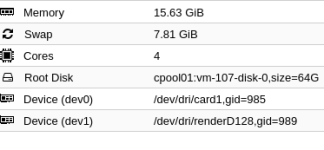
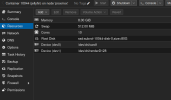
Ich versuche gerade jellyfin in proxmox mit hardware transcoding zum laufen zu bringen, das ganzen mit der neuen passthrough funktion wie im bild unten zu sehen. Das passthrough funktioniert die ausgabe von im lxc ist:

root@jellyfin:~# ls -l /dev/dri/
total 0
crw-rw---- 1 root root 226, 1 Jan 25 17:29 card1
crw-rw---- 1 root root 226, 128 Jan 25 17:29 renderD128

allerdings gibt es immer einen fehler wenn ich versuche hardwaretranscoding zu nutzen gleiches bei ffmpeg. Hat jemand eine Idee woran es liegen könnte
 

Attachments

  • Bildschirmfoto vom 2025-01-25 18-34-54.png
    Bildschirmfoto vom 2025-01-25 18-34-54.png
    44 KB · Views: 22
I have Jellyfin working in an LXC using the iGPU of my HP 600 G2 Micro PC (Intel Quad Core i7-6700T).
I primarily used this: https://tteck.github.io/Proxmox/#jellyfin-media-server-lxc
I used this as a secondary resource: https://www.wundertech.net/installing-jellyfin-on-proxmox/
I installed as privileged, so that may be different than you. I didn't have to pass anything through in the VM sense.
This might help, too: https://www.reddit.com/r/Proxmox/comments/q5wbl0/lxcmountentry_static_uidgid_in_lxc_guest/
Found this, too: https://forum.proxmox.com/threads/plex-hw-transcoding-lxc-and-jasper-lake-igpu-passthru.116163/
 
Last edited:
Du musst in Proxmox noch die gid bei den beiden eintragen, die ist aber je nach Container anders.
Im Container ausführen: cat /etc/group | grep -w 'render\|\video'

Bildschirmfoto zu 2025-03-15 14-45-27.png
 
Du musst in Proxmox noch die gid bei den beiden eintragen, die ist aber je nach Container anders.
Im Container ausführen: cat /etc/group | grep -w 'render\|\video'

View attachment 83660

Ich bin kein expert, aber was ich habe functioniert.
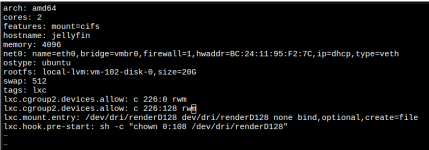
Here (below) is what I have.
I think the key manual customizations are the 'lxc.' statments in the config file. Particularly the pre-start chown statement.
I never reference card0 anywhere (that I know of).
The mount=cifs statement in the conf file is for my media (on another box) and is not relevant to getting things working.

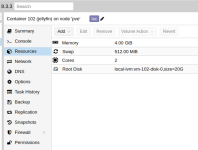
1742047498163.png

From pve console:

1742049004403.png

1742049057223.png

From jellyfin console:

1742047619100.png

1742047847362.png

/etc/pve/lxc/102.conf:

1742048061889.png
 

Attachments

  • 1742047370122.png
    1742047370122.png
    217.4 KB · Views: 3
Ich bin kein expert, aber was ich habe functioniert.
Sure, that's the old "manual" way.

It is now easier and you just can click it together in webGUI.

Code:
auf host:
ls -l /dev/dri/by-path/ /dev/kfd /dev/dri && lspci -d ::03xx

/dev/kfd -> mapping to render GID of LXC
/dev/dri/renderD128 -> mapping to video GID of LXC
/dev/dri/renderD129 -> mapping to video GID of LXC

in container:
cat /etc/group | grep -w 'render\|\video'

/dev/kfd in addition is AMD-specific
 
Last edited:
Sure, that's the old "manual" way.

It is now easier and you just can click it together in webGUI.

Code:
auf host:
ls -l /dev/dri/by-path/ /dev/kfd /dev/dri && lspci -d ::03xx

/dev/kfd -> mapping to render GID of LXC
/dev/dri/renderD128 -> mapping to video GID of LXC
/dev/dri/renderD129 -> mapping to video GID of LXC

in container:
cat /etc/group | grep -w 'render\|\video'

/dev/kfd in addition is AMD-specific

Cool. Thank you. I will try it this way at some point.
 
Just curious . Anyone got Intel Xe Arc working with Plex . Not i915 drivers but with XE?

I have an Intel Core Ultra i9 285T running on Proxmox Host with 6.17.4-2-pve .

LXC container is running Ubuntu 24.04

If I change my PVE host grub to:


GRUB_CMDLINE_LINUX_DEFAULT=quiet intel_iommu=on iommu=pt i915.force_probe=!7d67 xe.force_probe=7d67"

I can see that the xe driver is loaded:
root@pve:~# lspci -nnk | grep -A 3 VGA 00:02.0 VGA compatible controller [0300]: Intel Corporation Arrow Lake-S [Intel Graphics] [8086:7d67] (rev 06)<br> DeviceName: To Be Filled by O.E.M.<br> Subsystem: ASRock Incorporation Device [1849:7d67]<br> Kernel driver in use: xe<br>--<br>80:14.5 Non-VGA unclassified device [0000]: Intel Corporation Device [8086:7f2f] (rev 10)<br> Subsystem: ASRock Incorporation Device [1849:7f2f]<br>80:15.0 Serial bus controller [0c80]: Intel Corporation Device [8086:7f4c] (rev 10)<br> Subsystem: ASRock Incorporation Device [1849:7d67]

But I can’t seem to get plex to work with xe ? Can you maybe assist me here?
:slight_smile:
 
Wenn du die Grafiktreiber über ".force_probe" zwingen musst, dann weißt du schon wie "gut" die Unterstützung deiner Hardware im aktuellen Kernel ist.
In anderen Worten: Abwarten und Tee trinken.
 
  • Like
Reactions: Morphy
Vielleicht als kleine weiterführende Erklärung:
Normalerweise hat der Kernel Code anhand der PCI-ID eines Devices eine sehr genaue Vorstellung welcher Treiber für dieses Device geeignet und/oder vorgesehen ist.
Und wenn ein Treiber anhand der ID identifiziert wurde, dann sollte auch dieser verwendet werden, da es Gründe gibt warum dieser der Standard ist.

Wird standardmäßig gar kein Treiber geladen (Device bisher unbekannt), oder eventuell eben der "i915" statt dem gewünschten "xe", dann verlässt man mit dem Eintragen des genannten "force_probe" Parameters die normalen und getesteten Code-Pfade.
In anderen Worten: Ab hier ist Stabilität in keinem Fall mehr garantiert.
 
Last edited:
  • Like
Reactions: Morphy