Lxc intel arc pasthrough in proxmox

Lord_Neksus

New Member
Jan 19, 2025
27
7
3
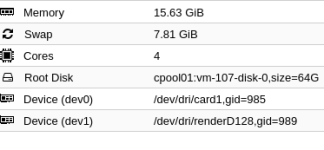
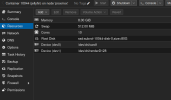
Ich versuche gerade jellyfin in proxmox mit hardware transcoding zum laufen zu bringen, das ganzen mit der neuen passthrough funktion wie im bild unten zu sehen. Das passthrough funktioniert die ausgabe von im lxc ist:

root@jellyfin:~# ls -l /dev/dri/
total 0
crw-rw---- 1 root root 226, 1 Jan 25 17:29 card1
crw-rw---- 1 root root 226, 128 Jan 25 17:29 renderD128

allerdings gibt es immer einen fehler wenn ich versuche hardwaretranscoding zu nutzen gleiches bei ffmpeg. Hat jemand eine Idee woran es liegen könnte
 

Attachments

  • Bildschirmfoto vom 2025-01-25 18-34-54.png
    Bildschirmfoto vom 2025-01-25 18-34-54.png
    44 KB · Views: 18
I have Jellyfin working in an LXC using the iGPU of my HP 600 G2 Micro PC (Intel Quad Core i7-6700T).
I primarily used this: https://tteck.github.io/Proxmox/#jellyfin-media-server-lxc
I used this as a secondary resource: https://www.wundertech.net/installing-jellyfin-on-proxmox/
I installed as privileged, so that may be different than you. I didn't have to pass anything through in the VM sense.
This might help, too: https://www.reddit.com/r/Proxmox/comments/q5wbl0/lxcmountentry_static_uidgid_in_lxc_guest/
Found this, too: https://forum.proxmox.com/threads/plex-hw-transcoding-lxc-and-jasper-lake-igpu-passthru.116163/
 
Last edited:
Du musst in Proxmox noch die gid bei den beiden eintragen, die ist aber je nach Container anders.
Im Container ausführen: cat /etc/group | grep -w 'render\|\video'

Bildschirmfoto zu 2025-03-15 14-45-27.png
 
Du musst in Proxmox noch die gid bei den beiden eintragen, die ist aber je nach Container anders.
Im Container ausführen: cat /etc/group | grep -w 'render\|\video'

View attachment 83660

Ich bin kein expert, aber was ich habe functioniert.
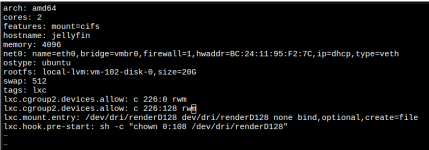
Here (below) is what I have.
I think the key manual customizations are the 'lxc.' statments in the config file. Particularly the pre-start chown statement.
I never reference card0 anywhere (that I know of).
The mount=cifs statement in the conf file is for my media (on another box) and is not relevant to getting things working.

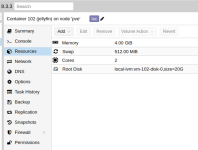
1742047498163.png

From pve console:

1742049004403.png

1742049057223.png

From jellyfin console:

1742047619100.png

1742047847362.png

/etc/pve/lxc/102.conf:

1742048061889.png
 

Attachments

  • 1742047370122.png
    1742047370122.png
    217.4 KB · Views: 3
Ich bin kein expert, aber was ich habe functioniert.
Sure, that's the old "manual" way.

It is now easier and you just can click it together in webGUI.

Code:
auf host:
ls -l /dev/dri/by-path/ /dev/kfd /dev/dri && lspci -d ::03xx

/dev/kfd -> mapping to render GID of LXC
/dev/dri/renderD128 -> mapping to video GID of LXC
/dev/dri/renderD129 -> mapping to video GID of LXC

in container:
cat /etc/group | grep -w 'render\|\video'

/dev/kfd in addition is AMD-specific
 
Last edited:
Sure, that's the old "manual" way.

It is now easier and you just can click it together in webGUI.

Code:
auf host:
ls -l /dev/dri/by-path/ /dev/kfd /dev/dri && lspci -d ::03xx

/dev/kfd -> mapping to render GID of LXC
/dev/dri/renderD128 -> mapping to video GID of LXC
/dev/dri/renderD129 -> mapping to video GID of LXC

in container:
cat /etc/group | grep -w 'render\|\video'

/dev/kfd in addition is AMD-specific

Cool. Thank you. I will try it this way at some point.