

Hi,
today created a new VM to evaluate AlmaLinux 10.1, when i try to boot it, it booted an old Ubuntu System that was deleted a few days ago. This is LVM on a FC SAN with Snapshots as Volume Chains enabled.
It makes kinda sense if lvm is allocating something in thick mode but does itself nothing with data in that range. I think this is dangerous depending on who has access to a VM, an auto provision VM may accidently boot from disk and not ISO because there is a valid signature and parition. Is this expected with storage on LVM?
I think this may have an affect on Backup, if there is a lot of old data. Last time i created a new VM and backed it up, that was quiete large an almost no Zeros.
I would like to see some feature to let Proxmox zero out the whole lvm range on VM creation to make sure there is no existing data.
Is this a bug or expected?
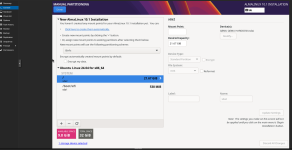
today created a new VM to evaluate AlmaLinux 10.1, when i try to boot it, it booted an old Ubuntu System that was deleted a few days ago. This is LVM on a FC SAN with Snapshots as Volume Chains enabled.
It makes kinda sense if lvm is allocating something in thick mode but does itself nothing with data in that range. I think this is dangerous depending on who has access to a VM, an auto provision VM may accidently boot from disk and not ISO because there is a valid signature and parition. Is this expected with storage on LVM?
I think this may have an affect on Backup, if there is a lot of old data. Last time i created a new VM and backed it up, that was quiete large an almost no Zeros.
I would like to see some feature to let Proxmox zero out the whole lvm range on VM creation to make sure there is no existing data.
Is this a bug or expected?


