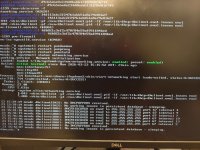
Good day, i've been having this issue with proxmox server since i've setup and moved to another switch. I'm basically losing access to it even though all settings have been maintained in . I have checked networking service as it seems like everytime the server restart it starts using eno1 and eno2 when in actuality i have eno3 and eno4 as bridge bonded to vmbr0. What may be causing this as each time the server restarts i cannot access proxmox for a very long time i think it eventually rectifies itself as when it happened first i did some troubleshooting and was unsuccessful only to check it 2 days later and it was up and working again and i can get access to it again. Kinda new to proxmox any assistance would be great. Thanks


Lose Access after every Restart
- Thread starter ittechskn
- Start date
You are using an out of date browser. It may not display this or other websites correctly.
You should upgrade or use an alternative browser.
You should upgrade or use an alternative browser.

Personally I will never use DHCP for a server.
There are static examples in the doc, including one for bonding: https://pve.proxmox.com/pve-docs/pve-admin-guide.html#sysadmin_network_bond
There are static examples in the doc, including one for bonding: https://pve.proxmox.com/pve-docs/pve-admin-guide.html#sysadmin_network_bond
Hi @ittechskn,
The screenshots are hard to parse and analyse
Could you please attach the file here or, at least, paste in text format the output of:
Regards,
NT
The screenshots are hard to parse and analyse
Could you please attach the file here or, at least, paste in text format the output of:
Bash:
# cat /etc/network/interfacesRegards,
NT
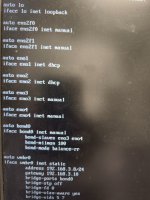
On second thoughts, based on the screenshot:
- eno1 is "inet dhcp"
- eno2 is "inet dhcp"
- vmbr0 is static with a fixed IP
So, the reason for the delay could be the sequential execution of operations:
- first trying to get IP by DHCP on eno1... wait until timeout
- then trying to get IP by DHCP on eno2... wait until timeout
- only then does it start setting up eno3, eno4, bond0 and vmbr0
How to test this hypothesis - change:
iface eno1 inet dhcp
...
iface eno2 inet dhcp
to
iface eno1 inet manual
...
iface eno2 inet manual
And check after a reboot how long it will take for the machine to be available?
Best regards
NT
- eno1 is "inet dhcp"
- eno2 is "inet dhcp"
- vmbr0 is static with a fixed IP
So, the reason for the delay could be the sequential execution of operations:
- first trying to get IP by DHCP on eno1... wait until timeout
- then trying to get IP by DHCP on eno2... wait until timeout
- only then does it start setting up eno3, eno4, bond0 and vmbr0
How to test this hypothesis - change:
iface eno1 inet dhcp
...
iface eno2 inet dhcp
to
iface eno1 inet manual
...
iface eno2 inet manual
And check after a reboot how long it will take for the machine to be available?
Best regards
NT
oh ok...apologiesHi @ittechskn,
The screenshots are hard to parse and analyse
Could you please attach the file here or, at least, paste in text format the output of:
Bash:# cat /etc/network/interfaces
Regards,
NT
here you go:
auto lo
iface lo inet loopback
auto ens2f0
iface ens2f0 inet manual
auto ens2f1
iface ens2f1 inet manual
auto eno1
iface eno1 inet dhcp
auto eno2
iface eno2 inet dhcp
auto eno3
iface eno3 inet manual
auto eno4
iface eno4 inet manual
auto bond0
iface bond0 inet manual
bond-slaves eno3 eno4
bond-mi imon 100
bond-node balance-rr
auto vmbr0
iface vmbr0 inet static
address 192.168.3.8/24
gateway 192.168.3.10
bridge-ports bond0
bridge-stp off
bridge-fd 0
bridge-vlan-aware yes
bridge-vids 5,7
OK, thanks
Based on this, I would still like to recommend that you try my first suggestion:
In the configuration, change the lines:
to
And check after a reboot how long it will take for the machine to be available?
Best regards,
NT
Based on this, I would still like to recommend that you try my first suggestion:
In the configuration, change the lines:
Code:
iface eno1 inet dhcp
...
iface eno2 inet dhcpto
Code:
iface eno1 inet manual
...
iface eno2 inet manualAnd check after a reboot how long it will take for the machine to be available?
Best regards,
NT
I ran into a problem yesterday on my non-routed storage VLAN. I moved it to its own bridge and it stopped working. Turns out Chrony was marking the bridge as down, because there is no internet access on that VLAN, it doesn't go through my router at all. I ended up having to disable the Chrony hook to get the new bridge to come up reliably. Maybe this could be part of your problem too? I don't know. This only happens on one of my proxmox nodes, the one I run virtual pfSense on.
Ok then, i will test this as it makes sense now...how long is the timeout period though? I have changed it this morning and rebooted server and been waiting for 30mins now but still no accessOK, thanks
Based on this, I would still like to recommend that you try my first suggestion:
In the configuration, change the lines:
Code:iface eno1 inet dhcp ... iface eno2 inet dhcp
to
Code:iface eno1 inet manual ... iface eno2 inet manual
And check after a reboot how long it will take for the machine to be available?
Best regards,
NT
Ok then, i will test this as it makes sense now...how long is the timeout period though? I have changed it this morning and rebooted server and been waiting for 30mins now but still no access
According to what I found:
"In Debian 13 (Trixie), the default DHCP client (isc-dhcp-client / dhclient) timeout is 60 seconds. "
So, 30 mins after reboot and still no access - this is not expected and definitely indicates an issue. If you have an IPMI/ iLO access to the server (I'm assuming that the server is a physical machine), you could do two checks:
1. Observe the boot screen and see if somewhere the boot process is stuck temporarily or even forever.
2. If the boot process goes smoothly, then log in and check and verify the applied network settings (is it vmbr0 with the right address, does it have the right gateway, etc.)
3. If #2 is OK, try to see if the server (192.168.3.8) has a ping to its gateway (192.168.3.10).
I could imagine a ton of reasons why this setup isn't working, so we need to eliminate the possibilities one by one.
And one more question, after a reboot, on which IP did you try to reach the server? 192.168.3.8 or different?
Best regards,
NT
ok then,According to what I found:
"In Debian 13 (Trixie), the default DHCP client (isc-dhcp-client / dhclient) timeout is 60 seconds. "
So, 30 mins after reboot and still no access - this is not expected and definitely indicates an issue. If you have an IPMI/ iLO access to the server (I'm assuming that the server is a physical machine), you could do two checks:
1. Observe the boot screen and see if somewhere the boot process is stuck temporarily or even forever.
2. If the boot process goes smoothly, then log in and check and verify the applied network settings (is it vmbr0 with the right address, does it have the right gateway, etc.)
3. If #2 is OK, try to see if the server (192.168.3.8) has a ping to its gateway (192.168.3.10).
I could imagine a ton of reasons why this setup isn't working, so we need to eliminate the possibilities one by one.
And one more question, after a reboot, on which IP did you try to reach the server? 192.168.3.8 or different?
Best regards,
NT
1. it was hanging on pve volume check but it seems after changing eno1 & eno2 it doesn't hang on that screen now but i still dont have access to proxmox web gui and can't ping it.
2. it booted now smoothly since changed to manual and vbmr0 is only 1 i have.
3. still doesn't have a ping back to gateway address
NB: also yes proxmox is running on physical dell poweredge
Last edited:
ok thank you, i looked at these and see that maybe the issue is the bond method i used because it keep checking for eno1 & eno2 at first boot but after timeout shouldn't it revert to the next available interfaces after?Personally I will never use DHCP for a server.
There are static examples in the doc, including one for bonding: https://pve.proxmox.com/pve-docs/pve-admin-guide.html#sysadmin_network_bond
Niceok then,
1. it was hanging on pve volume check but it seems after changing eno1 & eno2 it doesn't hang on that screen now but i still dont have access to proxmox web gui and can't ping it.
2. it booted now smoothly since changed to manual and vbmr0 is only 1 i have.
3. still doesn't have a ping back to gateway address
NB: also yes proxmox is running on physical dell poweredge
We have progress here... although we still have an issue, now we have more information
> 1. ... after changing eno1 & eno2 it doesn't hang on that screen now ...
OK, at this moment, we have eliminated eno1 and eno2 from the equation... we will deal with them later
> 2. it booted now smoothly since changed to manual and vbmr0 is only 1 i have.
OK, that is a confirmation of the previous statement
> 3. still doesn't have a ping back to gateway address
I need a little bit more clarification here. From where can you not ping the gateway? You are able to log in to the server (192.168.3.8), and from it, you cannot ping its gateway (192.168.3.10)? Is this the situation, or is it different?
Best regards,
NT
3. i am logging in directly on the poweredge, if i try pinging the 192.168.3.10(gateway) it don't get a response back from it nor can i ping from the gateway to 192.168.3.8(proxmox server)Nice
We have progress here... although we still have an issue, now we have more information
> 1. ... after changing eno1 & eno2 it doesn't hang on that screen now ...
OK, at this moment, we have eliminated eno1 and eno2 from the equation... we will deal with them later
> 2. it booted now smoothly since changed to manual and vbmr0 is only 1 i have.
OK, that is a confirmation of the previous statement
> 3. still doesn't have a ping back to gateway address
I need a little bit more clarification here. From where can you not ping the gateway? You are able to log in to the server (192.168.3.8), and from it, you cannot ping its gateway (192.168.3.10)? Is this the situation, or is it different?
Best regards,
NT

Code:
auto vmbr0
iface vmbr0 inet static
address 192.168.3.8/24
gateway 192.168.3.10
bridge-ports bond0
bridge-stp off
bridge-fd 0
bridge-vlan-aware yes
bridge-vids 5,7[0] https://pve.proxmox.com/pve-docs/pve-admin-guide.html#_vlan_on_the_host
yes that it correct, the native vlan is untagged on the switch its connected too as LAG in 2 ports.The IP sits on the native VLAN (untagged). Is this your intention? If not look at the examples [0], you will need a vlan interface for tagged traffic.Code:auto vmbr0 iface vmbr0 inet static address 192.168.3.8/24 gateway 192.168.3.10 bridge-ports bond0 bridge-stp off bridge-fd 0 bridge-vlan-aware yes bridge-vids 5,7
[0] https://pve.proxmox.com/pve-docs/pve-admin-guide.html#_vlan_on_the_host
Hi @ittechskn ,
IMHO next step is to check the connectivity between the server and the gateway.
My approach here would be:
We need to start eliminating each hypothesis one by one.
Best regards,
NT
IMHO next step is to check the connectivity between the server and the gateway.
My approach here would be:
- Bring down eno5 and leave only eno3 up (let's check interface by interface).
- pinging from the server (192.168.3.8) to the gateway (192.168.3.10).
during the ping runs:
2.1. tcpdump on vmbr0 to see if the requests are properly generated and sent.
2.2. tcpdump on eno3 to double-check that the requests are sent through the right interface.
- at the gateway - tcpdump on the receiving device to see if:
3.1. Requests are received.
3.2. Responses are generated and sent back through the right interface.
- There are a few possible scenarios to fail here, mostly:
4.1. The server does not send the request, then we need to search for an issue in the server itself.
4.2. The requests are sent but not received by the gateway. Then the reason must be searched in the switch (probably).
4.3.The requests are received by the gateway, but:
4.3.1. it drops them for some reason.
4.3.2. Requests are received, responses are generated and sent, but not received by the server (sent through the wrong interface, switch dropped them, etc.)
We need to start eliminating each hypothesis one by one.
Best regards,
NT
Ok, so new development...after your suggestion i was about to do tcpdump but after removing 1 interface at a time as you suggested i notice right after i disconnected 1 interface i started receiving ping from proxmox server. So i reconnected second interface but the ping stayed up so i figured maybe the LAG on host is not configured correctly so i disconnected 1 interface and left 1 interface connected and restarted proxmox server to verify and once again right after restart i still didn't receive a connection back to proxmox server again aaaahhhhh!! Don't know if this might help in finding whats causing the connectivity issue.Hi @ittechskn ,
IMHO next step is to check the connectivity between the server and the gateway.
My approach here would be:
- Bring down eno5 and leave only eno3 up (let's check interface by interface).
- pinging from the server (192.168.3.8) to the gateway (192.168.3.10).
during the ping runs:
2.1. tcpdump on vmbr0 to see if the requests are properly generated and sent.
2.2. tcpdump on eno3 to double-check that the requests are sent through the right interface.
- at the gateway - tcpdump on the receiving device to see if:
3.1. Requests are received.
3.2. Responses are generated and sent back through the right interface.
- There are a few possible scenarios to fail here, mostly:
4.1. The server does not send the request, then we need to search for an issue in the server itself.
4.2. The requests are sent but not received by the gateway. Then the reason must be searched in the switch (probably).
4.3.The requests are received by the gateway, but:
4.3.1. it drops them for some reason.
4.3.2. Requests are received, responses are generated and sent, but not received by the server (sent through the wrong interface, switch dropped them, etc.)
We need to start eliminating each hypothesis one by one.
Best regards,
NT
NB: i will still try the tcpdump though
First - my mistake, you have eno4, but I talked about eno5... sorry, but I think that you get the idea.
> so i disconnected 1 interface and left 1 interface connected and restarted proxmox server to verify and once again right after restart i still didn't receive a connection back
How do you disconnect the interface? Physically or just drop it down by command line? Because if you just drop it by a command, on the next reboot it will be back online. If you want to completely test the "single interface" hypothesis - disable eno4 in /etc/network/interfaces (probaly the commenting out the whole section:
and remove it from:
will be enough
So, please check this hypothesis. I know that it will be frustrating and time-consuming, but if with a single interface in the bond things work (especially for both of them), then we will left a less space for the issue to hide
Best regards,
NT
> so i disconnected 1 interface and left 1 interface connected and restarted proxmox server to verify and once again right after restart i still didn't receive a connection back
How do you disconnect the interface? Physically or just drop it down by command line? Because if you just drop it by a command, on the next reboot it will be back online. If you want to completely test the "single interface" hypothesis - disable eno4 in /etc/network/interfaces (probaly the commenting out the whole section:
Code:
auto eno4
iface eno4 inet manual
and remove it from:
Code:
bond-slaves eno3 eno4will be enough
So, please check this hypothesis. I know that it will be frustrating and time-consuming, but if with a single interface in the bond things work (especially for both of them), then we will left a less space for the issue to hide
Best regards,
NT