

local LVM storage on /dev/md0 with same storage name for all nodes

Aug 14, 2025
2
0
1
Hello,
I'm trying to define new LOCAL LVM storage on md raid /dev/md0 on each cluster node with same name for VMs replications ( diff storage name doesn't support replications ), meaning the same usage like local ZFS .
If I use "datacenter" way ( datacenter->storage->LVM) , can't create next one storage due "name is used" ( duplicity logically ) .
The next problem is that Proxmox doesn't offer raid disks for LVM usage in GUI, I have to fix it manually.
pvesm add lvm local-LVM --vgname local-LVM --content images,rootdir - not solving this situation - name duplicity

Can you help to solve this , pls.
regs.
 
FIXED
After long time searching web and pxm forum I found solution here:

What exactly needed:
- for first steps you don't need GUI, use command line instead of

HOWTO

disks

# lsblk
nvme1n1 259:8 0 7T 0 disk
nvme2n1 259:9 0 7T 0 disk

raid mirror
# mdadm --create /dev/md0 --level=1 --raid-devices=2 /dev/nvme1n1 /dev/nvme2n1
# cat /proc/mdstat

Personalities : [raid1]
md0 : active raid1 nvme1n1[1] nvme2n1[0]
7501333824 blocks super 1.2 [2/2] [UU]
[>....................] resync = 0.0% (2801920/7501333824) finish=579.8min speed=215532K/sec
bitmap: 56/56 pages [224KB], 65536KB chunk
LVM - create volume group

# pvcreate /dev/md0
# vgcreate local-LVM /dev/md0
# pvs

PV VG Fmt Attr PSize PFree
/dev/md0 local-LVM lvm2 a-- <6.99t <6.99t

# vgs
VG #PV #LV #SN Attr VSize VFree
local-LVM 1 0 0 wz--n- <6.99t <6.99t


# lvcreate -l 85%VG -T local-LVM/local-LVM -c 512k # that's what you exactly need
Thin pool volume with chunk size 512.00 KiB can address at most 127.00 TiB of data.
WARNING: Pool zeroing and 512.00 KiB large chunk size slows down thin provisioning.
WARNING: Consider disabling zeroing (-Zn) or using smaller chunk size (<512.00 KiB).
Logical volume "local-LVM" created.


- 85%VG - do not use 100%, free space for snapshots
- -c 512k - chunk size, I used smaller one then in doc. recommended due quick zeroing ( as written above )

create PXM storage
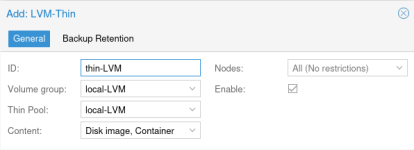
# pvesm add lvmthin local-LVM --vgname local-LVM --thinpool local-LVM --content images,rootdir

OR

Datacenter -> storage -> add -> LVM-Thin
1755172618510.png

# lsblk

nvme1n1 259:8 0 7T 0 disk
└─md0 9:0 0 7T 0 raid1
├─local--LVM-local--LVM_tmeta 252:0 0 764M 0 lvm
│ └─local--LVM-local--LVM-tpool 252:2 0 5.9T 0 lvm
│ └─local--LVM-local--LVM 252:3 0 5.9T 1 lvm
└─local--LVM-local--LVM_tdata 252:1 0 5.9T 0 lvm
└─local--LVM-local--LVM-tpool 252:2 0 5.9T 0 lvm
└─local--LVM-local--LVM 252:3 0 5.9T 1 lvm
nvme2n1 259:9 0 7T 0 disk
└─md0 9:0 0 7T 0 raid1
├─local--LVM-local--LVM_tmeta 252:0 0 764M 0 lvm
│ └─local--LVM-local--LVM-tpool 252:2 0 5.9T 0 lvm
│ └─local--LVM-local--LVM 252:3 0 5.9T 1 lvm
└─local--LVM-local--LVM_tdata 252:1 0 5.9T 0 lvm
└─local--LVM-local--LVM-tpool 252:2 0 5.9T 0 lvm
└─local--LVM-local--LVM 252:3 0 5.9T 1 lvm


Claude Sonnet4 AI

Chunk size guidelines by volume size:

  • < 1TB: 64K - 256K
  • 1-4TB: 512K - 1024K
  • 4TB+: 1024K (1MB) ← Your case
  • Very large (20TB+): 2048K (2MB)

Why 1MB for 7TB?​

  • Performance: Good balance for mixed workloads
  • Metadata overhead: Reasonable metadata size
  • Allocation efficiency: Works well with most VM disk operations
  • Proxmox compatibility: Well-tested chunk size