

After an update yesterday I got a boot restart loop. I believe it was the first time I did "apt --auto remove" in like 6 months, definitely first since the 7.0 kernel. I manually went in and stopped the boot loop and got an error (see photo) . It seemed similar to (https://forum.proxmox.com/threads/failed-to-open-efi-proxmox-grubx64-efi-error-please-help.163389/) so I tried to rescue boot from a usb iso and it got me back in. Secure boot has always been off. I did a lot to get proxmox working about a year ago because this motherboard had a nic not supported in the linux kernel at the time I first built the system and it was my first time with proxmox. I got back in but am not sure how to proceed. Would it be best to just start fresh? I think everything on the motherboard is supported starting kernel 6.19, and I literally don't remember and didn't document half of what I did to this system.
I only have 2 VMs and 1 CT that are actually necessary on this, and a ZFS array. I didn't realize when I first started with proxmox that you cant add a machine with a VM or CT into a cluster so I was planning on doing something about that anyway. Thanks for any advice
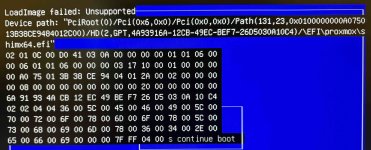
I only have 2 VMs and 1 CT that are actually necessary on this, and a ZFS array. I didn't realize when I first started with proxmox that you cant add a machine with a VM or CT into a cluster so I was planning on doing something about that anyway. Thanks for any advice
Code:
Linux pve1 7.0.2-6-pve #1 SMP PREEMPT_DYNAMIC PMX 7.0.2-6 (2026-05-20T08:55Z) x86_64


The programs included with the Debian GNU/Linux system are free software;

the exact distribution terms for each program are described in the

individual files in /usr/share/doc/*/copyright.


Debian GNU/Linux comes with ABSOLUTELY NO WARRANTY, to the extent

permitted by applicable law.


root@pve1:~# apt update

Get:1 http://security.debian.org/debian-security trixie-security InRelease [43.4 kB]

Hit:2 http://deb.debian.org/debian trixie InRelease

Get:3 http://security.debian.org/debian-security trixie-security/main amd64 Packages [207 kB]

Get:4 http://deb.debian.org/debian trixie-updates InRelease [47.3 kB]

Get:5 http://security.debian.org/debian-security trixie-security/main Translation-en [126 kB]

Hit:6 http://download.proxmox.com/debian/ceph-squid trixie InRelease

Get:7 http://download.proxmox.com/debian/pve trixie InRelease [3,534 B]

Get:8 http://download.proxmox.com/debian/pve trixie/pve-no-subscription amd64 Packages [465 kB]

Get:9 https://pkgs.tailscale.com/stable/debian trixie InRelease

Get:10 https://pkgs.tailscale.com/stable/debian trixie/main amd64 Packages [15.0 kB]

Fetched 914 kB in 1s (1,016 kB/s)

37 packages can be upgraded. Run 'apt list --upgradable' to see them.

root@pve1:~# efibootmgr -v

BootCurrent: 000C

Timeout: 0 seconds

BootOrder: 0000,000B,0001,000C

Boot0000* proxmox       HD(2,GPT,4a93916a-12cb-49ec-bef7-26d5030a10c4,0x800,0x200000)/File(\EFI\proxmox\shimx64.efi)

      dp: 04 01 2a 00 02 00 00 00 00 08 00 00 00 00 00 00 00 00 20 00 00 00 00 00 6a 91 93 4a cb 12 ec 49 be f7 26 d5 03 0a 10 c4 02 02 / 04 04 36 00 5c 00 45 00 46 00 49 00 5c 00 70 00 72 00 6f 00 78 00 6d 00 6f 00 78 00 5c 00 73 00 68 00 69 00 6d 00 78 00 36 00 34 00 2e 00 65 00 66 00 69 00 00 00 / 7f ff 04 00

Boot0001* Linux Boot Manager    HD(2,GPT,4a93916a-12cb-49ec-bef7-26d5030a10c4,0x800,0x200000)/File(\EFI\systemd\systemd-bootx64.efi)

      dp: 04 01 2a 00 02 00 00 00 00 08 00 00 00 00 00 00 00 00 20 00 00 00 00 00 6a 91 93 4a cb 12 ec 49 be f7 26 d5 03 0a 10 c4 02 02 / 04 04 46 00 5c 00 45 00 46 00 49 00 5c 00 73 00 79 00 73 00 74 00 65 00 6d 00 64 00 5c 00 73 00 79 00 73 00 74 00 65 00 6d 00 64 00 2d 00 62 00 6f 00 6f 00 74 00 78 00 36 00 34 00 2e 00 65 00 66 00 69 00 00 00 / 7f ff 04 00

Boot000B* UEFI OS       HD(2,GPT,4a93916a-12cb-49ec-bef7-26d5030a10c4,0x800,0x200000)/File(\EFI\BOOT\BOOTX64.EFI)0000424f

      dp: 04 01 2a 00 02 00 00 00 00 08 00 00 00 00 00 00 00 00 20 00 00 00 00 00 6a 91 93 4a cb 12 ec 49 be f7 26 d5 03 0a 10 c4 02 02 / 04 04 30 00 5c 00 45 00 46 00 49 00 5c 00 42 00 4f 00 4f 00 54 00 5c 00 42 00 4f 00 4f 00 54 00 58 00 36 00 34 00 2e 00 45 00 46 00 49 00 00 00 / 7f ff 04 00

    data: 00 00 42 4f

Boot000C* UEFI: PNY USB 3.2.1 FD PMAP, Partition 2      PciRoot(0x1)/Pci(0x14,0x0)/USB(21,0)/HD(2,GPT,fd290c29-b919-4340-b3fa-bba2689d4d43,0x270,0x4000)0000424f

      dp: 02 01 0c 00 d0 41 03 0a 01 00 00 00 / 01 01 06 00 00 14 / 03 05 06 00 15 00 / 04 01 2a 00 02 00 00 00 70 02 00 00 00 00 00 00 00 40 00 00 00 00 00 00 29 0c 29 fd 19 b9 40 43 b3 fa bb a2 68 9d 4d 43 02 02 / 7f ff 04 00

    data: 00 00 42 4f

root@pve1:~# bootctl

System:

      Firmware: n/a (n/a)

 Firmware Arch: x64

   Secure Boot: disabled

  TPM2 Support: yes

  Measured UKI: no

  Boot into FW: supported


Random Seed:

 System Token: not set

       Exists: yes


Available Boot Loaders on ESP:

          ESP: /boot/efi (/dev/disk/by-partuuid/4a93916a-12cb-49ec-bef7-26d5030a10c4)

         File: ├─/EFI/systemd/systemd-bootx64.efi (systemd-boot 257.13-1~deb13u1)

               ├─/EFI/BOOT/fbx64.efi

               ├─/EFI/BOOT/grubx64.efi

               ├─/EFI/BOOT/mmx64.efi

               └─/EFI/BOOT/BOOTx64.efi


Boot Loaders Listed in EFI Variables:

        Title: proxmox

           ID: 0x0000

       Status: active, boot-order

    Partition: /dev/disk/by-partuuid/4a93916a-12cb-49ec-bef7-26d5030a10c4

         File: └─/EFI/proxmox/shimx64.efi


        Title: UEFI OS

           ID: 0x000B

       Status: active, boot-order

    Partition: /dev/disk/by-partuuid/4a93916a-12cb-49ec-bef7-26d5030a10c4

         File: └─/EFI/BOOT/BOOTX64.EFI


        Title: Linux Boot Manager

           ID: 0x0001

       Status: active, boot-order

    Partition: /dev/disk/by-partuuid/4a93916a-12cb-49ec-bef7-26d5030a10c4

         File: └─/EFI/systemd/systemd-bootx64.efi


Boot Loader Entries:

        $BOOT: /boot/efi (/dev/disk/by-partuuid/4a93916a-12cb-49ec-bef7-26d5030a10c4)

        token: e2552ccc124c4d39a0f53d7a75db5a2d


Default Boot Loader Entry:

         type: Boot Loader Specification Type #1 (.conf)

        title: Debian GNU/Linux 13 (trixie) (7.0.2-6-pve)

           id: e2552ccc124c4d39a0f53d7a75db5a2d-7.0.2-6-pve.conf

       source: /boot/efi//loader/entries/e2552ccc124c4d39a0f53d7a75db5a2d-7.0.2-6-pve.conf (on the EFI System Partition)

     sort-key: debian

      version: 7.0.2-6-pve

   machine-id: e2552ccc124c4d39a0f53d7a75db5a2d

        linux: /boot/efi//e2552ccc124c4d39a0f53d7a75db5a2d/7.0.2-6-pve/linux

       initrd: /boot/efi//e2552ccc124c4d39a0f53d7a75db5a2d/7.0.2-6-pve/initrd.img-7.0.2-6-pve

      options: root=/dev/mapper/pve-root ro quiet intel_iommu=on iommu=pt i915.enable_gvt=1 pcie_aspm=powersave systemd.machine_id=e2552ccc124c4d39a0f53d7a75db5a2d


[1]+  Stopped                 bootctl

root@pve1:~# apt install --reinstall grub-efi-amd64

The following packages were automatically installed and are no longer required:

  proxmox-kernel-6.17.13-6-pve-signed  proxmox-kernel-6.17.9-1-pve-signed

Use 'apt autoremove' to remove them.


Summary:

  Upgrading: 0, Installing: 0, Reinstalling: 1, Removing: 0, Not Upgrading: 37

  Download size: 46.7 kB

  Space needed: 0 B / 32.8 GB available


Get:1 http://download.proxmox.com/debian/pve trixie/pve-no-subscription amd64 grub-efi-amd64 amd64 2.12-9+pmx2 [46.7 kB]

Fetched 46.7 kB in 0s (115 kB/s)

Preconfiguring packages ...

(Reading database ... 239974 files and directories currently installed.)

Preparing to unpack .../grub-efi-amd64_2.12-9+pmx2_amd64.deb ...

Unpacking grub-efi-amd64 (2.12-9+pmx2) over (2.12-9+pmx2) ...

Setting up grub-efi-amd64 (2.12-9+pmx2) ...

Installing for x86_64-efi platform.

File descriptor 3 (pipe:[50923]) leaked on vgs invocation. Parent PID 7751: grub-install.real

File descriptor 3 (pipe:[50923]) leaked on vgs invocation. Parent PID 7751: grub-install.real

Installation finished. No error reported.

Generating grub configuration file ...

Found linux image: /boot/vmlinuz-7.0.2-6-pve

Found initrd image: /boot/initrd.img-7.0.2-6-pve

Found linux image: /boot/vmlinuz-7.0.0-3-pve

Found initrd image: /boot/initrd.img-7.0.0-3-pve

Found linux image: /boot/vmlinuz-6.17.13-11-pve

Found initrd image: /boot/initrd.img-6.17.13-11-pve

Found linux image: /boot/vmlinuz-6.17.13-6-pve

Found initrd image: /boot/initrd.img-6.17.13-6-pve

Found linux image: /boot/vmlinuz-6.17.9-1-pve

Found initrd image: /boot/initrd.img-6.17.9-1-pve

Found linux image: /boot/vmlinuz-6.14.11-9-pve

Found initrd image: /boot/initrd.img-6.14.11-9-pve

Found linux image: /boot/vmlinuz-6.14.8-1-pve

Found initrd image: /boot/initrd.img-6.14.8-1-pve

Found memtest86+ 64bit EFI image: /boot/memtest86+x64.efi

Found memtest86+ 32bit EFI image: /boot/memtest86+ia32.efi

Found memtest86+ 64bit image: /boot/memtest86+x64.bin

Found memtest86+ 32bit image: /boot/memtest86+ia32.bin

Adding boot menu entry for UEFI Firmware Settings ...

done

Processing triggers for shim-signed:amd64 (1.48+pmx1+16.1-1+pmx1) ...
Last edited: