root@Masternode:~# find /etc/modprobe.d/* -exec tail -n+1 {} +
tail -n+1 /proc/cmdline /etc/kernel/cmdline /etc/default/grub
lspci -vnnk | awk '/VGA/{print $0}' RS=
==> /etc/modprobe.d/blacklist.conf <==
blacklist i915
blacklist intel_agp
==> /etc/modprobe.d/intel-microcode-blacklist.conf <==
# The microcode module attempts to apply a microcode update when
# it autoloads. This is not always safe, so we block it by default.
blacklist microcode
==> /etc/modprobe.d/pve-blacklist.conf <==
# This file contains a list of modules which are not supported by Proxmox VE
# nvidiafb see bugreport
https://bugzilla.proxmox.com/show_bug.cgi?id=701
blacklist nvidiafb
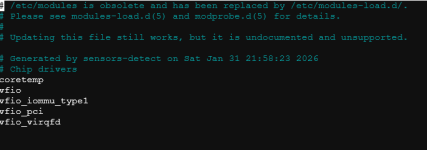
==> /etc/modprobe.d/vfio.conf <==
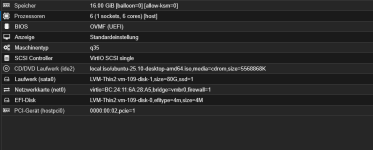
options vfio-pci ids=8086:a7a0
==> /etc/modprobe.d/zfs.conf <==
options zfs zfs_arc_max=3340763136
==> /proc/cmdline <==
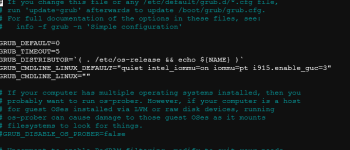
BOOT_IMAGE=/boot/vmlinuz-6.17.13-6-pve root=/dev/mapper/pve-root ro quiet intel_iommu=on iommu=pt i915.enable_guc=3
tail: cannot open '/etc/kernel/cmdline' for reading: No such file or directory
==> /etc/default/grub <==
# If you change this file or any /etc/default/grub.d/*.cfg file,
# run 'update-grub' afterwards to update /boot/grub/grub.cfg.
# For full documentation of the options in these files, see:
# info -f grub -n 'Simple configuration'
GRUB_DEFAULT=0
GRUB_TIMEOUT=5
GRUB_DISTRIBUTOR=`( . /etc/os-release && echo ${NAME} )`
GRUB_CMDLINE_LINUX_DEFAULT="quiet intel_iommu=on iommu=pt i915.enable_guc=3"
GRUB_CMDLINE_LINUX=""
# If your computer has multiple operating systems installed, then you
# probably want to run os-prober. However, if your computer is a host
# for guest OSes installed via LVM or raw disk devices, running
# os-prober can cause damage to those guest OSes as it mounts
# filesystems to look for things.
#GRUB_DISABLE_OS_PROBER=false
# Uncomment to enable BadRAM filtering, modify to suit your needs
# This works with Linux (no patch required) and with any kernel that obtains
# the memory map information from GRUB (GNU Mach, kernel of FreeBSD ...)
#GRUB_BADRAM="0x01234567,0xfefefefe,0x89abcdef,0xefefefef"
# Uncomment to disable graphical terminal
#GRUB_TERMINAL=console
# The resolution used on graphical terminal
# note that you can use only modes which your graphic card supports via VBE/GOP/UGA
# you can see them in real GRUB with the command `videoinfo'
#GRUB_GFXMODE=640x480
# Uncomment if you don't want GRUB to pass "root=UUID=xxx" parameter to Linux
#GRUB_DISABLE_LINUX_UUID=true
# Uncomment to disable generation of recovery mode menu entries
#GRUB_DISABLE_RECOVERY="true"
# Uncomment to get a beep at grub start
#GRUB_INIT_TUNE="480 440 1"
00:02.0 VGA compatible controller [0300]: Intel Corporation Raptor Lake-P [Iris Xe Graphics] [8086:a7a0] (rev 04) (prog-if 00 [VGA controller])
DeviceName: Onboard - Video
Flags: fast devsel, IRQ 16, IOMMU group 0
Memory at 603c000000 (64-bit, non-prefetchable) [size=16M]
Memory at 4000000000 (64-bit, prefetchable) [size=256M]
I/O ports at 3000
Expansion ROM at 000c0000 [virtual] [disabled] [size=128K]
Capabilities: [40] Vendor Specific Information: Len=0c <?>
Capabilities: [70] Express Root Complex Integrated Endpoint, IntMsgNum 0
Capabilities: [ac] MSI: Enable- Count=1/1 Maskable+ 64bit-
Capabilities: [d0] Power Management version 2
Capabilities: [100] Process Address Space ID (PASID)
Capabilities: [200] Address Translation Service (ATS)
Capabilities: [300] Page Request Interface (PRI)
Capabilities: [320] Single Root I/O Virtualization (SR-IOV)
Kernel driver in use: vfio-pci
Kernel modules: i915, xe
und die iommu dinger:
root@Masternode:~# {
shopt -s nullglob
for g in $(find /sys/kernel/iommu_groups/* -maxdepth 0 -type d | sort -V); do
echo "IOMMU Group ${g##*/}:"
for d in $g/devices/*; do
echo -e "\t$(lspci -nns ${d##*/})"
done;
done;
}
IOMMU Group 0:
00:02.0 VGA compatible controller [0300]: Intel Corporation Raptor Lake-P [Iris Xe Graphics] [8086:a7a0] (rev 04)
IOMMU Group 1:
00:00.0 Host bridge [0600]: Intel Corporation Raptor Lake-P/U 4p+8e cores Host Bridge/DRAM Controller [8086:a707]
IOMMU Group 2:
00:06.0 PCI bridge [0604]: Intel Corporation Raptor Lake PCIe 4.0 Graphics Port [8086:a74d]
IOMMU Group 3:
00:07.0 PCI bridge [0604]: Intel Corporation Raptor Lake-P Thunderbolt 4 PCI Express Root Port #0 [8086:a76e]
IOMMU Group 4:
00:07.2 PCI bridge [0604]: Intel Corporation Raptor Lake-P Thunderbolt 4 PCI Express Root Port #2 [8086:a72f]
IOMMU Group 5:
00:0a.0 Signal processing controller [1180]: Intel Corporation Raptor Lake Crashlog and Telemetry [8086:a77d] (rev 01)
IOMMU Group 6:
00:0d.0 USB controller [0c03]: Intel Corporation Raptor Lake-P Thunderbolt 4 USB Controller [8086:a71e]
00:0d.2 USB controller [0c03]: Intel Corporation Raptor Lake-P Thunderbolt 4 NHI #0 [8086:a73e]
00:0d.3 USB controller [0c03]: Intel Corporation Raptor Lake-P Thunderbolt 4 NHI #1 [8086:a76d]
IOMMU Group 7:
00:14.0 USB controller [0c03]: Intel Corporation Alder Lake PCH USB 3.2 xHCI Host Controller [8086:51ed] (rev 01)
00:14.2 RAM memory [0500]: Intel Corporation Alder Lake PCH Shared SRAM [8086:51ef] (rev 01)
IOMMU Group 8:
00:15.0 Serial bus controller [0c80]: Intel Corporation Alder Lake PCH Serial IO I2C Controller #0 [8086:51e8] (rev 01)
00:15.1 Serial bus controller [0c80]: Intel Corporation Alder Lake PCH Serial IO I2C Controller #1 [8086:51e9] (rev 01)
00:15.2 Serial bus controller [0c80]: Intel Corporation Alder Lake PCH Serial IO I2C Controller #2 [8086:51ea] (rev 01)
IOMMU Group 9:
00:16.0 Communication controller [0780]: Intel Corporation Alder Lake PCH HECI Controller [8086:51e0] (rev 01)
IOMMU Group 10:
00:17.0 SATA controller [0106]: Intel Corporation Alder Lake-P SATA AHCI Controller [8086:51d3] (rev 01)
IOMMU Group 11:
00:19.0 Serial bus controller [0c80]: Intel Corporation Alder Lake-P Serial IO I2C Controller #0 [8086:51c5] (rev 01)
00:19.1 Serial bus controller [0c80]: Intel Corporation Alder Lake-P Serial IO I2C Controller #1 [8086:51c6] (rev 01)
IOMMU Group 12:
00:1c.0 PCI bridge [0604]: Intel Corporation Alder Lake PCI Express x4 Root Port #5 [8086:51bc] (rev 01)
IOMMU Group 13:
00:1d.0 PCI bridge [0604]: Intel Corporation Alder Lake PCI Express Root Port #9 [8086:51b0] (rev 01)
IOMMU Group 14:
00:1d.1 PCI bridge [0604]: Intel Corporation Alder Lake PCI Express x1 Root Port #10 [8086:51b1] (rev 01)
IOMMU Group 15:
00:1f.0 ISA bridge [0601]: Intel Corporation Raptor Lake LPC/eSPI Controller [8086:519d] (rev 01)
00:1f.3 Audio device [0403]: Intel Corporation Raptor Lake-P/U/H cAVS [8086:51ca] (rev 01)
00:1f.4 SMBus [0c05]: Intel Corporation Alder Lake PCH-P SMBus Host Controller [8086:51a3] (rev 01)
00:1f.5 Serial bus controller [0c80]: Intel Corporation Alder Lake-P PCH SPI Controller [8086:51a4] (rev 01)
IOMMU Group 16:
58:00.0 Non-Volatile memory controller [0108]: Samsung Electronics Co Ltd NVMe SSD Controller SM981/PM981/PM983 [144d:a808]
IOMMU Group 17:
03:00.0 Non-Volatile memory controller [0108]: Sandisk Corp WD Black SN770 / PC SN740 256GB / PC SN560 (DRAM-less) NVMe SSD [15b7:5017] (rev 01)
IOMMU Group 18:
01:00.0 Ethernet controller [0200]: Intel Corporation Ethernet Controller I226-V [8086:125c] (rev 04)
IOMMU Group 19:
02:00.0 Ethernet controller [0200]: Intel Corporation Ethernet Controller I226-V [8086:125c] (rev 04
Puh, ich hab leider google suchen benutzt und mich auf irgendwelchen websiten rumgetrieben wo jemand ähnliches versucht hat. Deswegen muss ich zugeben das ich dieses vfio nur stumpf übernommen habe.
Was das mit der GPU angeht, ich würds gern nutzen um einfach zu gucken ob ich auf der vm alte spiele spielen könnte. Reine neugier ob möglich und wie verhält sich das im Netzwerk.
Eventuell mit moonlight koppen das ich im browser spielen kann, so wars mal angehdacht
Ich hoffe es ist nicht zu unübersichtlich das ichd as ganze hier einfach so reinkopiert habe, vielen dank das du mir helfen möchtest bzw. drüberschaust