Laboratory Cluster

frankz

Renowned Member
Nov 16, 2020
491
32
68
Hello everyone I should make a laboratory cluster and therefore having a limited budget I would like to buy
Dell Optiplex 7070 SFF Desktop Computer PC i7-9700 16gb ram(Renewed)

Do you think it's fine as 100% compatibility with propxmox ? Would it be at least enough several VMs if I expand them to 32 GB ?
 
That will work yes, as for capacity for how many VMs it can handle, this is down to what VMs you plan to run. You could see how far you get with 16gb of memory and upgrade as needed.
 
That will work yes, as for capacity for how many VMs it can handle, this is down to what VMs you plan to run. You could see how far you get with 16gb of memory and upgrade as needed.
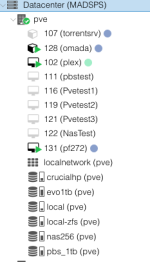
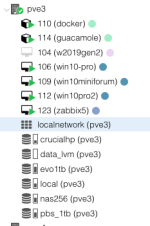
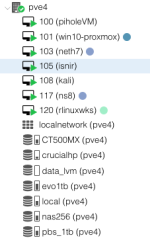
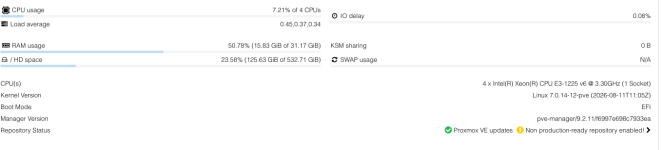
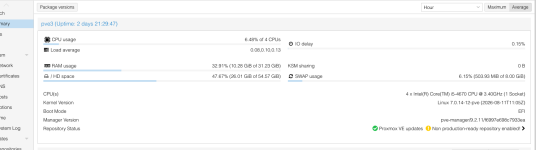
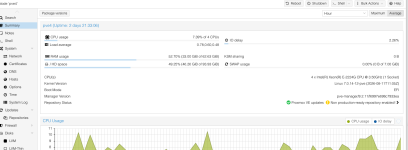
Sorry if I send you my current cluster, what I should make and on another location where I have my laboratory. With this configuration you see there are several lxc VM machines and all in NFS on a small nas g1 of the hp with xigmanas and a crucial 1tb SSD. Everything is fine and I'm happy. As mentioned before I should do another clust, I am aware that 16 GB per node is the minimum to be able to leave, but I have to do it with 5 network cards and vlans like this you see . The interest is to know if the CPU is fast enough compared to those you see, in short we are talking about an i7 9700 that should have as well as the compatibility vtx hyper I think etc should be more performing. What about ?
 

Attachments

  • Screenshot 2026-08-27 alle 09.40.13.png
    Screenshot 2026-08-27 alle 09.40.13.png
    23.5 KB · Views: 14
  • Screenshot 2026-08-27 alle 09.40.24.png
    Screenshot 2026-08-27 alle 09.40.24.png
    21.9 KB · Views: 12
  • Screenshot 2026-08-27 alle 09.40.37.png
    Screenshot 2026-08-27 alle 09.40.37.png
    21.7 KB · Views: 10
  • Screenshot 2026-08-27 alle 09.40.53.png
    Screenshot 2026-08-27 alle 09.40.53.png
    42.3 KB · Views: 10
  • Screenshot 2026-08-27 alle 09.41.09.png
    Screenshot 2026-08-27 alle 09.41.09.png
    62 KB · Views: 10
  • Screenshot 2026-08-27 alle 09.41.19.png
    Screenshot 2026-08-27 alle 09.41.19.png
    106.3 KB · Views: 14
Hi Frankz,

Wow what a mishmash of random computers you have. I don't quite understand your problem, however. What is it you're looking for someone to advise you on? The storage, the CPU specs? If it's a laboratory, the best thing is to experiment and learn along the way.
Thanks,

Tmanok
 
Hi Frankz,

Wow what a mishmash of random computers you have. I don't quite understand your problem, however. What is it you're looking for someone to advise you on? The storage, the CPU specs? If it's a laboratory, the best thing is to experiment and learn along the way.
Thanks,

Tmanok
«
Hello dear, what I showed you is a cluster already in production in another location. I’m preparing a second cluster for my laboratory, and for this reason I had shared the images: they were only used to show the characteristics of the CPUs, memory and hardware used.


What I'm interested in is whether the Dell 7070 SFF with i7‐9700, compared to the old PVE3 Xeons you see in the picture, are better in performance and compatibility with Proxmox.


I ask you why I should buy three, and I would like to avoid spending money unnecessarily if the platform is not adequate.”

https://www.amazon.it/dp/B0H9991X1R...TMKL5VRV&psc=1&ref_=list_c_wl_lv_ov_lig_dp_it
 
Hi Frankz,

Ok, now I understand, thank you. Yes, in studying those CPUs, I can see clearly that three of them would offer you a substantial upgrade:
Host CPUCores / threadsTurboTDPPassMark CPU MarkSingle-thread bench
i7-97008 /84.7 GHz65 W13,1752,744
E-2224G4 / 44.7 GHz71 W7,5262,688
E3-1225 V64 / 43.7 GHz73 W5,8962,151
i5-46704 / 43.8 GHz84 W5,4842,125
Passmark CPU Benchmark shows your aggregate performance benchmark would jump from around 18,000 points to 39,000 points. Not to mention the most important part which is that you'd be doubling your physical core count. What's really neat is that you actually will likely end up saving electricity too:
  • Old cluster:
    73 + 84 + 71 = 228 W
  • i7 cluster:
    65 × 3 = 195 W
But that's the TDP, not idle power consumption.

The last benefit is your homogeneity will permit VMs to live migrate with a lower risk of crashing... But on the other hand your biggest penalty is losing ECC memory which overall increases the risk of crashing even at idle. Every day, gamma rays rain from the sky and flip bits on electronics and storage media. ECC is one of the most important tools to overcome this. But honestly for a lab it's overkill anyway.

Enjoy, sounds like a good lab setup.


Tmanok

 
Last edited:
Hi Frankz,

Ok, now I understand, thank you. Yes, in studying those CPUs, I can see clearly that three of them would offer you a substantial upgrade:
Host CPUCores / threadsTurboTDPPassMark CPU MarkSingle-thread bench
i7-97008 /84.7 GHz65 W13,1752,744
E-2224G4 / 44.7 GHz71 W7,5262,688
E3-1225 V64 / 43.7 GHz73 W5,8962,151
i5-46704 / 43.8 GHz84 W5,4842,125
Passmark CPU Benchmark shows your aggregate performance benchmark would jump from around 18,000 points to 39,000 points. Not to mention the most important part which is that you'd be doubling your physical core count. What's really neat is that you actually will likely end up saving electricity too:
  • Old cluster:
    73 + 84 + 71 = 228 W
  • i7 cluster:
    65 × 3 = 195 W
But that's the TDP, not idle power consumption.

The last benefit is your homogeneity will permit VMs to live migrate with a lower risk of crashing... But on the other hand your biggest penalty is losing ECC memory which overall increases the risk of crashing even at idle. Every day, gamma rays rain from the sky and flip bits on electronics and storage media. ECC is one of the most important tools to overcome this. But honestly for a lab it's overkill anyway.

Enjoy, sounds like a good lab setup.


Tmanok

You were very kind and thank you so much.
 
Hey Frankz,

Realtek cards "work" on most Linux hosts, but server admins don't trust them due to well-earned stigma. NICs are very affordable, I have a pile of them. But an I340-T4 for under $40 CAD or PRO/1000 4 Port for the same price will be more reliable. I don't always recommend server vendor made NICs (HP/Dell/Lenovo/etc) because they can have thermal issues, but mostly only on select fibre cards.

Consider eBay for the cheapest used NICs, or if you buy servers / computers, consider buying them with PCIe cards installed- many sellers ignore their presence or add little to no additional cost for them.
Cheers, happy to help amico!


Tmanok
 
Hey Frankz,

Realtek cards "work" on most Linux hosts, but server admins don't trust them due to well-earned stigma. NICs are very affordable, I have a pile of them. But an I340-T4 for under $40 CAD or PRO/1000 4 Port for the same price will be more reliable. I don't always recommend server vendor made NICs (HP/Dell/Lenovo/etc) because they can have thermal issues, but mostly only on select fibre cards.

Consider eBay for the cheapest used NICs, or if you buy servers / computers, consider buying them with PCIe cards installed- many sellers ignore their presence or add little to no additional cost for them.
Cheers, happy to help amico!


Tmanok
Hello dear , so at the end that of dic the four rtl or the four i340 t2 ?? I had to make for the rtl I use at the moment not what I should buy :
Code:
#!/bin/bash

# Interfacce target
INTERFACES=("enp1s0" "enp3s0")

# Opzioni da disattivare
OPTIONS=("rx" "tx" "gso" "gro" "tso" "rxvlan" "txvlan")

for iface in "${INTERFACES[@]}"; do
  echo "Disattivazione offload su $iface..."
  for opt in "${OPTIONS[@]}"; do
    ethtool -K "$iface" "$opt" off
  done
done

echo "Offload disattivato su: ${INTERFACES[*]}"
rtl.sh (END)

Thank you for any response and for your sympathy!