KVM processes in SWAP despite 35-55 GiB free RAM – Proxmox + ZFS

Raid007

Member
Feb 15, 2024
21
3
8
System:
  • Proxmox VE (8.4.17, updated, no fresh install), ZFS 2.2.9-pve1, Linux 6.8.12-20-pve
  • 256 GiB RAM, Single CPU (no NUMA)
  • vm.swappiness = 1 - set from 60 to 5 and than to 1
  • ZFS ARC: default limit of 50% RAM = 125.7 GiB, currently used at 125.6 GiB (99.9%) - but no /etc/modprobe.d/zfs.conf is existing
    • Not updated to ZFS 2.3.0-pve1 - there is a update about the usage...
Problem:
Every morning ~7-8 GiB SWAP is used by KVM processes and Proxmox daemons (pvedaemon, pve-ha-crm etc.).
During the day vmstat shows so = 0 – nothing is actively being swapped out.
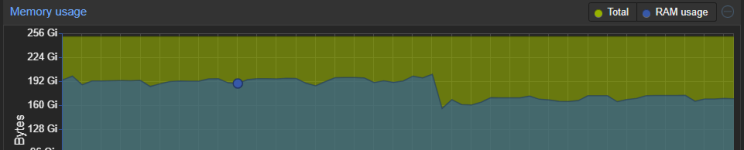
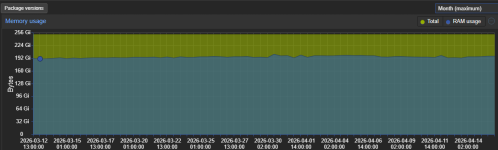
The weekly RAM graph confirms free RAM never drops below ~35 GiB.
swapoff -a && swapon -a fixes it temporarily, but SWAP refills overnight.
At night the backups are running. Everything worked fine. At January it started with the described problem.
1776336729997.png

Question:
Why does SWAP fill up nightly when RAM usage never exceeds 86% and swappiness is 1?
Is ZFS ARC eviction latency still a valid cause even when global free RAM never drops below 35 GiB?
Could memory fragmentation explain this?
Has anyone a similar problem?

I only have 8TB diskspace on my ZFS - so decreasing to 96GB should be no problem, is it?
Would that be the correct way?

Code:
cat << 'EOF' > /etc/modprobe.d/zfs.conf
options zfs zfs_arc_max=103079215104
options zfs zfs_arc_min=4294967296
options zfs zfs_arc_sys_free=8589934592
EOF
update-initramfs -u

Kind Regards
Raid007
 
Why does SWAP fill up nightly when RAM usage never exceeds 86% and swappiness is 1?

vm.swappiness=1 does not disable swap entirely; it only makes the kernel less aggressive about using it.
Also, even when there is still some free RAM available, pages that have not been used for a long time can still be swapped out.

I only have 8TB diskspace on my ZFS - so decreasing to 96GB should be no problem, is it?

I think lowering the ARC is a good first step to try. an 8 TiB ZFS pool would only need around 10 GiB of ARC, so 96 GiB should be more than safe. You could probably start with an even lower value and tune it from there.
 
  • Like
Reactions: Raid007
Since my root filesystem is on ZFS, there is no way to change the ARC limit at runtime. Or is there any way?

The only option is to update /etc/modprobe.d/zfs.conf and run update-initramfs -u to rebuild the initramfs. After a reboot the new limits will be active.

Since the machine has 96 GB of RAM and the disk is already fairly busy, a higher ARC size makes sense — more cache means fewer disk reads. Am I right?
 
I tried setting the ARC limit at runtime.


However, arc_summary showed no change. Further research reveals that this is expected behavior — zfs_arc_max can technically be changed at runtime, but the internal value arc_c_max that actually controls the ARC size only gets recalculated under memory pressure. Since the system was mostly idle, no pressure occurred and the displayed limit stayed unchanged.

I will update /etc/modprobe.d/zfs.conf and call update-initramfs -u and restart the next time it will possible.

Update: tried this on prod at runtime, because SWAP was already increasing. worked instant. Now hope everything else keeps working fine ;)
 
Last edited:
Despite reducing the ZFS ARC size significantly, 44% of swap was used overnight — even though there was always plenty of free RAM available on the host.

What makes this even more confusing is that it also happened on VMs where ballooning is completely disabled (balloon: 0), so Proxmox was never actively taking memory away from those VMs.

vm.swappiness = 1 is already set. So I really don't get it, why my proxmox is swapping.

Problem is, that swapping can lead to i/o bootleneck on my system. So I really don't like using the SWAP.

Do you have any ideas where the SWAP usage can come from?
 
The Linux kernel decides that it would prefer to use the memory for cache and buffers instead. As long as swap is not read back again, this is fine and normal (as software sometimes allocated memory that is never used). Disable swap completely if you "really don't like using the SWAP"?
 
Last edited:
the displayed limit stayed unchanged
Try dropping the cache like this afterwards
Bash:
sync; echo 3 > /proc/sys/vm/drop_cache
I suppose you could create service overrides to disable swapping for certain things and/or look into ZRAM/ZSWAP.
 
Last edited:
  • Like
Reactions: Johannes S
Thank you Impact, the limit is already shown as exspected.

Since our disks are already under load, the real issue is not the swap itself but the disk I/O it causes.
When swap hit 99–100%, the resulting read/write pressure on the disk was enough to cause I/O issues and eventually crash one VM.

The plan going forward is to use zram-tools to place swap entirely in RAM. The kernel can still do whatever it wants with anonymous pages — but instead of hitting the disk, it will compress and store them in RAM. The disk is completely out of the picture.

Hopefully this resolves the I/O issue.
 
Hey, no my swap is on:
Code:
root@pve1:~# swapon --show
NAME      TYPE      SIZE USED PRIO
/dev/dm-0 partition   8G   0B   -2
 
Why not disable swap? It is not mandatory. You don't like it to be used anyway, so why provide swap in first place?

Our production PVE servers are running fine without any swap.
If you have enough RAM just disable and never think about again.
 
That's a valid point – but can we really be sure RAM is always available?
The Proxmox graph shows it as mostly free and I have selected "Week - maximum". The drop is, where I have decreased the ARC Max Size.

1776695080298.png

If backup would have spikes in RAM usage, would they be found in the graph?

My concern with disabling swap entirely is: what happens during exactly those moments (where now SWAP is happing)? Instead of swapping, the kernel would go straight to the OOM killer – and a randomly killed VM or process during a backup could cause far worse problems than a swap that fills up and stays full.

Am I wrong to be cautious here? Has anyone actually verified that RAM stays sufficient during peak backup load, not just on average?
 
I'd simply try this or some of what I suggested above. Do you have any performance issues?