

Hello, everyone,
I'm attempting to get my PVE environments (version 9.2.5) configured with OpenID authentication to a Keycloak SSO server (26.7.0), and am running into errors during authentication. Hopefully someone can point out where I've gone wrong.
After configuring the OpenID realm, when I try to log in, I receive the following error in the browser:
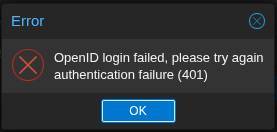
and, if I look at the journalctl output, I see the following:
Looking at the logs on the Keycloak side, I see a successful login noted for the user/realm.
Based on plenty of Internet searching and reading in these forums and others, I've tried or verified the following items:
Thanks!
-Nick
I'm attempting to get my PVE environments (version 9.2.5) configured with OpenID authentication to a Keycloak SSO server (26.7.0), and am running into errors during authentication. Hopefully someone can point out where I've gone wrong.
After configuring the OpenID realm, when I try to log in, I receive the following error in the browser:
and, if I look at the journalctl output, I see the following:
Jul 31 09:12:48 pxnode01 pvedaemon[3269733]: openid authentication failure; rhost=::ffff:1.2.3.4 msg=Failed to contact token endpoint: Request failedLooking at the logs on the Keycloak side, I see a successful login noted for the user/realm.
Based on plenty of Internet searching and reading in these forums and others, I've tried or verified the following items:
- CA certificate for the SSO server has been installed into the /usr/local/share/ca-certificates folder and update-ca-certificates run to refresh the store. "openssl s_client -connect keycloak.server.com:443" is successful from the ProxMox shell session.
- Several sites mentioned needing to set the Signature Algorithms for the ProxMox client in Keycloak to RS256. I did this, and even tried regenerating the client secret in KeyCloak and reconfiguring in ProxMox, to no avail.
- Verified that both Authentication and Client Authorization are enabled for the application in Keycloak, and tried enabling both Standard and Implicit flow.
- Verified that the Issuer URL is correct for the version of Keycloak that i'm running (drops the /auth/ portion of the URL).
- Verified that Redirect URIs are configured correctly in Keycloak.
Thanks!
-Nick
Last edited:

 and thank you for posting the fix.