Thanks for the reply,
@mariol!
I cannot reproduce this behavior here in a current Ubuntu-Server 24.04 VM.
It happens only when I type fast. If I type really slow, it doesn't happen.
Is this the only Ubuntu VM?
I can not reproduce on debian-13.2.0
Guess this is because debian-installer won't let me select a keyboard variant?
Is this a Desktop or an Ubuntu-Server VM?
Recipe to reproduce:
boot ubuntu-24.04.3-live-server-amd64.iso
on grub menu, choose "Try or install ubuntu server"
select german keyboard, variant "no dead keys"
switch to virtual terminal 2
fast type '\)'
no desktop and no install needed to reproduce.
Can be reproduced right after keyboard selection in the installer (on a different virtual terminal)
Please post your VM-Config: "qm config <vmid>"
# qm config 104
perl: warning: Setting locale failed.
perl: warning: Please check that your locale settings:
LANGUAGE = (unset),
LC_ALL = (unset),
LC_CTYPE = (unset),
LC_NUMERIC = "de_DE.UTF-8",
LC_COLLATE = (unset),
LC_TIME = "de_DE.UTF-8",
LC_MESSAGES = (unset),
LC_MONETARY = "de_DE.UTF-8",
LC_ADDRESS = "de_DE.UTF-8",
LC_IDENTIFICATION = "de_DE.UTF-8",
LC_MEASUREMENT = "de_DE.UTF-8",
LC_PAPER = "de_DE.UTF-8",
LC_TELEPHONE = "de_DE.UTF-8",
LC_NAME = "de_DE.UTF-8",
LANG = "en_US.UTF-8"
are supported and installed on your system.
perl: warning: Falling back to a fallback locale ("en_US.UTF-8").
boot: order=scsi0;ide2;net0
cores: 1
cpu: x86-64-v2-AES
ide2: local:iso/ubuntu-24.04.3-live-server-amd64.iso,media=cdrom,size=3226020K
memory: 8192
meta: creation-qemu=10.1.2,ctime=1767187056
name: ubuntu-original
net0: virtio=BC:24:11:EB:F1:F0,bridge=vmbr0,firewall=1
numa: 0
ostype: l26
scsi0: local-lvm:vm-104-disk-0,iothread=1,size=32G
scsihw: virtio-scsi-single
smbios1: uuid=665234fd-2c5d-4352-9ef0-3116a5be5e44
sockets: 1
vmgenid: 60cd9f0c-e8f6-469b-8ac2-ff286ef12843
What Proxmox VE Version to you use? "pveversion -v"
# pveversion -v
perl: warning: Setting locale failed.
perl: warning: Please check that your locale settings:
LANGUAGE = (unset),
LC_ALL = (unset),
LC_CTYPE = (unset),
LC_NUMERIC = "de_DE.UTF-8",
LC_COLLATE = (unset),
LC_TIME = "de_DE.UTF-8",
LC_MESSAGES = (unset),
LC_MONETARY = "de_DE.UTF-8",
LC_ADDRESS = "de_DE.UTF-8",
LC_IDENTIFICATION = "de_DE.UTF-8",
LC_MEASUREMENT = "de_DE.UTF-8",
LC_PAPER = "de_DE.UTF-8",
LC_TELEPHONE = "de_DE.UTF-8",
LC_NAME = "de_DE.UTF-8",
LANG = "en_US.UTF-8"
are supported and installed on your system.
perl: warning: Falling back to a fallback locale ("en_US.UTF-8").
proxmox-ve: 9.1.0 (running kernel: 6.17.2-1-pve)
pve-manager: 9.1.1 (running version: 9.1.1/42db4a6cf33dac83)
proxmox-kernel-helper: 9.0.4
proxmox-kernel-6.17.2-1-pve-signed: 6.17.2-1
proxmox-kernel-6.17: 6.17.2-1
amd64-microcode: 3.20250311.1
ceph-fuse: 19.2.3-pve2
corosync: 3.1.9-pve2
criu: 4.1.1-1
frr-pythontools: 10.3.1-1+pve4
ifupdown2: 3.3.0-1+pmx11
ksm-control-daemon: 1.5-1
libjs-extjs: 7.0.0-5
libproxmox-acme-perl: 1.7.0
libproxmox-backup-qemu0: 2.0.1
libproxmox-rs-perl: 0.4.1
libpve-access-control: 9.0.4
libpve-apiclient-perl: 3.4.2
libpve-cluster-api-perl: 9.0.7
libpve-cluster-perl: 9.0.7
libpve-common-perl: 9.0.15
libpve-guest-common-perl: 6.0.2
libpve-http-server-perl: 6.0.5
libpve-network-perl: 1.2.3
libpve-rs-perl: 0.11.3
libpve-storage-perl: 9.0.18
libspice-server1: 0.15.2-1+b1
lvm2: 2.03.31-2+pmx1
lxc-pve: 6.0.5-3
lxcfs: 6.0.4-pve1
novnc-pve: 1.6.0-3
proxmox-backup-client: 4.0.20-1
proxmox-backup-file-restore: 4.0.20-1
proxmox-backup-restore-image: 1.0.0
proxmox-firewall: 1.2.1
proxmox-kernel-helper: 9.0.4
proxmox-mail-forward: 1.0.2
proxmox-mini-journalreader: 1.6
proxmox-offline-mirror-helper: 0.7.3
proxmox-widget-toolkit: 5.1.2
pve-cluster: 9.0.7
pve-container: 6.0.18
pve-docs: 9.1.0
pve-edk2-firmware: 4.2025.05-2
pve-esxi-import-tools: 1.0.1
pve-firewall: 6.0.4
pve-firmware: 3.17-2
pve-ha-manager: 5.0.8
pve-i18n: 3.6.2
pve-qemu-kvm: 10.1.2-3
pve-xtermjs: 5.5.0-3
qemu-server: 9.0.30
smartmontools: 7.4-pve1
spiceterm: 3.4.1
swtpm: 0.8.0+pve3
vncterm: 1.9.1
zfsutils-linux: 2.3.4-pve1
Would
access via SSH be a solution?
Not really, since I am currently debugging remastering of install-images. No sshd running at such an early stage of install.
Maybe
screen could be simpler solution then
byobu?
Not really. Problem is not using byobu. Problem is that keyboard is not usable at all. All the alphanumeric keys are broken.
For example, typing "screen" gives:

(the "yy: command not found" is because before typing '\)', I checked whether keyboard selection actually activated german keyboard)
Cant find any way to get a usable keyboard at all. Only reboot the VM.
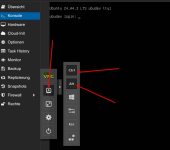
Press the virtual STRG + ALT and the real F-Key on your keyboard to change the TTY.
View attachment 94477
Ugh, tried this countless times without any luck.
Now tried again and it worked. Guess console lost focus when I selected the "ctrl" and "alt" buttons?
Another big inconvenience: typing C-w (kill-region) in emacs when inside a VM closes the pve tab in firefox. Guess there's not much that can be done here :-(



 .
.