kein Zugriff auf GUI nach Update auf Proxmox9

hyper2

New Member
Jan 18, 2025
18
0
1
Hallo zusammen,

ich komme nicht weiter.

Mein Proxmox läuft soweit nach dem Update einwandfrei.

Alle Maschinen laufen und ich kann diese nutzen.'

Die Oberfläche von Proxmox kann ich nur von 2 Rechnern aus erreichen (ip:8006)

Bei anderen Rechnern kommt

Hmmm… can't reach this page​

von Ipad und Android Mobile geht es gar nicht auch nicht über Apps


Ein Reboot des Knoten bringt auch nix


Hat jemand eine Idee?

Es scheint von WLAN Devicen nicht zu gehen, sondern nur über LAN Clients, muss ich jetzt nochmals prüfen!
 
Last edited:
Nicht ohne erheblich mehr Informationen wie zB. ein Netzwerkdiagramm und die lokalen Ips der genannten Geräte.
 
der Proxmox hat die ..170

Der router die .1

Alle ziehen sich die IPs per DHCP von der Fritzbox.
 
Ich hätte schon gerne die gesamte Adresse gesehen. Wie sieht es mit den Clients aus? Kann PVE oder andere LAN Geräte von den WLAN Geräten angepingt werden? Möglicherweise sind sie ja in einem Gast WLAN.
 
  • Like
Reactions: news
die Adressen sind 192.168.178.1 Fritzbox

192.168.178.170 Proxmoxx

Client is 192.168.178.77 wo es funktioniert
und z.B. 192.168.178.76 funktioniert nicht

Auch die Auflösüng proxmox.fritz.box:8006 funktioniert nur auf dem 77 Client.
 
Code:
$ traceroute --help
traceroute [ -46dFITnreAUDV ] [ -f first_ttl ] [ -g gate,... ] [ -i device ] [ -m max_ttl ] [ -N squeries ] [ -p port ] [ -t tos ] [ -l flow_label ] [ -w MAX,HERE,NEAR ] [ -q nqueries ] [ -s src_addr ] [ -z sendwait ] [ --fwmark=num ] host [ packetlen ]
Options:
  -4                          Use IPv4
  -6                          Use IPv6
bitte von allen Rechner traceroute <proxmox-ve-server-> machen und hier posten.
Evtl. ist vorher noch apt update && apt install net-tools -y notwendig
 
Andere Möglichkeit wäre mit tcpdump zu schauen, ob die Requests von den Geräten von denen es nicht geht überhaupt auf der Proxmox Maschine ankommen.

Per SSH einloggen auf der Proxmox und alle Pakete zeigen die von der IP 192.168.178.76 auf der Proxmox eingehen:

Code:
tcpdump -i eno1 host 192.168.178.76

Name des Netzwerkinterface ggf. anpassen.
 
der tcpdump


Code:
tcpdump -i eno1 host 192.168.178.76

Debian GNU/Linux comes with ABSOLUTELY NO WARRANTY, to the extent
permitted by applicable law.
root@pve:~# tcpdump -i enp1s0 host 192.168.178.76
tcpdump: verbose output suppressed, use -v[v]... for full protocol decode
listening on enp1s0, link-type EN10MB (Ethernet), snapshot length 262144 bytes
15:06:54.546486 IP S23-Ultra-von-Dirk.fritz.box.mdns > mdns.mcast.net.mdns: 0*- [0q] 1/0/0 PTR IzMwVUT8n14AAA._FC9F5ED42C8A._tcp.local. (65)
15:06:55.636799 IP S23-Ultra-von-Dirk.fritz.box.mdns > mdns.mcast.net.mdns: 1 [2q] PTR (QU)? _googlecast._tcp.local. PTR (QU)? _%9E5E7C8F47989526C9BCD95D24084F6F0B27C5ED._sub._googlecast._tcp.local. (94)
15:06:55.962991 IP S23-Ultra-von-Dirk.fritz.box.mdns > mdns.mcast.net.mdns: 0 [1n] ANY (QM)? I0QwV0n8n14AAA._FC9F5ED42C8A._tcp.local. (94)
15:06:56.216071 IP S23-Ultra-von-Dirk.fritz.box.mdns > mdns.mcast.net.mdns: 0 [1n] ANY (QM)? I0QwV0n8n14AAA._FC9F5ED42C8A._tcp.local. (94)
15:06:56.470398 IP S23-Ultra-von-Dirk.fritz.box.mdns > mdns.mcast.net.mdns: 0 [1n] ANY (QM)? I0QwV0n8n14AAA._FC9F5ED42C8A._tcp.local. (94)
15:06:56.525205 IP S23-Ultra-von-Dirk.fritz.box.mdns > mdns.mcast.net.mdns: 0*- [0q] 1/0/0 PTR IzMwVUT8n14AAA._FC9F5ED42C8A._tcp.local. (65)
15:06:56.646060 IP S23-Ultra-von-Dirk.fritz.box.mdns > mdns.mcast.net.mdns: 2 [3q] PTR (QM)? _googlecast._tcp.local. PTR (QM)? _%9E5E7C8F47989526C9BCD95D24084F6F0B27C5ED._sub._googlecast._tcp.local. PTR (QM)? _CFE7FEDA._sub._googlecast._tcp.local. (110)
15:06:56.708457 IP S23-Ultra-von-Dirk.fritz.box.mdns > mdns.mcast.net.mdns: 0*- [0q] 12/0/6 (Cache flush) PTR Android_NTVIFEBO.local., (Cache flush) AAAA fe80::a0fd:aff:fe54:800e, (Cache flush) PTR Android_NTVIFEBO.local., (Cache flush) A 192.168.178.76, (Cache flush) PTR Android_NTVIFEBO.local., (Cache flush) AAAA 2001:9e8:4696:8700:a0fd:aff:fe54:800e, (Cache flush) PTR Android_NTVIFEBO.local., (Cache flush) AAAA fd43:8ff1:4234:0:a0fd:aff:fe54:800e, PTR I0QwV0n8n14AAA._FC9F5ED42C8A._tcp.local., (Cache flush) SRV Android_NTVIFEBO.local.:53601 0 0, (Cache flush) TXT "f=5220" "n=Mj-fAm5rymMZ6FLjH1IjCaE" "IPv4=192.168.178.76", PTR _FC9F5ED42C8A._tcp.local. (694)

15:06:57.668788 IP S23-Ultra-von-Dirk.fritz.box.mdns > mdns.mcast.net.mdns: 3 [3q] PTR (QM)? _googlecast._tcp.local. PTR (QM)? _%9E5E7C8F47989526C9BCD95D24084F6F0B27C5ED._sub._googlecast._tcp.local. PTR (QM)? _CFE7FEDA._sub._googlecast._tcp.local. (110)
15:06:57.710851 IP S23-Ultra-von-Dirk.fritz.box.mdns > mdns.mcast.net.mdns: 0*- [0q] 12/0/6 (Cache flush) PTR Android_NTVIFEBO.local., (Cache flush) AAAA fe80::a0fd:aff:fe54:800e, (Cache flush) PTR Android_NTVIFEBO.local., (Cache flush) A 192.168.178.76, (Cache flush) PTR Android_NTVIFEBO.local., (Cache flush) AAAA 2001:9e8:4696:8700:a0fd:aff:fe54:800e, (Cache flush) PTR Android_NTVIFEBO.local., (Cache flush) AAAA fd43:8ff1:4234:0:a0fd:aff:fe54:800e, PTR I0QwV0n8n14AAA._FC9F5ED42C8A._tcp.local., (Cache flush) SRV Android_NTVIFEBO.local.:53601 0 0, (Cache flush) TXT "f=5220" "n=Mj-fAm5rymMZ6FLjH1IjCaE" "IPv4=192.168.178.76", PTR _FC9F5ED42C8A._tcp.local. (694)

15:06:58.538281 IP S23-Ultra-von-Dirk.fritz.box.mdns > mdns.mcast.net.mdns: 0*- [0q] 1/0/0 PTR IzMwVUT8n14AAA._FC9F5ED42C8A._tcp.local. (65)
15:06:59.731765 IP S23-Ultra-von-Dirk.fritz.box.mdns > mdns.mcast.net.mdns: 0*- [0q] 12/0/6 (Cache flush) PTR Android_NTVIFEBO.local., (Cache flush) AAAA fe80::a0fd:aff:fe54:800e, (Cache flush) PTR Android_NTVIFEBO.local., (Cache flush) A 192.168.178.76, (Cache flush) PTR Android_NTVIFEBO.local., (Cache flush) AAAA 2001:9e8:4696:8700:a0fd:aff:fe54:800e, (Cache flush) PTR Android_NTVIFEBO.local., (Cache flush) AAAA fd43:8ff1:4234:0:a0fd:aff:fe54:800e, PTR I0QwV0n8n14AAA._FC9F5ED42C8A._tcp.local., (Cache flush) SRV Android_NTVIFEBO.local.:53601 0 0, (Cache flush) TXT "f=5220" "n=Mj-fAm5rymMZ6FLjH1IjCaE" "IPv4=192.168.178.76", PTR _FC9F5ED42C8A._tcp.local. (694)
15:07:03.730144 IP S23-Ultra-von-Dirk.fritz.box.mdns > mdns.mcast.net.mdns: 0*- [0q] 12/0/6 (Cache flush) PTR Android_NTVIFEBO.local., (Cache flush) AAAA fe80::a0fd:aff:fe54:800e, (Cache flush) PTR Android_NTVIFEBO.local., (Cache flush) A 192.168.178.76, (Cache flush) PTR Android_NTVIFEBO.local., (Cache flush) AAAA 2001:9e8:4696:8700:a0fd:aff:fe54:800e, (Cache flush) PTR Android_NTVIFEBO.local., (Cache flush) AAAA fd43:8ff1:4234:0:a0fd:aff:fe54:800e, PTR I0QwV0n8n14AAA._FC9F5ED42C8A._tcp.local., (Cache flush) SRV Android_NTVIFEBO.local.:53601 0 0, (Cache flush) TXT "f=5220" "n=Mj-fAm5rymMZ6FLjH1IjCaE" "IPv4=192.168.178.76", PTR _FC9F5ED42C8A._tcp.local. (694)
^X15:07:11.748210 IP S23-Ultra-von-Dirk.fritz.box.mdns > mdns.mcast.net.mdns: 0*- [0q] 12/0/6 (Cache flush) PTR Android_NTVIFEBO.local., (Cache flush) AAAA fe80::a0fd:aff:fe54:800e, (Cache flush) PTR Android_NTVIFEBO.local., (Cache flush) A 192.168.178.76, (Cache flush) PTR Android_NTVIFEBO.local., (Cache flush) AAAA 2001:9e8:4696:8700:a0fd:aff:fe54:800e, (Cache flush) PTR Android_NTVIFEBO.local., (Cache flush) AAAA fd43:8ff1:4234:0:a0fd:aff:fe54:800e, PTR I0QwV0n8n14AAA._FC9F5ED42C8A._tcp.local., (Cache flush) SRV Android_NTVIFEBO.local.:53601 0 0, (Cache flush) TXT "f=5220" "n=Mj-fAm5rymMZ6FLjH1IjCaE" "IPv4=192.168.178.76", PTR _FC9F5ED42C8A._tcp.local. (694)
 
und einmal von einem anderen WIN Client welcher auch nicht drauf kommt.

root@pve:~# tcpdump -i enp1s0 host 192.168.178.165
tcpdump: verbose output suppressed, use -v[v]... for full protocol decode
listening on enp1s0, link-type EN10MB (Ethernet), snapshot length 262144 bytes
15:13:35.995428 IP c11-981y5nlxh79.fritz.box.mdns > 224.0.0.251.mdns: 0 A (QM)? solsticediscoveryservice.local. (48)
15:13:36.019863 IP c11-981y5nlxh79.fritz.box > igmp.mcast.net: igmp v3 report, 1 group record(s)
15:13:36.213651 IP c11-981y5nlxh79.fritz.box > igmp.mcast.net: igmp v3 report, 1 group record(s)
15:13:36.996378 IP c11-981y5nlxh79.fritz.box.mdns > 224.0.0.251.mdns: 0 A (QM)? solsticediscoveryservice.local. (48)
15:13:37.013367 IP c11-981y5nlxh79.fritz.box.mdns > 224.0.0.251.mdns: 0 A (QM)? solsticediscoveryservice.local. (48)
15:13:38.025199 IP c11-981y5nlxh79.fritz.box.mdns > 224.0.0.251.mdns: 0 A (QM)? solsticediscoveryservice.local. (48)
15:13:38.282948 IP c11-981y5nlxh79.fritz.box.mdns > 224.0.0.251.mdns: 0 A (QM)? solsticedirectoryservice.local. (48)
15:13:38.958255 IP c11-981y5nlxh79.fritz.box.mdns > 224.0.0.251.mdns: 0 A (QM)? solsticediscoveryservice.local. (48)
15:13:39.289081 IP c11-981y5nlxh79.fritz.box.mdns > 224.0.0.251.mdns: 0 A (QM)? solsticedirectoryservice.local. (48)
15:13:39.291209 IP c11-981y5nlxh79.fritz.box.mdns > 224.0.0.251.mdns: 0 A (QM)? solsticedirectoryservice.local. (48)
15:13:46.155248 IP c11-981y5nlxh79.fritz.box.60430 > 239.255.255.250.3702: UDP, length 656
15:13:46.279497 IP c11-981y5nlxh79.fritz.box.60430 > 239.255.255.250.3702: UDP, length 656
15:13:46.527159 IP c11-981y5nlxh79.fritz.box.60430 > 239.255.255.250.3702: UDP, length 656
15:13:47.025381 IP c11-981y5nlxh79.fritz.box.60430 > 239.255.255.250.3702: UDP, length 656
15:13:48.002965 IP c11-981y5nlxh79.fritz.box.60430 > 239.255.255.250.3702: UDP, length 656
15:13:49.949500 IP c11-981y5nlxh79.fritz.box.60430 > 239.255.255.250.3702: UDP, length 656
15:13:50.166215 IP homebridge.fritz.box.8581 > c11-981y5nlxh79.fritz.box.54225: Flags [P.], seq 351876695:351876698, ack 1188849110, win 568, length 3
15:13:50.183590 IP c11-981y5nlxh79.fritz.box.54225 > homebridge.fritz.box.8581: Flags [P.], seq 1:8, ack 3, win 8194, length 7
15:13:50.183629 IP homebridge.fritz.box.8581 > c11-981y5nlxh79.fritz.box.54225: Flags [.], ack 8, win 568, length 0
15:13:51.422185 IP c11-981y5nlxh79.fritz.box.mdns > 224.0.0.251.mdns: 0 A (QM)? solsticediscoveryservice.local. (48)
15:13:51.959908 IP c11-981y5nlxh79.fritz.box.60430 > 239.255.255.250.3702: UDP, length 656
15:13:52.425348 IP c11-981y5nlxh79.fritz.box.mdns > 224.0.0.251.mdns: 0 A (QM)? solsticediscoveryservice.local. (48)
15:13:52.427844 IP c11-981y5nlxh79.fritz.box.mdns > 224.0.0.251.mdns: 0 A (QM)? solsticediscoveryservice.local. (48)
15:13:53.440664 IP c11-981y5nlxh79.fritz.box.mdns > 224.0.0.251.mdns: 0 A (QM)? solsticediscoveryservice.local. (48)
15:13:53.675853 IP c11-981y5nlxh79.fritz.box.mdns > 224.0.0.251.mdns: 0 A (QM)? solsticedirectoryservice.local. (48)
15:13:54.683803 IP c11-981y5nlxh79.fritz.box.mdns > 224.0.0.251.mdns: 0 A (QM)? solsticedirectoryservice.local. (48)
15:13:54.684370 IP c11-981y5nlxh79.fritz.box.mdns > 224.0.0.251.mdns: 0 A (QM)? solsticedirectoryservice.local. (48)
15:13:54.713234 ARP, Request who-has homebridge.fritz.box (bc:24:11:46:ef:71 (oui Unknown)) tell c11-981y5nlxh79.fritz.box, length 46
15:13:54.713249 ARP, Reply homebridge.fritz.box is-at bc:24:11:46:ef:71 (oui Unknown), length 28
15:13:55.695231 IP c11-981y5nlxh79.fritz.box.mdns > 224.0.0.251.mdns: 0 A (QM)? solsticedirectoryservice.local. (48)
15:13:57.344110 IP c11-981y5nlxh79.fritz.box.mdns > 224.0.0.251.mdns: 0 A (QM)? solsticediscoveryservice.local. (48)
15:13:58.355741 IP c11-981y5nlxh79.fritz.box.mdns > 224.0.0.251.mdns: 0 A (QM)? solsticediscoveryservice.local. (48)
15:13:58.357874 IP c11-981y5nlxh79.fritz.box.mdns > 224.0.0.251.mdns: 0 A (QM)? solsticediscoveryservice.local. (48)
15:13:59.371781 IP c11-981y5nlxh79.fritz.box.mdns > 224.0.0.251.mdns: 0 A (QM)? solsticediscoveryservice.local. (48)
15:13:59.624852 IP c11-981y5nlxh79.fritz.box.mdns > 224.0.0.251.mdns: 0 A (QM)? solsticedirectoryservice.local. (48)
^C
35 packets captured
45 packets received by filter
10 packets dropped by kerne
 
Beide Male nur MDNS Multicast Pakete, aber keine HTTP oder HTTPS Requests auf Port 8006 an der Proxmox. Sorry wenn ich das vorher nicht erwähnt habe, während der tcpdump lief hast du versucht zuzugreifen, richtig? Wenn ja, sollten da TCP Pakete auf Port 8006 eingehen.
 
Last edited:
was mich gerade ein wenig wundert, wenn ich aus dem Mobilfunknetz per Wireguard mich verbinde, komme ich auf die Kiste vom Mobile drauf.
 
Beide Male nur MDNS Multicast Pakete, aber keine HTTP oder HTTPS Requests auf Port 8006 an der Proxmox. Sorry wenn ich das vorher nicht erwähnt habe, während der tcpdump lief hast du versucht zuzugreifen, richtig? Wenn ja, sollten da TCP Pakete auf Port 8006 eingehen.
ja klar, aber warum senden die Geräte da nix hin?
 
Schwer zu sagen. Sonst wurde wirklich nichts verändert im Netzwerk oder an den Clients? Ich wüsste nicht, wie ein Proxmox Update dazu führen könnte, dass von bestimmten Clients keine Pakete mehr ankommen am Proxmox-Server. Wenn tcpdump nichts zeigt, kommt da auch nichts an.

Ein Schuss ins blaue wäre vielleicht nach WLAN Client Isolation zu schauen an der Fritzbox (weiss nicht wie das bei der Fritzbox heisst, aber das Feature haben viele Router/Accesspoints) wenn das nur bei WLAN Clients auftritt.
 
  • Like
Reactions: news
Schwer zu sagen. Sonst wurde wirklich nichts verändert im Netzwerk oder an den Clients? Ich wüsste nicht, wie ein Proxmox Update dazu führen könnte, dass von bestimmten Clients keine Pakete mehr ankommen am Proxmox-Server. Wenn tcpdump nichts zeigt, kommt da auch nichts an.

Ein Schuss ins blaue wäre vielleicht nach WLAN Client Isolation zu schauen an der Fritzbox (weiss nicht wie das bei der Fritzbox heisst, aber das Feature haben viele Router/Accesspoints) wenn das nur bei WLAN Clients auftritt.
danke habe ich geschaut ist eingeschaltet WLAN Geräte dürfen untereinander kommunizieren.

Wie gesagt was mich wundert, Wireguard an auf dem Mobile und ich komme auf den Proxmox drauf.
 
Bei mir läuft das:

Code:
lsof -i -n -P -sTCP:LISTEN | grep \*
systemd         1     root 43u  IPv4   18452      0t0  TCP *:111 (LISTEN)
systemd         1     root 45u  IPv6   17447      0t0  TCP *:111 (LISTEN)
rpcbind      1067     _rpc  4u  IPv4   18452      0t0  TCP *:111 (LISTEN)
rpcbind      1067     _rpc  6u  IPv6   17447      0t0  TCP *:111 (LISTEN)
sshd         1329     root  6u  IPv4   31912      0t0  TCP *:22 (LISTEN)
sshd         1329     root  7u  IPv6   31914      0t0  TCP *:22 (LISTEN)
pveproxy     1532 www-data  6u  IPv6    9880      0t0  TCP *:8006 (LISTEN)
spiceprox    1542 www-data  6u  IPv6   32864      0t0  TCP *:3128 (LISTEN)
spiceprox 1364887 www-data  6u  IPv6   32864      0t0  TCP *:3128 (LISTEN)
pveproxy  1445378 www-data  6u  IPv6    9880      0t0  TCP *:8006 (LISTEN)
pveproxy  1451254 www-data  6u  IPv6    9880      0t0  TCP *:8006 (LISTEN)
pveproxy  1453535 www-data  6u  IPv6    9880      0t0  TCP *:8006 (LISTEN)


Kannst Du von den Geräten im WLAN denn auf andere Maschinen im Wired-LAN zugreifen? Vielleicht hast Du da noch ein NAS oder irgendwas stehen zum gegentesten?
 
Hi, ja klar, alles im WLAN läuft sonst, z.B. auf alle LXC Container komme ich von jedem Mobile drauf. Aber sobald der Port 8006 ins Spiel kommt, geht von einigen Geräten nix mehr.

Das gleiche läuft bei mir auch:


Code:
systemd        1     root 43u  IPv4   6241      0t0  TCP *:111 (LISTEN)
systemd        1     root 45u  IPv6   6243      0t0  TCP *:111 (LISTEN)
rpcbind      632     _rpc  4u  IPv4   6241      0t0  TCP *:111 (LISTEN)
rpcbind      632     _rpc  6u  IPv6   6243      0t0  TCP *:111 (LISTEN)
sshd         902     root  6u  IPv4   9863      0t0  TCP *:22 (LISTEN)
sshd         902     root  7u  IPv6   9865      0t0  TCP *:22 (LISTEN)
pveproxy    1108 www-data  6u  IPv6  11689      0t0  TCP *:8006 (LISTEN)
spiceprox   1118 www-data  6u  IPv6  12536      0t0  TCP *:3128 (LISTEN)
spiceprox 413699 www-data  6u  IPv6  12536      0t0  TCP *:3128 (LISTEN)
pveproxy  640435 www-data  6u  IPv6  11689      0t0  TCP *:8006 (LISTEN)
pveproxy  644285 www-data  6u  IPv6  11689      0t0  TCP *:8006 (LISTEN)
pveproxy  653795 www-data  6u  IPv6  11689      0t0  TCP *:8006 (LISTEN)
 
Was war denn mit dem Vorschlag und der traceroute?
Client A -> tracert 192.168.178.170 (windows), traceroute 192.168.178.170 (*nix).
Client B -> tracert 192.168.178.170 (windows), traceroute 192.168.178.170 (*nix).
 
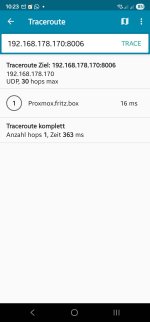
Hier mal ein Traceroute von einem Gerät welches nicht funktioniert
 

Attachments

  • Screenshot_20250820_102311_PingTools.jpg
    Screenshot_20250820_102311_PingTools.jpg
    105.9 KB · Views: 11
und hier von einem WIN Client der keinen Zugriff hat:

Code:
tracert 192.168.178.170


Tracing route to Proxmox.fritz.box [192.168.178.170]

over a maximum of 30 hops:


  1     8 ms     1 ms     1 ms  Proxmox.fritz.box [192.168.178.170]


Trace complete.


und das gleiche von einem Rechner der Zugriff hat:


Code:
tracert 192.168.178.170


Tracing route to Proxmox.fritz.box [192.168.178.170]

over a maximum of 30 hops:


  1     1 ms     1 ms     1 ms  Proxmox.fritz.box [192.168.178.170]


Trace complete.
 
Last edited: