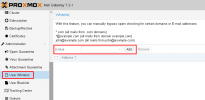
sure, I just did that what you said.in this field you need to enter the address, for which you want to add the whitelist-entry - then click on add - in the pop-up you can enter an entry
I hope this explains it
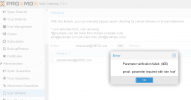
You can try to do this: https://forum.proxmox.com/threads/invalid-csrf-token-on-every-edit.68209/#post-493746 (reboot server and clear cache, browser history ect and try again)sure, I just did that what you said.
Sometimes it's prompt this (and I'm still root account), and the input address will disppear after refresh...
I'm not sure if it's a bug...
It's clear enough, But now, for some reason, I can not restart PMG...You can try to do this: https://forum.proxmox.com/threads/invalid-csrf-token-on-every-edit.68209/#post-493746 (reboot server and clear cache, browser history ect and try again)
Here is more detail for https://pmg.proxmox.com/pmg-docs/pmg-admin-guide.html#pmgconfig_whitelist_overview
By the way that field is for user whitelist if you are trying to a global exception is better to add to Who Objects https://pmg.proxmox.com/pmg-docs/pmg-admin-guide.html#pmg_mailfilter_who
There are three different types of whitelist you can do.
First is https://pmg.proxmox.com/pmg-docs/pmg-admin-guide.html#_mail_proxy_configuration (Configuration - Mail Proxy - Whitelist - only add IP or network here or it won't work and restart postfix service for each exception to apply changes) This is for SPF, Unknown senders, DNSBL exceptions)
Second is https://pmg.proxmox.com/pmg-docs/pmg-admin-guide.html#pmg_mailfilter_who (you can add anything here it will bypass SpamAssasion filtering depending on whitelist priority accept action is final so no rules will execute after that)
Third is https://pmg.proxmox.com/pmg-docs/pmg-admin-guide.html#pmgconfig_whitelist_overview (4.4.3. User White-/Blacklist) - The user white- and blacklist are user specific. Every user can add mail addresses to their white- and blacklist.

We use essential cookies to make this site work, and optional cookies to enhance your experience.